Excerpt:
QuickBooks Error Code 6150, 1006 typically occurs when creating or opening a company file, often due to file corruption or malicious software. It can prevent you from accessing or working on your financial data. Resolving the issue involves troubleshooting steps like ensuring admin rights, running the QuickBooks File Doctor tool, restoring backups, and performing system scans for malware. These solutions help restore functionality and protect your company files from further damage.
 Add As A Preferred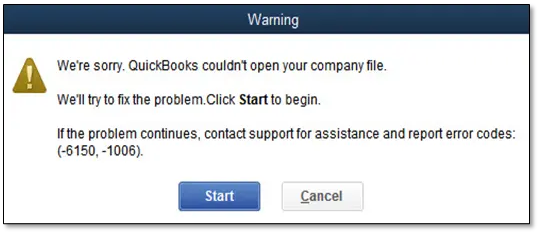
QuickBooks Error Code 6105 appears when corruption damages company files one of several file access failures documented in our complete QuickBooks error codes list. This error blocks daily operations by preventing file access. QuickBooks displays this during file opening or data condensing operations. Common error messages: “Error Code 6105: Condense Data Failed” or “QuickBooks Error 6105 – The company file is damaged or corrupted.” This article provides a diagnostic framework, risk assessment, and solution guide. Delayed repairs allow corruption to spread. If you are experiencing repeated file access failures beyond this error, our QuickBooks company file errors guide covers the full range of 6000-series errors and their fixes. QuickBooks Error 6105 belongs to the 6000 series of company file errors that commonly affect data integrity and access in QuickBooks Desktop.
When QuickBooks Error 6150 occurs (typically while opening a company file), users typically see one of these messages:
6150 belongs to Intuit’s officially documented company-file/network 6000-series error group, most commonly appearing on damaged files or files accessed over an unstable network connection, and Intuit’s own support article walks through using QuickBooks File Doctor as the primary fix.
Confirmed via Intuit’s own “Fix company file and network issues with QuickBooks File Doctor” and “How to fix Error 6150, -1006” support articles.
The following table highlights the common causes of error 6150:
| Error Event | Likely Cause | Related Errors |
| Opening company file | File corruption | Error C=387, Error 6000 series |
| Creating new company file | Damaged installation | Unrecoverable error |
| After malware attack | CryptoWall virus | File inaccessible |
| After Windows update | Damaged .NET Framework | Runtime errors |
List of common symptoms generally a user faces:
The table represent the quick summary:
| Level | Solution | Skill Level | Risk Level | Success Probability | Approx. Time | Key Notes |
| Level 1 – Beginner Safe Fixes | Restart QuickBooks & Computer | Beginner | Low | Low–Moderate | 10 min | Clears temporary memory conflicts; no data risk |
| Update QuickBooks to Latest Release | Beginner | Low | Moderate | 15–30 min | Fixes bugs & runtime conflicts; always backup first | |
| Level 2 – Intermediate Fixes | Run QuickBooks File Doctor (via Tool Hub) | Intermediate | Low–Moderate | High | 20–30 min | Repairs company file corruption automatically |
| Restore Company File from Backup | Intermediate | Low | High | 15–20 min | Safest recovery if backup is recent & verified | |
| Rename ND & TLG Files | Intermediate | Low–Moderate | High | 15–20 min | Forces QuickBooks to recreate fresh network & log files | |
| Level 3 – Advanced / Professional Fixes | Check for CryptoWall Virus | Advanced | Moderate–High | Moderate | 30–60 min | Malware can encrypt company files; antivirus scan required |
| Repair QuickBooks Installation | Advanced | Moderate | High | 20–45 min | Repairs damaged program files without affecting company data | |
| Reinstall QuickBooks Desktop | Advanced | High | High | 30–60 min | Clean installation removes deep corruption; requires license reactivation |
Solution 1.1: Restart QuickBooks & Computer
Solution 1.2: Update QuickBooks to Latest Release
Solution 2.1: Run QuickBooks File Doctor (via Tool Hub)
Solution 2.2: Restore Company File from Backup
Solution 2.3: Rename ND & TLG Files
Solution 3.1: Check for CryptoWall Virus
Solution 3.2: Repair QuickBooks Installation
Solution 3.3: Reinstall QuickBooks Desktop
If you are experiencing company file access issues beyond Error 6150, these related errors may also be affecting your QuickBooks Desktop:
| Error | Description |
|---|---|
| QuickBooks Desktop Error Code 6010 | Database server connection blocked, commonly due to antivirus, firewall, or hosting configuration issues. |
| QuickBooks Desktop Error Code 6000 80 | Company file locked or corrupted during open/save operations in multi-user environment. |
| QuickBooks Desktop Error Code 6073 | Company file already open in single-user mode on another computer, causing access conflict. |
To minimize the risk of encountering QuickBooks Error Code 6150, users should adopt the following preventive measures:
If QuickBooks Error Code 6105 continues after following tiered solutions above, do not keep experimenting with repeated repairs. Escalating corruption increases permanent data damage risk. At this stage, structured professional diagnosis is the safest path forward. Get expert assistance to analyze your company file, secure financial data, and restore system stability quickly. Acting early protects both records and business continuity. For ongoing or complex issues that these steps do not resolve, seek complete QuickBooks Desktop troubleshooting support to ensure your company file is fully repaired without risking further data loss.
QuickBooks Error Code 6150, -1006 occurs when QuickBooks is unable to open or access a company file due to issues like file corruption, incomplete installation, or conflicts with security settings.
Common causes include damaged company files, incomplete installation of QuickBooks, conflicts with other software, security settings blocking access, or malware infections.
Yes, keeping QuickBooks updated ensures you have the latest features and security updates, which can help prevent errors like 6150, -1006.


