Excerpt:
This article provides step-by-step instructions to download QuickBooks Desktop 2019 (Pro, Premier, Accountant, Enterprise) for both Windows and Mac. It helps users easily access and install the software based on their region and version (US, Canada, UK). Additionally, it highlights key features of QuickBooks Desktop 2019, including improved invoice tracking, enhanced reports, and multi-user support, ensuring users can streamline their accounting and business management tasks efficiently.
 Add As A Preferred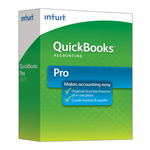
| Version: | Desktop 2019 (United States) 32-Bit |
| Size: | 697.95 MB – Version 2019 |
| Latest Update Release | Release 17(R17) |
| Update Size: | 872 MB |
QuickBooks Desktop 2019 was one of the most widely used versions of Intuit’s accounting software, offering multiple editions tailored for different business sizes and industries. Although Intuit has now discontinued direct sales and support for Desktop 2019 (including security updates after May 31, 2022), many businesses still rely on this version. This guide covers how to download QuickBooks Desktop 2019 for Windows and Mac, along with key features and region-specific availability. If you are looking for other release years, you can also explore the complete Download QuickBooks Desktop hub for additional installation files and options.
Quick Navigation: 2011 | 2012 | 2013 | 2014 | 2015 | 2016 | 2017 | 2018 | 2019 | 2020 | 2021 | 2022 | 2023 | 2024
Note: If you already purchased a license, you will need the product number and license number (found in purchase email or original packaging).
QuickBooks Desktop 2019 for Mac was designed exclusively for Apple users but was only officially released in the US market.
Steps:
Important: QuickBooks Mac Desktop has limited support and different features compared to Windows editions. If you’re using macOS Ventura or later, compatibility may be an issue, so upgrading to QuickBooks Desktop 2023 or QuickBooks Online may be advisable.
| Edition | Best For | Key Features |
|---|---|---|
| QuickBooks Desktop Pro 2019 | Small businesses (up to 3 users) | Track income & expenses, invoicing, manage accounts payable, simple reporting, basic inventory. |
| QuickBooks Desktop Premier 2019 | Small–medium businesses (up to 5 users) | Industry-specific reports (manufacturing, contracting, nonprofit, retail), advanced inventory, sales orders, forecasting. |
| QuickBooks Desktop Accountant 2019 | Accounting professionals | Accountant Toolbox, reclassify transactions, batch delete/void, write-off invoices, client data review. |
| QuickBooks Desktop Enterprise 2019 | Growing/large businesses (up to 40 users) | Advanced inventory & pricing, custom reporting, payroll, role-based permissions, hosting options, scales with business growth. |
| QuickBooks POS 2019 | Retail businesses | Sales & inventory management, barcode scanning, payment integration, customer tracking. |
| QuickBooks Desktop for Mac 2019 | Mac-based small businesses (US only) | Custom invoices, expense tracking, inventory, reports, sync with Apple Contacts & Calendar. |
| Items | Details |
|---|---|
| Product Name: | QuickBooks Desktop Pro 2019 (USA) |
| Version: | 2019 (United States) 32-bit |
| Size: | 697.95 MB |
| Latest Release: | Release 17(R17) |
| Update Size: | 872 MB |
| Download Link: | Download QuickBooks Desktop Pro 2019 USA Version |
| Items | Details |
|---|---|
| Product Name: | QuickBooks Desktop Pro 2019 (CA) |
| Version: | 2019 (Canada) 32-bit |
| Size: | 602 MB |
| Latest Release: | Release 17(R17) |
| Update Size: | 477 MB |
| Download Link: | Download QuickBooks Desktop Pro 2019 CA Version |
| Items | Details |
|---|---|
| Product Name: | QuickBooks Desktop Pro 2019 (UK) |
| Version: | 2019 (United Kingdom) 32-bit |
| Size: | 646 MB |
| Latest Release: | Release 10(R10) |
| Update Size: | 276 MB |
| Download Link: | Download QuickBooks Desktop Pro 2019 UK Version |
Before downloading, make sure your system meets the: QuickBooks Desktop System Requirements
| Items | Details |
|---|---|
| Product Name: | QuickBooks Desktop Premier 2019 (USA) |
| Version: | 2019 (United States) 32-bit |
| Size: | 697.95 MB |
| Latest Release: | Release 17(R17) |
| Update Size: | 872 MB |
| Download Link: | Download QuickBooks Desktop Premier 2019 USA Version |
| Items | Details |
|---|---|
| Product Name: | QuickBooks Desktop Premier 2019 (CA) |
| Version: | 2019 (Canada) 32-bit |
| Size: | 602 MB |
| Latest Release: | Release 17(R17) |
| Update Size: | 477 MB |
| Download Link: | Download QuickBooks Desktop Premier 2019 CA Version |
| Items | Details |
|---|---|
| Product Name: | QuickBooks Desktop Premier 2019 (UK) |
| Version: | 2019 (United Kingdom) 32-bit |
| Size: | 646 MB |
| Latest Release: | Release 10(R10) |
| Update Size: | 276 MB |
| Download Link: | Download QuickBooks Desktop Premier 2019 UK Version |
| Items | Details |
|---|---|
| Product Name: | QuickBooks Desktop Accountant 2019 (USA) |
| Version: | 2019 (United States) 32-bit |
| Size: | 697.95 MB |
| Latest Release: | Release 17(R17) |
| Update Size: | 872 MB |
| Download Link: | Download QuickBooks Desktop Accountant 2019 USA Version |
| Items | Details |
|---|---|
| Product Name: | QuickBooks Desktop Accountant 2019 (CA) |
| Version: | 2019 (Canada) 32-bit |
| Size: | 602 MB |
| Latest Release: | Release 17(R17) |
| Update Size: | 477 MB |
| Download Link: | Download QuickBooks Desktop Accountant 2019 CA Version |
| Items | Details |
|---|---|
| Product Name: | QuickBooks Desktop Accountant 2019 (UK) |
| Version: | 2019 (United Kingdom) 32-bit |
| Size: | 646 MB |
| Latest Release: | Release 10(R10) |
| Update Size: | 276 MB |
| Download Link: | Download QuickBooks Desktop Accountant 2019 UK Version |
| Items | Details |
|---|---|
| Product Name: | QuickBooks Desktop Enterprise 2019 (USA) |
| Version: | 19.0 (United States) 32-bit |
| Size: | 687.73 MB |
| Latest Release: | Release 17(R17) |
| Update Size: | 871 MB |
| Download Link: | Download QuickBooks Desktop Enterprise 2019 USA Version |
| Download Link: | Download QuickBooks Desktop Enterprise Accountant 2019 USA Version |
| Items | Details |
|---|---|
| Product Name: | QuickBooks Desktop Enterprise 2019 (CA) |
| Version: | 19.0 (Canada) 32-bit |
| Size: | 586 MB |
| Latest Release: | Release 17(R17) |
| Update Size: | 477 MB |
| Download Link: | Download QuickBooks Desktop Enterprise 2019 CA Version |
| Items | Details |
|---|---|
| Product Name: | QuickBooks Desktop Mac 2019 (USA) |
| Version: | 2019 (United States) |
| Size: | 147 MB |
| Latest Release: | Release 15(R15) |
| Update Size: | N/A |
| Download Link: | Download QuickBooks Desktop Mac 2019 USA Version |
| Items | Details |
|---|---|
| Product Name: | QuickBooks Desktop Point of Sale 19.0 Basic (USA) |
| Version: | 19.0 (United States) |
| Size: | 707 MB |
| Latest Release: | Release 12R(12) |
| Update Size: | 221 MB |
| Download Link: | Download QuickBooks Desktop Point of Sale 19.0 Basic USA Version |
| Items | Details |
|---|---|
| Product Name: | QuickBooks Desktop Point of Sale 19.0 Pro (USA) |
| Version: | 19.0 (United States) |
| Size: | 707 MB |
| Latest Release: | Release 12R(12) |
| Update Size: | 221 MB |
| Download Link: | Download QuickBooks Desktop Point of Sale 19.0 Pro (USA) Version |
| Items | Details |
|---|---|
| Product Name: | QuickBooks Desktop Point of Sale 19.0 Multi-Store (USA) |
| Version: | 19.0 (United States) |
| Size: | 707 MB |
| Latest Release: | 12R(12) |
| Update Size: | 221 MB |
| Download Link: | Download QuickBooks Desktop Point of Sale 19.0 Multi-Store (USA) Version |
This version is perfect for small businesses that need strong offline accounting solutions, advanced reporting and inventory features, or work with multiple currencies and complex payroll systems.
Finding a verified QuickBooks 2019 download link requires following official source protocols to protect your accounting data. Intuit moved away from physical media distribution, making electronic software delivery the primary method for software setup.
.exe for Windows or .dmg for Mac) on a secure local drive or external media for future system recovery needs.Installation failures usually stem from operating system incompatibilities, damaged system components, or missing system requirements. Execute these troubleshooting steps to resolve the issue:


