Excerpt:
Renaming corrupted .ND and .TLG files in QuickBooks can resolve network and data issues, especially when the company file fails to open or encounters errors. By following simple steps to locate and rename these files, QuickBooks will automatically generate new ones upon reopening the company file, restoring functionality without data loss. This process ensures smooth multi-user access and data integrity, helping QuickBooks run effectively.
 Add As A Preferred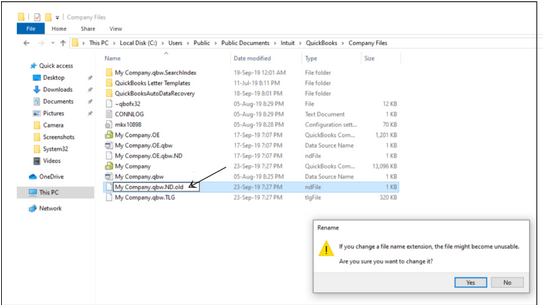
.ND and .TLG both are the configuration files that allow QuickBooks Desktop to access/open the company file in a network or multi-user environment. These files are basically generated through the QuickBooks Database Server Manager and help to identify the applications database server used.
QuickBooks users may encounter an error message “6000 1074”caused by damaged ND and TLG files.
Such files play a lead role when multiple users attempt to access the same company file from different locations. The corrupted or damaged .ND and .TLG files prevent you from accessing or functioning QuickBooks software in your system. This is why you are all recommended to rename these files as soon as possible. This process doesn’t cause any accidental data loss since these files are automatically recreated while opening or scanning the company files using the QuickBooks database server manager.
In QuickBooks, .nd (Network Data) and .tlg (Transaction Log) files are essential. The .nd file facilitates communication between QuickBooks and other workstations in multi-user environments. The .tlg file tracks all transactions since the last backup, ensuring data recovery by logging every change made.
| Scenario 1: | When the Company file won’t open. |
| Scenario 2: | When the .ND or .TLG file is damaged, faulty or corrupted. |
| Scenario 3: | When the .QBW file is moved during an upgrade without moving the corresponding .ND file. |
Here’s when and why you need to rename .nd and .tlg files:
To rename .nd and .tlg files in QuickBooks, start by locating them in the same directory as your company file. The .nd file and .tlg file share the same name as your company file, with their respective extensions.
Here’s how to find them:
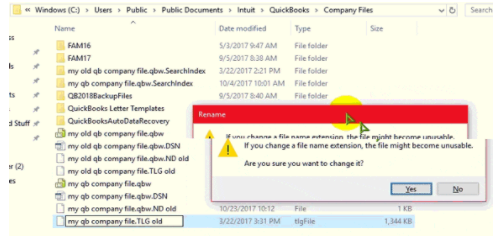
To rename .nd and .tlg files, follow these steps:
4. Rename the .tlg File:
Renaming these files will prompt QuickBooks to generate new .nd and .tlg files the next time you open your company file, helping resolve network and data issues.
After renaming the .nd and .tlg files, confirm the process was successful and QuickBooks is working correctly:
Following these steps helps resolve network and data issues, ensuring QuickBooks operates smoothly and maintains data integrity. If you face any challenges, seek help from a QuickBooks Professional to ensure proper and safe handling.
Below, we’ve presented a list of all the exclusive features related to QuickBooks .ND and .TLG files.
Let’s take a look:
Note: To check your Product Information, including server name and the IP address, press F2 or Ctrl+1 keys on your keyboard.
There are some of the most common company file error occurs when renaming QuickBooks .nd and .tlg files, which includes:
Renaming .nd and .tlg files in QuickBooks helps fix network and data issues. Locate and rename these files properly, then verify the changes. Regular maintenance and correct procedures ensure QuickBooks runs smoothly, maintaining data integrity and improving performance.
You can delete .nd and .tlg files, but renaming them is safer. Deleting forces QuickBooks to generate new files, which can be risky if issues arise, as the old files are lost. Renaming preserves the old files for easy restoration if needed.
If you can’t locate the .nd or .tlg files, check the directory where your QuickBooks company file is stored. These files should be in the same folder as the company file. If they are still missing, it may signal a deeper issue needing professional help.
If you rename a .nd or .tlg file incorrectly, QuickBooks may fail to locate or recreate these files, causing errors in opening the company file or using multi-user mode. Follow the proper renaming procedure to prevent such issues.
➜QuickBooks .ND File (Network Data): This is a configuration file that enables QuickBooks Desktop to access the main Company File (.QBW) in a multi-user or network environment. It is created by the QuickBooks Database Server Manager and contains critical information for server communication, such as the server’s IP address and port used for the company file.
➜QuickBooks .TLG File (Transaction Log): This file is crucial for data recovery and integrity. It logs every change and transaction made to the Company File (.QBW) since the last successful complete backup. If your main company file becomes corrupted or damaged, Intuit data services can use the .TLG file in conjunction with your latest backup to restore lost transactions.
Since the .ND and .TLG files are critical for network access and data integrity, their corruption or incorrect configuration can trigger several errors, most notably those related to multi-user mode and file access:
➜H-Series Errors: Errors like H202, H303, or H505 typically indicate an issue preventing workstations from connecting to the company file over the network, which is often tied to a damaged or incorrect .ND file configuration or hosting issues.
➜Data Integrity Errors: Errors like -6189, 816 or when the company file simply fails to open in multi-user mode can be caused by damaged .ND or .TLG files.
.QBW), do I need to move the corresponding .ND and .TLG files?Yes, you must move all three files together to the new location. The .ND and .TLG files must reside in the exact same folder as the .QBW file they correspond to. If you move the .QBW file without its .ND and .TLG counterparts, QuickBooks will either recreate new (empty) ones in the new location or, in some cases, fail to open the file correctly, resulting in an error.
.ND and .TLG files cause loss of company data or transaction history?No. Renaming .ND or .TLG does not affect the main company file (.QBW), which holds all your actual data (accounts, transactions, payroll, etc.). The .ND and .TLG are auxiliary files QuickBooks simply regenerates fresh ones when needed. Thus, your core financial data remains intact.
You only need to rename the .ND/.TLG files located in the folder where the company file resides (usually on the server). Because .ND holds the network-related metadata (server, path, port), renaming it at the server location ensures a fresh, correct descriptor. Once recreated, all connected workstations will use that updated configuration when they connect.


