Excerpt:
QuickBooks Error 80070057 disrupts workflows when trying to open a company file, usually due to network communication issues or insufficient permissions. This article guides you through effective solutions, including properly opening the file, moving it to the default location, updating QuickBooks, adjusting permissions, and using QuickBooks tools like the File Doctor. These steps help resolve the error, ensuring seamless QuickBooks operation for your business.
 Add As A Preferred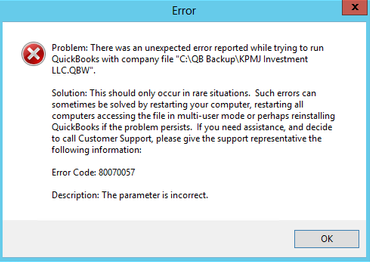
QuickBooks Error 80070057 is a runtime error that appears when the software is unable to open or access a company file. It typically occurs in multi-user environments where the company file is stored on a server or another system across a network. The error message often states: “80070057: The parameter is incorrect.”
This error occurs when QuickBooks is unable to gain proper access to the folder where the company file is saved. In a multi-user or network environment, the system requires complete read, write, and modify permissions to interact with the file. If these permissions are not correctly assigned, QuickBooks cannot establish a secure connection to the company file.
Error 80070057 can also arise due to misconfigured hosting settings, damaged network-related files, or an invalid company file path. When these problems interrupt the connection between QuickBooks and the file location, the application cannot access the company file and generates the error message.
QuickBooks Error 80070057 usually occurs when the software cannot properly communicate with the company file. This is most common in multi-user or network environments where file access depends on correct permissions, hosting configuration, and system security settings. Below are the most relevant factors that can trigger this error:
QuickBooks Error 80070057 is often accompanied by noticeable system and application issues that signal problems with file access or network communication. Recognizing these warning signs early can help you diagnose the issue quickly and prevent workflow interruptions or potential data loss.
| Error Message / Type | What It Indicates | Possible Trigger |
| Unexpected Error due to Corruption or Damage | QuickBooks shows an unexpected error without clearly stating “The parameter is incorrect.” | Corrupted company file or damaged installation files |
| Insufficient Permissions to Delete Files | Message states you don’t have sufficient permissions. | Restricted folder permissions, launching from .QBW file, or antivirus blocking QuickBooks ports |
| Unexpected Error with Company File | Error appears while opening or running a specific company file. | File corruption, incompatibility, or network issues |
| Incorrect Parameter with Company File Types | Error appears when clicking QBB, QBM, QBW, ND, or TLG files. | Incorrect file association, damaged file, or access issue |
QuickBooks Error 80070057 can usually be resolved by identifying the root cause—whether it’s permission restrictions, hosting misconfiguration, or network-related file damage. Following a structured troubleshooting approach helps restore proper communication between QuickBooks and the company file, allowing you to regain access and continue working without disruption.
Opening the company file from within QuickBooks (instead of double-clicking the .QBW file directly) ensures proper file association and permission validation, reducing access conflicts.
Resolution Time: 2–3 minutes
Success Rate: 70%
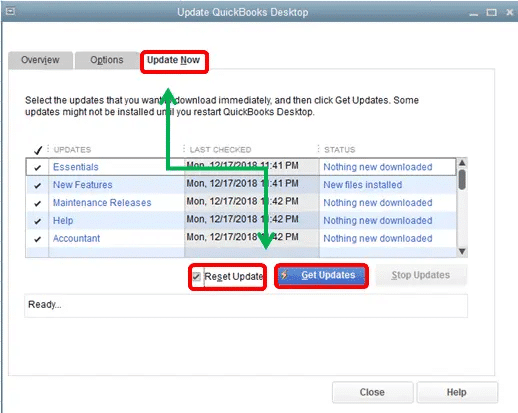
Updating QuickBooks installs critical patches, fixes compatibility conflicts with Windows components, and resolves known bugs that may trigger file access errors.
Estimated Resolution Time: 10–20 minutes
Success Rate: 80%
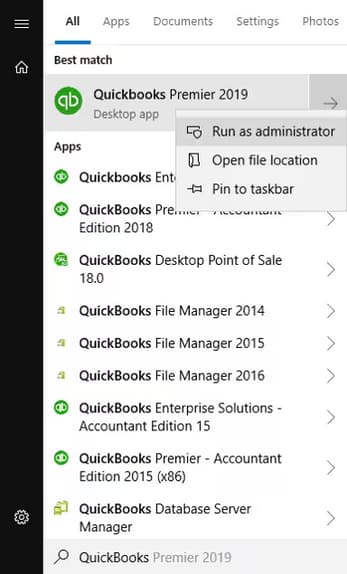
Running QuickBooks with administrative privileges grants full system-level permissions, eliminating access restrictions that may block the company file.
Estimated Resolution Time: 2–5 minutes
Success Rate: 75–80%
Storing the company file in QuickBooks’ default directory ensures proper path recognition, stable permissions, and improved network accessibility.
Estimated Resolution Time: 5–10 minutes
Success Rate: 75–80%
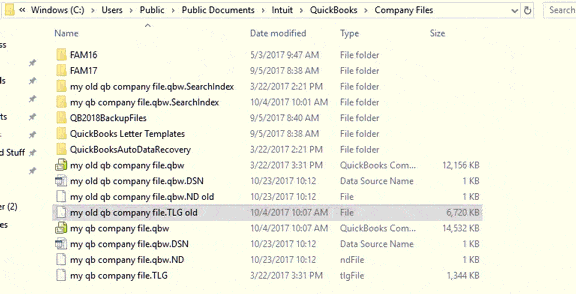
Note: If your company file is saved in a different location, move it to its default location.
Location: C:/Users/Public/PublicDocuments/Intuit/QuickBooks/Company Files
QuickBooks File Doctor automatically detects and repairs company file corruption, network issues, and connectivity problems that commonly cause Error 80070057.
Estimated Resolution Time: 15–25 minutes
Success Rate: 85–90%
The QuickBooks Tool Hub helps to fix common errors. You’ll need to close QuickBooks to use the tool hub. For the best experience, we recommend you use Tool Hub on Windows 10, 64-bit.
Note: To find out which tool hub version you have, select the Home tab and the version will be on the bottom.

Note: If you are unable to find the icon, do a search in Windows for QuickBooks Tool Hub and select the program.
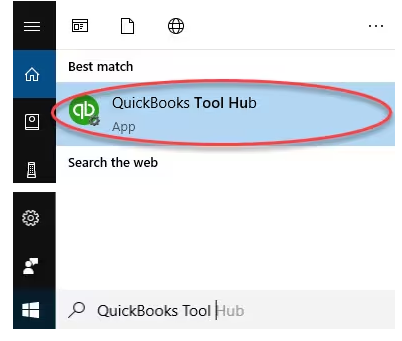
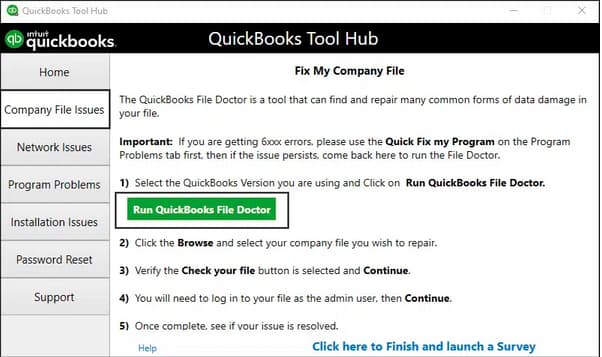
Note: Look for QuickBooks Desktop File Doc and try to open it manually if the QuickBooks File Doctor doesn’t open.
Depending on file size, the scan can take 10 to 15 minutes. It may show as unsuccessful even if the problem is fixed. Once finished, reopen QuickBooks and your company file.
Note: When QuickBooks File Doctor doesn’t resolve the issue, proceed by repairing data damage on your QuickBooks Desktop company file.g
Freeing up disk space removes temporary and corrupted system files that may interfere with QuickBooks performance and file operations.
Estimated Resolution Time: 10–15 minutes
Success Rate: 60%
Note: To view a description of each type of file, choose the name.
Note: If it’s been less than 10 days since you upgraded Windows, your previous version will appear as a system file you can delete. Deleting it will remove the Windows.old folder, which is required to roll back to the previous Windows version. When you delete your previous Windows version, this action can’t be undone and you won’t be able to go back to your old version.
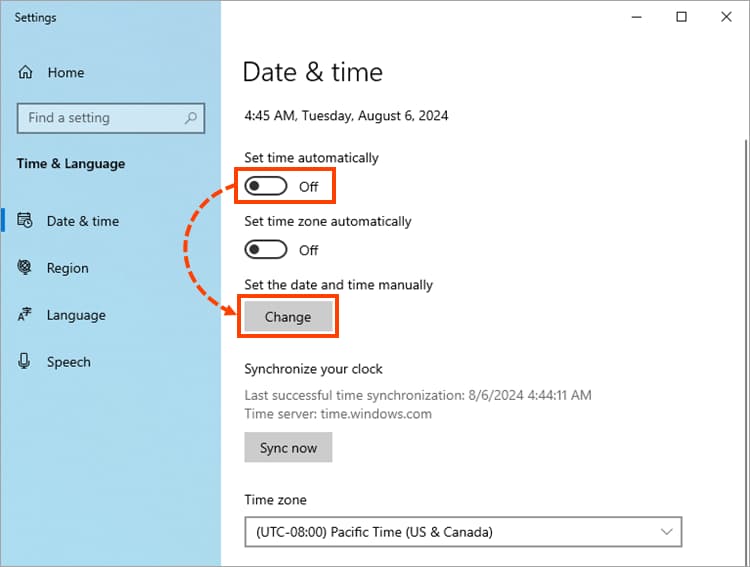
Correct system date and time settings ensure proper Windows authentication and prevent validation conflicts that may block file access.
Estimated Resolution Time: 3–5 minutes
Success Rate: 40%



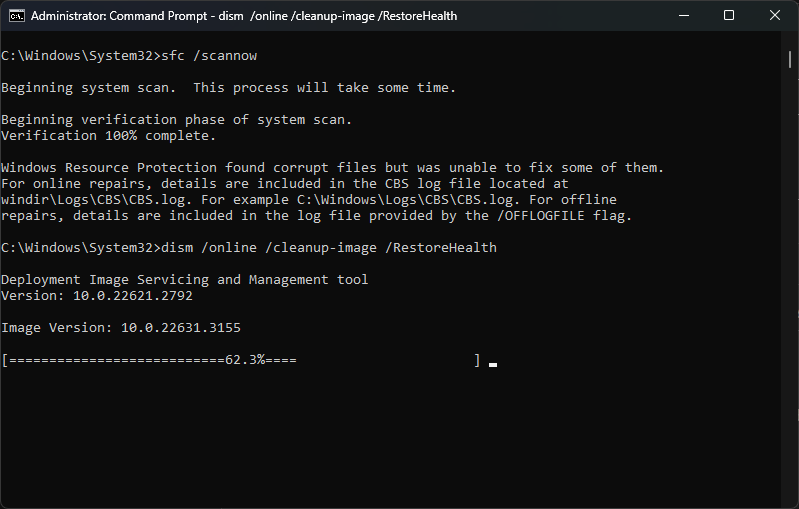
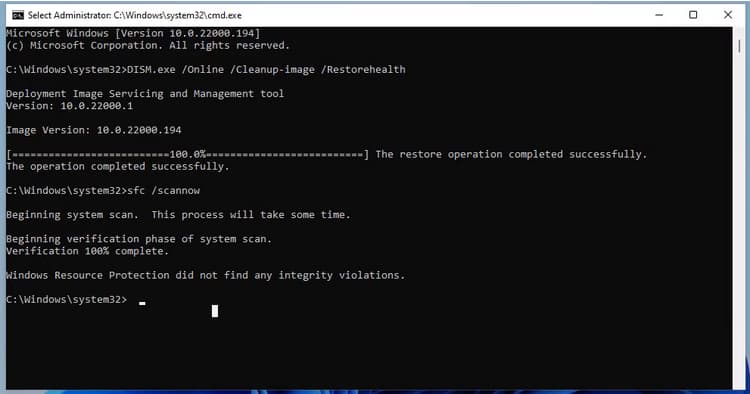
DISM and SFC repair corrupted or missing Windows system files that QuickBooks depends on, restoring system stability and resolving deeper OS-level issues.
Estimated Resolution Time: 20–30 minutes
Success Rate: 70%
DISM provides the files required to repair your corrupted files. You should run DISM prior to running the System File Checker. To do this:
DISM.exe /Online /Cleanup-image /Restorehealth


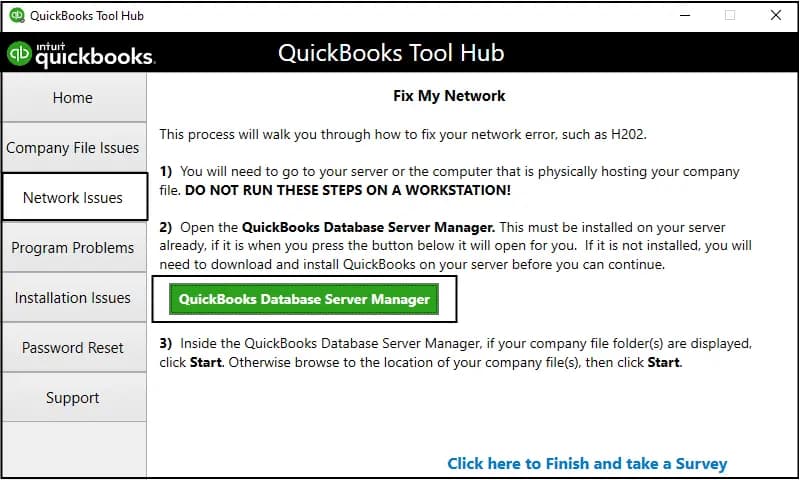
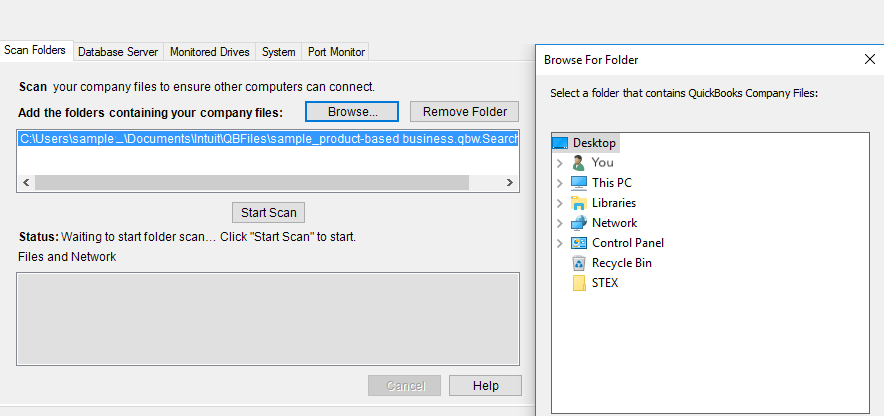
Renaming the damaged .ND file and rescanning via Database Server Manager rebuilds network configuration files and restores proper multi-user connectivity.
Estimated Resolution Time: 10–15 minutes
Success Rate: 85–90%
Example: MyCompanyFileName.qbw.nd
Example: MyCompanyFileName.qbw.nd.old
Note: If you’re using BitDefender, ensure the QuickBooks folder is added to the exclusion list.
QuickBooks Error 80070057 (The Parameter Is Incorrect) primarily occurs when the software is unable to access the company file due to permission restrictions, network misconfigurations, or damaged program components. Since the error is commonly linked to multi-user environments and server-stored files, ensuring proper folder permissions, correct hosting settings, and stable network connectivity is essential.
By identifying the specific cause whether it’s a corrupted .ND file, antivirus interference, firewall restrictions, or an invalid file path, you can apply the appropriate troubleshooting steps to restore access quickly. Keeping QuickBooks updated, ensuring proper folder permissions, and correctly configuring security settings can help prevent this error from recurring.
Running QuickBooks Desktop as an administrator often resolves Error 80070057 because the error is fundamentally about permission restrictions preventing the program from fully accessing the company file.
The .ND (Network Data) file is a crucial configuration file that allows QuickBooks Desktop to access a company file (.QBW) over a network, especially in multi-user mode.
filename.qbw.nd.old) effectively removes the damaged configuration. The next time the QuickBooks Database Server Manager runs a scan, it forces the automatic creation of a new, clean .ND file, resolving the communication failure.You can test for insufficient read or write permissions directly using a simple document creation test in the folder where the company file is saved. This step confirms the error is permission-related before moving the file or running major tools.
.QBW) is located.When troubleshooting 80070057, you must use the QuickBooks Database Server Manager (QDSM), installed on the server or host computer, to perform a rescan of the company file folder.
.QBW), then select Start Scan.When security software like BitDefender is overly restrictive, it blocks essential QuickBooks processes, causing the error. To grant full access, you must set an exclusion for the entire QuickBooks company file folder and the main QuickBooks program files.
C:\Users\Public\Public Documents\Intuit\QuickBooks\Company Files.C:\Program Files\Intuit\QuickBooks [Year].QBW32.exeQBDBMgrN.exe (Database Server Manager service)QBCFMonitorService.exe (QuickBooks Client File Monitor Service)The error can be triggered when the application is asked to open a file type in a manner that requires authentication it cannot complete (e.g., trying to restore a backup without using the proper restoration command).
.QBW) is accidentally changed or corrupted, QuickBooks cannot recognize it as a valid company file and displays the “parameter is incorrect” error.When you move a company file to resolve permission issues, the recommended and safest location to ensure the least resistance from Windows security settings is the Public Shared folder created by Intuit during installation.
C:\Users\Public\Public Documents\Intuit\QuickBooks\Company Files

