Excerpt:
QuickBooks Error 6209 often occurs during installation, updates, or while accessing company files, impacting system performance and workflow. This error can be caused by outdated software, corrupted files, or issues with the .NET framework. Solutions include updating QuickBooks, renaming corrupt files, performing system scans, or reinstalling necessary components. By following these steps, users can quickly resolve the issue and restore QuickBooks functionality.
 Add As A Preferred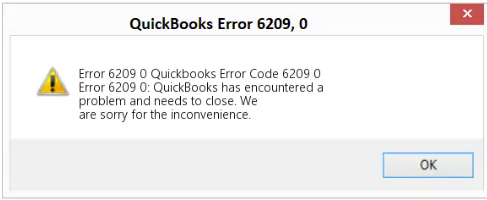
Fix QuickBooks Company File Error 6209 by repairing .NET Framework, using QuickBooks File Doctor, or renaming ND and TLG files to restore access to your company file.
QuickBooks Error 6209 appears when users cannot access their company files. This error blocks business operations by preventing file opening during installation, Windows updates, or file restoration. QuickBooks displays this error when attempting to open company files after system changes.
The most common Error 6209 messages read: “QuickBooks has encountered a problem when opening the company file. Error Code: (-6209, 0)” or “An error occurred when QuickBooks tried to access the company file. Please try again.”
This article provides a diagnostic framework, risk assessment, and complete solution guide. Data corruption and system configuration issues require immediate attention. Delayed repairs prevent access to critical financial records.
Intuit staff connect Error 6209 to Windows updates. Intuit has not published a specific Windows component behind it, so the causes below come from third-party vendors.
Match your symptom to find the correct solution path. Start by identifying when the error appears. Check if the error occurs after specific system changes to determine the appropriate fix.
| Possible Causes and QuickFix for Error 6209 | ||
|---|---|---|
| Error Event | Likely Cause | Recommended Fix (When to Perform) |
| Error 6209 after Windows update | Damaged .NET Framework | Immediately after noticing the error following a Windows update and before reopening QuickBooks, repair or reinstall the .NET Framework. |
| Error 6209 after QuickBooks installation | Corrupted installation files | Right after installation failure or error appearance and before using QuickBooks further, run the QuickBooks repair from the Control Panel. |
| Error 6209 when opening file | Damaged ND and TLG files | Before attempting to reopen the company file, rename the ND and TLG files and then try opening QuickBooks again. |
| Error 6209 with QBCFMonitorService message | Service conflicts | When the QBCFMonitorService message appears and before relaunching QuickBooks, disable the QBCFMonitorService temporarily and restart the system. |
Understanding QuickBooks system requirements prevents data loss during repairs. Follow this data safety advices For QuickBooks Error 6209:
Solutions are organized by skill level, risk level, and success probability. This tiered approach protects your data while maximizing repair chances. Start with Level 1 solutions and move to higher tiers only if lower-tier solutions fail.
These solutions require no technical expertise. The risk of data loss is minimal. Anyone can perform these steps safely.
| Solution 1.1: Update QuickBooks to Latest Release | |||
| Skill Level | Risk Level | Success Probability | Approximate Time Required |
| Beginner | Low | Moderate to High | 15-20 minutes |
| Risk Explanation | Updates rarely cause problems. Always maintain backups before updating. | Solution Explanation | Updating QuickBooks installs bug fixes and compatibility improvements. The latest version includes corrected file access routines. Updates resolve known issues causing Error 6209. |
Steps to Implement Solution 1.1
| Solution 1.2: Run QuickBooks File Doctor | |||
| Skill Level | Risk Level | Success Probability | Approximate Time Required |
| Beginner | Low | High | 30-45 minutes |
| Risk Explanation | File Doctor repairs files automatically. The tool rarely causes problems. Scan may take significant time for large files. | Solution Explanation | QuickBooks File Doctor detects and repairs company file corruption and system issues. The tool fixes common problems causing Error 6209. File Doctor is part of QuickBooks Tool Hub. |
Steps to Implement Solution 1.2
| Solution 1.3: Open Sample Company File to Test Installation | |||
| Skill Level | Risk Level | Success Probability | Approximate Time Required |
| Beginner | Low | Moderate | 5-10 minutes |
| Risk Explanation | Opening sample files cannot damage data. This test identifies whether problems affect the program or company file. | Solution Explanation | Sample company files come with QuickBooks installation. Opening a sample file tests whether QuickBooks program functions correctly. Success indicates company file specific problems. Failure indicates program installation issues. |
Steps to Implement Solution 1.3
These solutions modify system configurations or file settings. Basic computer knowledge is helpful but not required. Risk increases because operations affect system components. Always create backup before attempting Level 2 solutions.
| Solution 2.1: Rename ND and TLG Files | |||
| Skill Level | Risk Level | Success Probability | Approximate Time Required |
| Intermediate | Low to Moderate | High | 15-20 minutes |
| Risk Explanation | Renaming does not delete transaction data. QuickBooks creates new files automatically. Original files remain as backup. Follow naming instructions exactly. | Solution Explanation | Corruption in ND and TLG files triggers Error 6209 by preventing file access. Renaming forces QuickBooks to generate fresh configuration files. New files contain clean data without corruption. |
Steps to Implement Solution 2.1
| Solution 2.2: Disable QBCFMonitorService | |||
| Skill Level | Risk Level | Success Probability | Approximate Time Required |
| Intermediate | Moderate | Moderate | 10-15 minutes |
| Risk Explanation | Disabling this service affects multi-user capabilities temporarily. Service can be re-enabled later. Changes require administrator rights. | Solution Explanation | QBCFMonitorService runs in the background enabling multi-user access. Service conflicts sometimes trigger Error 6209 on workstations. Disabling prevents service interference with file access operations. |
Steps to Implement Solution 2.2
| Solution 2.3: Run System File Checker | |||
| Skill Level | Risk Level | Success Probability | Approximate Time Required |
| Intermediate | Low | Moderate | 30-60 minutes |
| Risk Explanation | System File Checker is a safe Windows utility. Scan cannot damage files. Processes may take significant time on large drives. | Solution Explanation | Windows System File Checker scans for corrupted system files. The utility repairs damaged files automatically. Corrupted system files cause Error 6209 by preventing QuickBooks operations. SFC restores system integrity. |
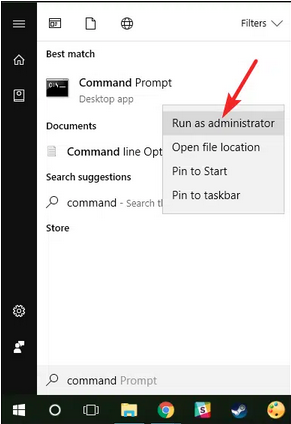
Steps to Implement Solution 2.3
These solutions require technical knowledge and carry higher risk. System-level changes can affect program operations. Contact professional support if uncomfortable with these procedures. Data backup is mandatory before attempting Level 3 solutions.
| Solution 3.1: Repair Microsoft .NET Framework | |||
| Skill Level | Risk Level | Success Probability | Approximate Time Required |
| Advanced | Moderate to High | High | 30-60 minutes |
| Risk Explanation | .NET Framework affects multiple programs. Incorrect repairs may cause applications to stop working. Professional assistance recommended for unfamiliar users. | Solution Explanation | Microsoft .NET Framework provides system libraries QuickBooks requires. Corruption triggers Error 6209 by preventing file access. Repairing or reinstalling .NET restores required components. This resolves compatibility issues affecting QuickBooks. |
Steps to Implement Solution 3.1
| Solution 3.2: Repair QuickBooks Installation | |||
| Skill Level | Risk Level | Success Probability | Approximate Time Required |
| Advanced | High | High | 30-45 minutes |
| Risk Explanation | Repair modifies QuickBooks installation files without changing company data. The process requires a product license key. Failed repair may prevent QuickBooks from starting. | Solution Explanation | Corrupted QuickBooks program files cause persistent Error 6209. Repair replaces damaged components without affecting company files. Fresh installation removes all corruption traces. |
Steps to Implement Solution 3.2
| Solution 3.3: Run QuickBooks Install Diagnostic Tool | |||
| Skill Level | Risk Level | Success Probability | Approximate Time Required |
| Advanced | Moderate | High | 30-45 minutes |
| Risk Explanation | Install Diagnostic Tool repairs Windows components and QuickBooks installation. The process is automatic but lengthy. Tools rarely cause problems. | Solution Explanation | QuickBooks Install Diagnostic Tool repairs damaged Microsoft components and QuickBooks installation files. The tool fixes Windows registry issues and .NET Framework problems. This comprehensive repair resolves complex Error 6209 causes. |
Steps to Implement Solution 3.3
| Solution 3.4: Perform Clean Install of QuickBooks | |||
| Skill Level | Risk Level | Success Probability | Approximate Time Required |
| Advanced | High | High | 60-90 minutes |
| Risk Explanation | Clean install removes all QuickBooks traces. The process requires complete uninstallation and reinstallation. Company files remain safe but backup is mandatory. Requires product license key. | Solution Explanation | Clean install completely removes QuickBooks and all associated files. This eliminates deep corruption that repair cannot fix. Fresh installation provides a clean slate for QuickBooks operations. Clean install resolves persistent Error 6209 issues. |
Steps to Implement Solution 3.4
Some situations require professional assistance. Attempting DIY repairs risks permanent data loss. Stop attempting the solution if:
Preventing Error 6209 requires consistent maintenance practices. Follow the listed points given below:
If QuickBooks Error 6209 continues after following the tiered solutions above, do not keep experimenting with repeated repairs. Escalating corruption can increase the risk of permanent data damage and system instability. At this stage, a structured professional diagnosis is the safest path forward.
Get expert assistance to analyze your system configuration, secure your financial data, and restore file access quickly. Acting early protects both your records and your business continuity. Professional support can diagnose complex system issues beyond standard troubleshooting procedures.
The error itself does not directly damage your company’s data. However, if the underlying file corruption or disk issue persists, it may prevent you from accessing or saving data properly. Creating regular backups minimizes potential data loss.
Yes. Based on Intuit system requirements, real-time antivirus scanning and aggressive firewall/optimization tools can block QuickBooks executable files, restrict access to .ND/.TLG files, or interrupt install processes.
This type of interference can contribute to failures when opening or verifying company files, which may appear in the form of errors like 6209 or similar access-related codes.
The most effective preventive measure, as confirmed by the root causes of Error 6209, is to keep your Windows Operating System and the Microsoft .NET Framework fully updated with the latest patches. Since the error is often triggered by corrupted or incomplete system components, maintaining a healthy, up-to-date Windows environment significantly reduces the chance of component conflicts that lead to this specific QuickBooks installation error.
.QBW file)?No, Error 6209 itself does not directly damage your core company file data (.QBW). The error is typically a system-level issue, often linked to broken installation components, corrupted system files (like the .NET Framework), or damaged configuration files (like .ND and .TLG) that prevent QuickBooks from connecting to or loading the data file. Since the error is a connection/launch issue, the data file remains intact, but inaccessible.
.ND and .TLG files, will I lose any of my financial data or historical transactions?No, you will not lose any financial data. The .ND (Network Data) and .TLG (Transaction Log) files are configuration files that help QuickBooks locate and access your company file, especially in a network or multi-user environment. They are not the core data file. When you rename them, QuickBooks automatically creates new, clean versions of these files the next time you open the company file. This is a common and safe troubleshooting step recommended by Intuit.
Yes, System Restore could potentially affect recent Windows updates or other software installed after the chosen restore point. System Restore works by rolling back system files, drivers, and registry settings to a previous point in time. It does not usually affect personal files (like your QuickBooks Company File or documents). However, any Windows or software updates installed after the restore point will be removed, and you will need to re-run them.
Indirectly, yes. While Error 6209 isn’t a hosting-specific error, Intuit notes that QuickBooks relies on several background services (like QuickBooksDBXX and QBCFMonitorService) for multi-user operations.
If hosting settings are incorrectly enabled/disabled on workstations or the server, it may cause QuickBooks to misread the company file path—leading to access issues that can surface alongside errors like 6209.


