Excerpt:
QuickBooks Error 6000 301 typically occurs when you’re unable to open your company file due to issues like insufficient disk space, damaged files, or incompatible QuickBooks versions. It can be caused by corrupted company files, lack of admin rights, or encryption software. Resolving this involves troubleshooting steps like restarting your system, updating QuickBooks, using the QuickBooks File Doctor, or repairing damaged files. This guide helps restore access to your company file and enhances QuickBooks performance.
 Add As A Preferred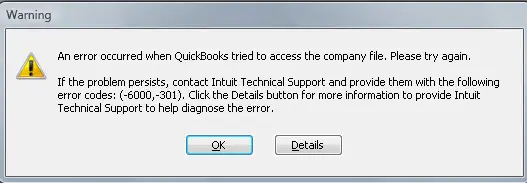
QuickBooks Error Code 6000, 301 is a critical company file access error that belongs to the 6000‑series of QuickBooks Desktop issues, all of which are closely tied to company file integrity and supporting configuration files. Unlike minor glitches, this error directly interferes with your ability to open or work with the company file (.QBW), making it a serious obstacle for businesses that rely on QuickBooks for daily accounting and financial management.
The error typically appears like:
“An error occurred when QuickBooks Desktop tried to access the company file. Please try again. If the issue persists, contact Intuit Technical Support and provide them with the following error codes: (-6000, -301).”
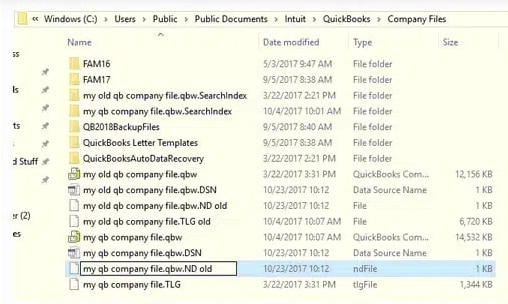
This error arises when QuickBooks encounters damaged or corrupted support files such as the Transaction Log (.TLG), Network Descriptor (.ND), or Data Source Name (.DSN) files.
It can also be triggered by encryption software conflicts, outdated QuickBooks versions, or corruption within the company file itself. Because these files are essential for multi‑user access and data management, any damage or misconfiguration can prevent QuickBooks from establishing a stable connection with the company file.
QuickBooks Error 6000, 301 often occurs in scenarios such as:
The impact of this error can be significant ranging from workflow interruptions and time loss to potential data rebuilding requirements. Since the company file contains sensitive financial information, resolving this error promptly is essential to avoid downtime and ensure data integrity.
The QuickBooks error code 6000, 301 generally effect the business in following ways:
In order to prevent this error in future, following steps are required to be implemented:
| Level | Error Context | Action | Why | Verification / Notes | Time |
| Beginner | QuickBooks Error 6000, 301 – Outdated Version | Update QuickBooks Desktop (Help > Update QuickBooks Desktop > Get Updates > Restart) | Updates often fix bugs and improve stability | Confirm QuickBooks launches without error | 15–30 min |
| QuickBooks Error 6000, 301 – File vs. Software Check | Open a Sample Company File (No Company Open > Open a Sample File) | Confirms if issue is file‑specific or software‑related | If sample file opens, issue lies in company file | 10–15 min | |
| Intermediate | QuickBooks Error 6000, 301 – Damaged Config Files | Rename Support Files (.ND, .TLG, .DSN → add .OLD) | Forces QuickBooks to recreate fresh config files | Try reopening company file | 15–20 min |
| QuickBooks Error 6000, 301 – Network Path Issue | Copy Company File Locally (move .QBW to Desktop, open via QuickBooks) | Rules out network path issues | File opens successfully from Desktop | 15–20 min | |
| QuickBooks Error 6000, 301 – Encryption Conflict | Disable Encryption Software Temporarily | Encryption tools can block QuickBooks processes | File opens after disabling | 10–15 min | |
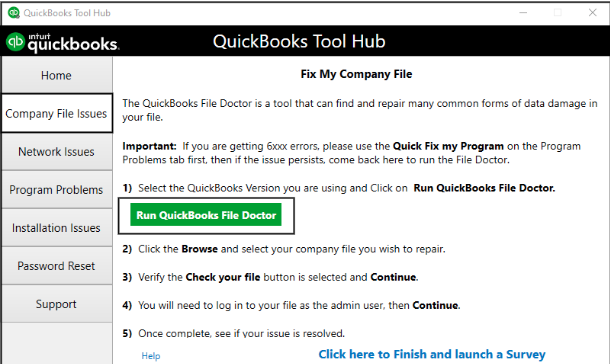
| Advanced | QuickBooks Error 6000, 301 – File Corruption | Run QuickBooks File Doctor (Tool Hub > Company File Issues) | Repairs corruption and network issues | Tool completes without errors | 20–30 min |
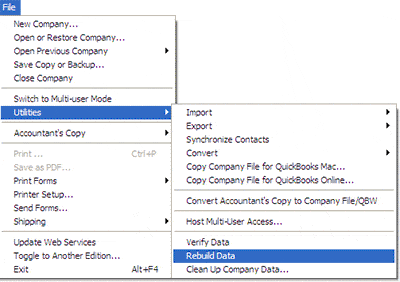
| QuickBooks Error 6000, 301 – Structural Damage | Verify & Rebuild Data (File > Utilities > Rebuild Data, then Verify Data) | Repairs structural damage in company file | Verify Data shows no issues | 30–60 min | |
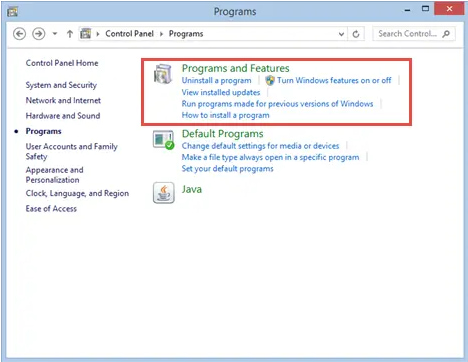
| QuickBooks Error 6000, 301 – Installation Corruption | Repair/Reinstall QuickBooks (Control Panel > Programs and Features > Repair; if fails, uninstall/reinstall) | Fixes installation corruption | QuickBooks launches cleanly | 30–60 min | |
| QuickBooks Error 6000, 301 – Windows System Conflict | Advanced Windows Checks (sfc /scannow, chkdsk /f, Event Viewer logs) | Ensures Windows isn’t causing the issue | No system errors reported | 30–60 min |
These are low‑risk steps that don’t involve system modifications.
Step 1: Update QuickBooks Desktop
Step 2: Open a Sample Company File
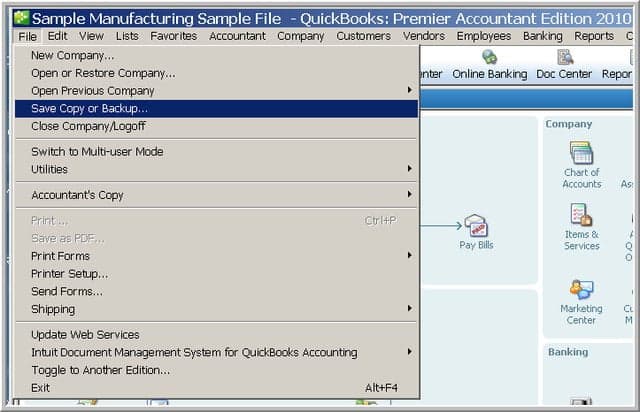
These steps involve QuickBooks data files or system components. Always backup your company file before proceeding.
Step 3: Rename Support Files (.ND, .TLG, .DSN)
Step 4: Copy Company File Locally
Step 5: Disable Encryption Software Temporarily
These are system‑level checks. Attempt only if you’re comfortable with Windows administration, or seek professional help.
Step 6: Run QuickBooks File Doctor (via Tool Hub)
Step 7: Verify & Rebuild Data
Step 8: Repair/Reinstall QuickBooks
Step 9: Advanced Windows Checks
QuickBooks Error Code 6000, 301 is a critical company file access issue that directly impacts financial workflows and data integrity. Because it stems from damaged support files, corrupted company data, outdated software, or improper network permissions. The error requires a structured, stepwise approach (given above) to be resolved.
By starting with beginner‑level safe fixes (updates and sample file checks), progressing through intermediate solutions (renaming support files, local file testing, disabling encryption), and finally applying advanced professional methods (File Doctor, Verify & Rebuild, reinstalling QuickBooks, and Windows system checks), businesses can systematically eliminate root causes while minimizing risk.
Ultimately, by addressing QuickBooks Error Code 6000, 301 the user can promptly safeguards business continuity, protects sensitive financial data, and restores all the confidential information in QuickBooks as a reliable accounting solution.
The Network Data (.ND) file and the Transaction Log (.TLG) file are essential support files QuickBooks uses to access your Company File (.QBW), particularly in a multi-user or network environment.
1. The .ND file stores configuration data, allowing QuickBooks Desktop to connect to the Company File over a network.
2. The .TLG file records all recent transactions and modifications since the last successful backup or data integrity check.
Renaming them to .ND.OLD and .TLG.OLD is safe because it forces QuickBooks to automatically create fresh, uncorrupted versions the next time you open the company file. This process often resolves errors caused by damaged network paths or corrupt transaction logs without affecting the core accounting data in the .QBW file.
Yes, the QuickBooks File Doctor tool is highly recommended and safe, as it is an official utility provided by Intuit. It is specifically designed to diagnose and repair two main categories of issues that cause 6000-series errors:
1. Data Damage: It scans and attempts to fix internal corruption within the QuickBooks Company File (.QBW) itself.
2. Network and Connectivity Issues: It checks your network settings, Windows firewall configuration, and the connection between the QuickBooks application and the server hosting the company file.
For Error Code 6000 301, the File Doctor can be the definitive tool to fix file structure problems that prevent access, especially when simple steps like renaming .ND and .TLG files fail.
When accessing a company file over a network, Error 6000 301 is often triggered by insufficient permissions on the server or host computer. If you encounter setup or hosting issues on your server, consulting dedicated enterprise desktop assistance can help ensure your multi-user network and permissions are configured correctly. Additionally, make sure the user accessing the file has full access rights by checking your folder permissions and firewall settings.
Specifically, check the following:
1. Folder Permissions: The Windows user account running the QuickBooks Database Server Manager (on the server) must have Full Control permissions for the folder that contains the company file.
2. Firewall Exclusion: The QuickBooks Database Server Manager program and specific QuickBooks ports must be added as exceptions in the firewall settings on both the server and the workstation to allow uninterrupted network communication.
3. QuickBooks Admin Login: You must be logged into the QuickBooks software using a user ID with Admin credentials, as instructed in the article’s Solution 1.
These are initial, foundational troubleshooting steps that address common system-level conflicts and restrictions:
1. Restarting the Computer: Clears temporary system caches, resolves conflicts caused by background processes, and refreshes system resources (like RAM) that might be causing internal glitches or slow performance.
2. Running as Administrator: QuickBooks often requires elevated permissions to fully access and modify the necessary system files, including database server components and network files. Running the application as an administrator ensures it is not being blocked by Windows User Account Control (UAC) settings from accessing the company file.
Yes, third-party encryption software is a frequent cause of the Error 6000 301.
1. QuickBooks Desktop is designed to handle company files in a standard, unencrypted format.
2. When a third-party application encrypts the folder or the company file itself, it blocks QuickBooks from reading or writing data.
3. The application cannot decrypt the file fast enough or fails to access the file altogether, resulting in the 6000-series access error.
Intuit advises against using external encryption software on company files and instead recommends using built-in Windows security features or contact the software vendor for guidance on disabling encryption.
If you can successfully open the company file after copying it to your local desktop, the file itself is likely not damaged. This diagnosis points directly to the original storage location as the source of the error, indicating one of the following issues:
1. Long File Path: The original folder structure was too deep, exceeding Windows’ character limit for file paths.
2. Network Interruption: The network connection was unstable or slow when accessing the server.
3. Folder Permissions: The original server folder lacked the necessary read/write permissions for your user account.
4. Synchronization Service Conflict: Cloud or sync services (like Dropbox, OneDrive) were actively locking the file.
The solution is to resolve the underlying issue at the original network location (e.g., shorten the path, fix permissions, or move the file to a standard QuickBooks hosting location).
When you choose the Repair option via the Windows Control Panel (Solution 4), the process automatically checks and restores all the necessary core components of your QuickBooks Desktop installation.
This includes:
1. QuickBooks Executable Files (.EXE): The main program files.
2. DLL Files: Critical system and dynamic-link libraries that enable various QuickBooks features.
3. Database Server Manager Files: Components required for multi-user access.
4. Windows Registry Entries: Corrects any damaged or missing configuration entries in the system registry.
You do not need to manually select individual components; the repair function is comprehensive and designed to fix internal installation errors without affecting your company file data.


