


QuickBooks Desktop is a comprehensive accounting software that operates across major operating systems, including Windows, macOS, and Linux. Compatibility issues can occur when the installed QuickBooks Desktop version does not align with the Windows 10 release on a system. Such misalignment may prevent access to company files, affect data processing, or trigger update-related errors.
This section presents the Windows 10 versions that support different QuickBooks Desktop editions, explains the conditions that lead to compatibility conflicts, and highlights system requirements, including dependencies like Microsoft .NET Framework 3.5 for older versions. Understanding these factors provides the foundation for effectively addressing compatibility issues and maintaining reliable QuickBooks Desktop performance on Windows 10.
Different Windows 10 Versions Supported by QuickBooks Desktop Pro, Premier, and Enterprise
QuickBooks Desktop–Windows 10 compatibility depends on the specific Windows 10 release installed on the system. Each Windows 10 version supports defined QuickBooks Desktop editions based on its framework components and system architecture. The aligned versions ensure that QuickBooks Desktop Pro, Premier, and Enterprise operate with stable installation behavior and consistent performance.
You can see the table listed below and upgrade your Windows 10 version accordingly:
| Windows 10 Versions | Compatible QuickBooks Desktop Versions |
| Windows 10 version 1809 | QuickBooks Desktop 2021 and 2022 |
| Windows 10 version 1803 | QuickBooks Desktop 2017 and later versions |
| Windows 10 version 1709 | QuickBooks Desktop from 2017 to 2020 versions |
| Windows 10 versions 1507, 1511, 1607 and 1703 | If you’re using one of these Windows 10 versions, you need to update to the latest Windows version as QuickBooks doesn’t offer exclusive features in such versions of operating systems. |
QuickBooks Desktop Versions Compatible with Windows 10 (QuickBooks 2016 R7 and Later)
Before fixing “QuickBooks not compatible with Windows 10” error, it is important to get familiar with the QuickBooks Desktop versions that are supported by Windows 10.
Here’s a list which will describe all the compatible versions:
- QuickBooks Desktop 2023
- QuickBooks Desktop 2022
- QuickBooks Desktop 2021
- QuickBooks Desktop 2020
- QuickBooks Desktop 2019
- QuickBooks Desktop 2018
- QuickBooks Desktop 2017
QuickBooks Desktop 2016 R7 and Later Versions
Regardless of the above list, if you’ve QuickBooks 2016 R7 and later versions, you can easily switch to Windows 10 without any trouble. While running QB software in your system, you won’t have to encounter QuickBooks compatibility issues with Windows 10, as it is totally compatible with this. However, you are still recommended to update QuickBooks to the latest release for better performance of the software.
QuickBooks Desktop 2015 & 2016 (Release 1 to 6)
QuickBooks Desktop 2015 & 2016 (R1 to 6) will only be compatible with Windows 10 when you have .NET Framework 3.5 enabled in your system, or else you may bump into QuickBooks compatibility issues with Windows 10.
QuickBooks Desktop 2014 and Earlier
QuickBooks Desktop 2014 and its earlier versions are not compatible with Windows 10, and if you still have the same version, it is highly recommended that you update your accounting software to the latest release as soon as possible. Otherwise, you will experience QuickBooks compatibility issues with Windows 10, like QuickBooks Error 15271, which may ultimately damage or affect your accounting data.
How to check your latest Windows 10 version?
Windows 10 version identification determines whether the installed operating system aligns with the release requirements of QuickBooks Desktop. The version data provides the baseline information needed to evaluate compatibility and identify the updates required for stable QuickBooks Desktop performance.
Follow the below-listed steps for the same:
- Navigate to the Start menu and then type About your PC in the search box.
- From all the available options, choose About your PC.
- Once the new screen starts displaying on your screen, scroll down to find your version number.
- Later, go online and search for the latest Windows 10 version. When you get the entire list of Windows 10 versions, match yours with it.
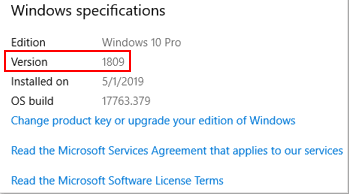
Note: The most recent Windows 10 version is 1809, which is certified to work perfectly with QuickBooks Desktop 2021 and 2022.
Steps to enable .NET Framework 3.5 to ensure optimal compatibility with QuickBooks Desktop
There can be some instances when you don’t have the .NET 3.5 Framework enabled by default, which is required for the smooth functioning of QuickBooks Desktop. To get a better experience on Windows 10, you need to turn on .NET Framework 3.5.
Here’s how:
- Hold and press the Windows+R keys on your keyboard simultaneously to open the Run window.
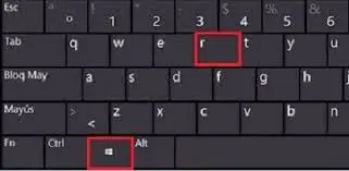
- Now, write down the Control Panel into the search box and later press OK.
- Click the Uninstall a Program option and then select Turn Windows features on or off.
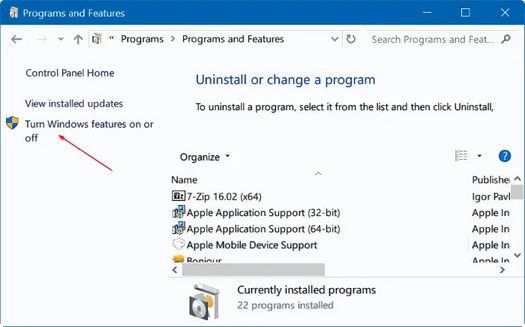
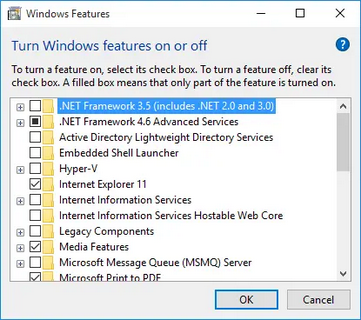
- Ensure .NET Framework 3.5 and .NET Framework 4.5 are selected from the checkbox.
- If it’s not, click on it and then hit the OK tab.
- If it is, select Cancel.
Conclusion!
QuickBooks Desktop–Windows 10 compatibility depends on the alignment between the installed Windows 10 release and the version requirements of QuickBooks Desktop. Compatibility attributes, version checks, system components, and required frameworks such as Microsoft .NET 3.5 define the conditions necessary for stable operation in supported environments. Keeping QuickBooks Desktop updated to the latest release further ensures smooth functionality and prevents compatibility-related errors. Outdated QuickBooks Desktop versions and system components provide a clear structure for managing updates, maintaining reliable performance, and planning for future software upgrades across evolving Windows 10 environments.
FAQs:
Is QuickBooks 2023 be compatible with Windows 10?
Yes, all editions of Microsoft Windows 10, including 64-bit, natively installed, are totally compatible with QuickBooks 2023. So, you don’t need to update your operating system if you have the QB desktop 2023 version.
Can I install QuickBooks version 2011 on Windows 10?
No, QuickBooks 2011 is not compatible with Windows 10. To run QuickBooks in your system, you need to update the most recent version of the software as well as Windows or any other operating system that you are using.
Is Windows 10 considered the best operating system for using QuickBooks?
Yes, Windows 10, Intel Core i5, or a comparable processor (2015 or newer) with a minimum of 4 GB of RAM is highly recommended for the smooth functioning of QuickBooks software.
Which Windows operating system does QuickBooks no longer support?
As per the latest Intuit guidelines, QuickBooks Desktop no longer supports Windows 8.1 since January 10, 2023. Thus, if you have the same operating system, you are recommended to update your Windows version as soon as possible.
Why does QuickBooks Desktop require .NET Framework 3.5 on some Windows 10 systems?
QuickBooks Desktop requires .NET Framework 3.5 on specific systems because several legacy QuickBooks Desktop components operate on the runtime environment provided by that framework, which supports installation stability and internal process execution.
Are older Windows 10 versions 1507 or 1511 supported by current QuickBooks Desktop editions?
Windows 10 versions 1507 and 1511 do not support current QuickBooks Desktop editions because these Windows releases lack the updated frameworks, driver sets, and security components required for modern QuickBooks Desktop functionality.
Disclaimer: The information outlined above for “How to Fix QuickBooks Compatibility Issue with Windows 10?” is applicable to all supported versions, including QuickBooks Desktop Pro, Premier, Accountant, and Enterprise. It is designed to work with operating systems such as Windows 7, 10, and 11, as well as macOS.