Excerpt:
The QuickBooks File Doctor Tool is a critical diagnostic utility designed by Intuit to resolve common issues in QuickBooks Desktop, particularly company file data damage, connectivity errors, and persistent multi user access problems, such as the widely encountered 6000 series and H series error codes. The most current and recommended method for accessing the tool is through the QuickBooks Tool Hub, which streamlines installation and ensures compatibility. Users must adhere to specific prerequisites, including running the installer with administrative rights, ensuring the system meets minimum requirements (like Windows 10/11 64 bit and Microsoft .NET Framework 4.8), and critically, creating a full data backup before initiating any repair process. Though the File Doctor is highly effective, users must recognize its limitations—it is Windows exclusive, has a file size limit of approximately 2 GB, and may fail to fix complex, severe structural database issues, requiring manual utility use or professional recovery in those instances.
 Add As A Preferred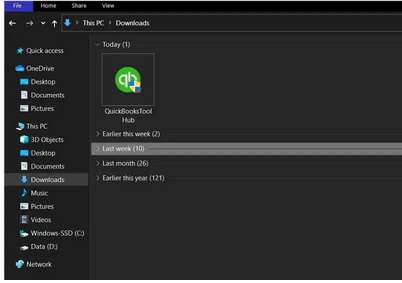
Highlights (Key Facts & Solutions)
QuickBooks File Doctor Tool is a file-repairing tool used to resolve common QuickBooks company File data damage, connection errors, Windows problems, diagnostic errors, update errors, and network-related issues.
QuickBooks File Doctor Tool is best known for 6000 series of errors that display while running QuickBooks in multi-user mode like -6147, -6130, -6150, etc.
QB File Doctor Tool was designed by Intuit in 2012 and became the most crucial part of the entire accounting system. It is integrated with QuickBooks Network Connection Diagnostic Tool (QNCD) and QuickBooks Company File Diagnostic Tool (QCFD).
When you start running this Tool in your system, QuickBooks File Doctor Tool automatically detects all the glitches or errors and then troubleshoots them in just a few clicks. It also scans every company file available in your software and repairs the corruption, if there’s any. The icon of the QuickBooks File Doctor tool is located on the main screen of your desktop window.
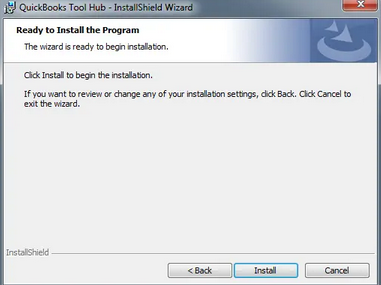
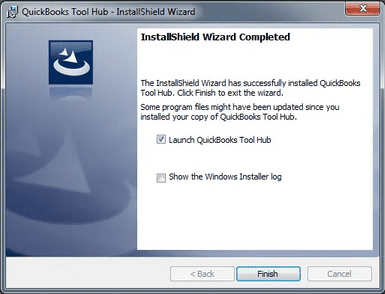
Before starting the installation of the QB File Doctor Tool from the tool hub, you are required to download the tool hub program.
Follow the below-listed instructions:

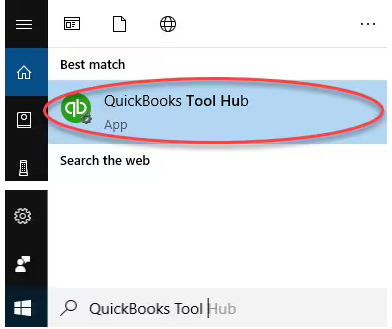
Important Note: Hold and Press the Windows or Start key if you are unable to locate the icon, and then search for QuickBooks Tool Hub. Once found, choose the program to open it.
Points to Remember before running QuickBooks File Doctor Tool
After downloading the tool hub into your system, it’s time to run this Tool. Below are some important considerations you need to keep in mind while working with the QB File Doctor Tool:
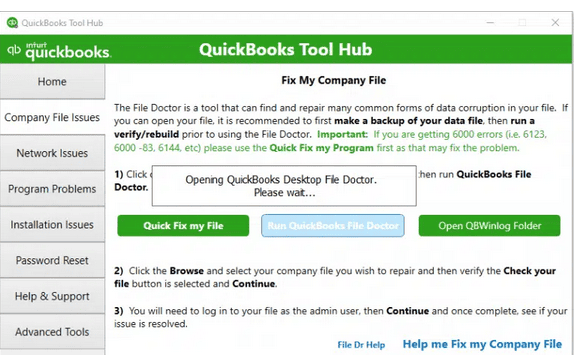
Note: If the QuickBooks File Doctor doesn’t open, search and locate QuickBooks Desktop File Doc and open it manually.
Note: Click Browse and search to find your File if you’re unable to see it.
Note: The scan time depends on your file size and can take up to 10 to 15 minutes. The scan may probably say it was unsuccessful, even if it fixes your issue.
QuickBooks File Doctor Tool works with the UK and US QuickBooks versions and is compatible with all the QuickBooks versions for Windows.
QuickBooks File Doctor Tool is integrated with QuickBooks 2016 and its later versions. If you want to update QuickBooks to the latest release, you can simply move the QuickBooks File Doctor download page to the official Intuit website and then start working on it. If you’re using an older QuickBooks version, you’ll have to download the File Doctor Tool separately.
Note: This Tool can’t be accessed by QuickBooks for Mac users.
A few years back, every QB tool, like QuickBooks Install Diagnostic Tool, Clean Installation Tool, Refresher Tool, and File Doctor, needed to be downloaded separately from different download pages. But after introducing QuickBooks Tool Hub, you can now enjoy all of them in one place.
While fixing company file errors using this Tool, you may sometimes end up with the following error codes.
Let’s have a look at them:
| Error code -6150 | Installation errors | Error in updating QuickBooks |
| Error code -6000 -301 | Network errors | Various type of H series error |
| QB Error code -6000 -305 | Firewall port was improperly configured | QuickBooks database server manager related bugs |
| Error code -6000 -82 | Multi-user mode errors | Damaged company files |
| Damaged Windows registry | Data corruption errors | QuickBooks error H202 |
| QB Error 6147, or Error -6130 | Unable to open QuickBooks company file | Missing or blank vendor, customer, or employee lists |
| And other 6000 series errors | Malware attack hard drive | QuickBooks Error code H505 |
Well, there are two types of QuickBooks File Doctor Tool that can be downloaded or installed from the official website of Inuit.
Below, we’ll briefly discuss each one:
The built-in version is basically used for US, UK, and Canada versions of the QuickBooks software and is only compatible with Windows 10, Windows 8, Windows 7, and MS Server 2003-2012.
Note: If the .NET Framework 2.0 is not available on the desktop, the QuickBooks file doctor tool will install it through the QuickBooks Install Diagnostic Tool.
Below are the benefits of using QuickBooks File Doctor:
There are a few limitations to using the File Doctor Tool:
Unlock hidden steps and overlooked technical checks that ensure a smooth QuickBooks File Doctor setup using Tool Hub. From verifying installations to handling launch failures, these essential subtopics guide you through every layer of the process—clearly, practically, and without guesswork. Follow each point to eliminate errors before they even begin.
Installing QuickBooks File Doctor via the Tool Hub requires meeting certain system prerequisites to ensure smooth functionality and avoid installation errors.
Before proceeding, verify the following:
QuickBooks Tool Hub helps fix many common errors, but before using it, it’s important to verify if it’s already installed.
Follow these steps to check its installation and version status:
Older versions of File Doctor can interfere with the installation or functioning of the latest version.
To ensure a smooth setup, follow these steps to completely uninstall outdated versions:
QuickBooks Tool Hub is a crucial utility for diagnosing and fixing common QuickBooks issues. If you’re having trouble finding or launching it, follow these steps to locate and open the Tool Hub properly:
The File Doctor tool may sometimes fail to launch directly from the QuickBooks Tool Hub. To run it manually and troubleshoot the issue, follow these steps:
Even a perfect tool fails without the right setup. This section covers practical insights often missed—pre-checks, troubleshooting, and system-specific limitations. Whether you’re avoiding install errors or working on a Mac, these additional tips ensure you get the most out of QuickBooks File Doctor without surprises or wasted time.
Installing the QuickBooks File Doctor Tool can sometimes fail due to compatibility or system issues.
To ensure a smooth installation, follow these essential steps:
QuickBooks File Doctor is a powerful utility for fixing company files and network-related errors. To ensure its effectiveness and avoid further complications, follow these best practices before and after using the tool:
QuickBooks company file errors can disrupt your workflow, especially if left unaddressed. The File Doctor Tool is designed to diagnose and repair specific issues.
Use the tool if you notice any of the following signs:
Installation issues with File Doctor are commonly caused by system configuration errors or corrupted setup files.
To avoid these problems, follow these steps:
QuickBooks File Doctor is a diagnostic tool developed specifically for Windows environments and is not compatible with macOS.
This limitation is primarily due to the following reasons:
Alternatively, contact Intuit Mac support or use Time Machine backup for manual data restoration.
QuickBooks File Doctor is a powerful tool that is especially used for data and file repair. There are many users who encounter different network-related problems while working on the software. This is when this file doctor tool takes place. Now the question arises, how to use it? Like others, if you’ve a similar query or doubt, don’t hesitate to share your concern with our experts at XXXXXX, and we’re just a call away from you.
The File Doctor may fail to launch due to firewall interference, outdated QuickBooks services, or incorrect file paths. If the tool does not open after selecting “Run QuickBooks File Doctor” in the Tool Hub, you can try to launch the in built version manually or address a common network block:
QBDBMgrN and QBCFMonitorService).
The scan time is highly dependent on your company file size and the complexity of the damage.
The proper procedure after any scan, regardless of the message, is:
The QuickBooks File Doctor Tool is exclusively for Windows operating systems and is integrated with current and recent QuickBooks Desktop versions.
QuickBooks File Doctor is a Windows utility and is not supported on macOS. For Mac users needing data repair or recovery, Intuit recommends using the following native tools:
.QBW) from a recent Time Machine backup remains the most reliable method for full recovery.The terminology has evolved, but the distinction is between the old external tool and the modern, recommended approach integrated via the Tool Hub:
The File Doctor Tool is highly effective for common, moderate issues but cannot resolve all forms of damage.
Before initiating any major repair process, these two preventive steps are crucial to ensure data integrity and the successful operation of the utility:
You can get the official tool directly through the Intuit website by installing the latest version of the QuickBooks Tool Hub. To access the download:
QuickBooksToolHub.exe).Note: Older standalone versions of the diagnostic utility are no longer maintained separately by Intuit; accessing it via the Tool Hub ensures you run the most current and secure version.
While earlier releases permitted a standalone QB File Doctor download, Intuit now integrates all file repair, network, and registry diagnostics into the consolidated Tool Hub. If you search for an Intuit File Doctor download or a File Doctor Intuit download, avoid third-party sites. Always use the official Tool Hub package to ensure safe execution on Windows systems.
To manually install QuickBooks File Doctor without relying on the QuickBooks Tool Hub, follow these steps:
qbfd.exe or QuickBooksDesktopFileDoctor.exe). Save the installer file to your Windows Downloads folder or Desktop.Note: Manual installation requires Windows 10 or 11 (64-bit) and Microsoft .NET Framework 4.8 or higher.
The QuickBooks File Doctor is a vital tool for resolving errors and network issues within QuickBooks. It repairs damaged company files and addresses common errors…


