Excerpt:
Recording employer-paid health insurance in QuickBooks requires strict adherence to IRS and ACA reporting requirements to ensure tax compliance and accurate payroll. The process involves setting up specialized payroll items using the correct Tax Tracking Type (e.g., Health Coverage Cost) to properly categorize the expense for W-2 Box 12 Code DD reporting, which is a non-taxable informational disclosure. The actual premium payments to the vendor should be recorded using the Enter Bills feature for a strong audit trail, not manual Journal Entries. For year-end reconciliation and corrections, technical features like creating zero net paychecks and using the Adjust Payroll Liabilities tool are essential to update prior-period contributions and fix errors without corrupting the employee's net pay.
 Add As A Preferred
Highlights (Key Facts & Solutions)
Overview
To record employer-paid health insurance in QuickBooks, begin by creating a payroll item for the company contributions, then assign it to the employees and record the payments as expenses, either through journal entries or a bill.
Under the Affordable Care Act, also known as Obamacare, most Americans are required to maintain a basic level of health insurance referred to as minimum essential coverage defined by the Department of Health and Human Services.
“Employer-sponsored coverage” includes health insurance for current employees, their families, and retired employees. Federal law allows former employees to keep their employer’s health insurance, at their own cost, for a limited time after leaving the job.
If your company has an insurance benefit plan, you need to set up and manage payroll items for your insurance benefit plan in QuickBooks Online Payroll and QuickBooks Desktop Payroll to track and tax it appropriately.
In order to set up, add, edit, and track insurance benefits plans or employer health benefits, you must determine the type of health benefit plan or insurance benefit plan.
However, if you don’t have an insurance benefit plan, QuickBooks has partnered with Allstate Health Solutions to provide employee health benefit options for QuickBooks Online Payroll customers.
Before recording Health Insurance in QuickBooks, make sure to address several key areas to avoid any technical problems in the future.
For QuickBooks Desktop
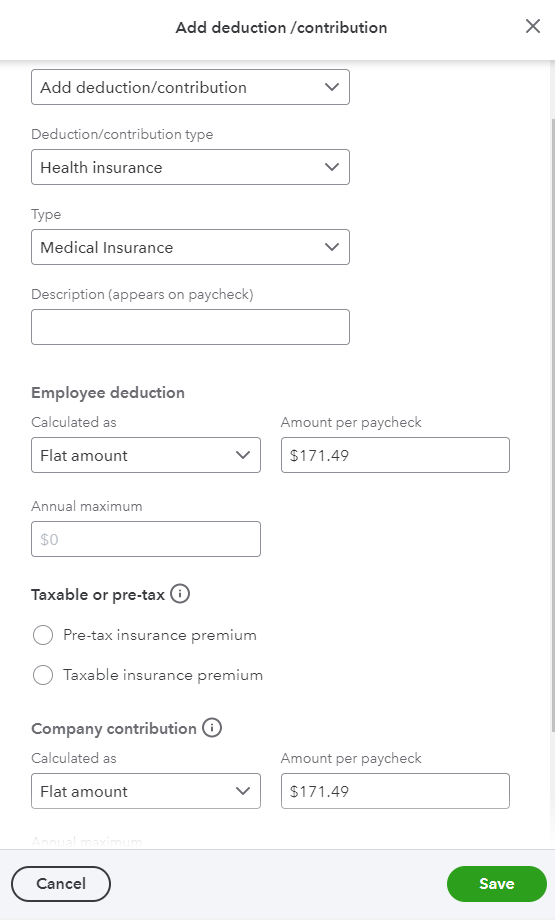
Step by Step to record Employer Paid Health Insurance in QuickBooks Desktop
Step to add/modify and remove Employer Paid Health Insurance in QuickBooks Desktop
Step to create zero net paychecks for Employer Paid Health Insurance in QuickBooks Desktop
Below is the Step by step guide to create zero net paychecks to include the company-paid insurance in QuickBooks Desktop.
To report employer health insurance on W-2 forms in QuickBooks Desktop, create a new payroll item under Payroll Item List, set up as a company contribution, and add it to employee paychecks before year-end.
Steps by step guide to report Employer Health Insurance on W-2 Forms in QuickBooks Desktop Payroll
For QuickBooks Online
To edit or remove an insurance item in QuickBooks Online, go to Payroll > Employees, select the employee, modify or delete the contribution, and press Save and Done.
Steps to edit / remove an Insurance Item in QuickBooks Online
To report employer health insurance on W-2 forms in QuickBooks Online Payroll, go to Taxes > Payroll Taxes > Filings > Resources, edit Box 12/13, enter amounts in Box 12DD and Box 12FF, and click Submit.
Steps to report Employer Health Insurance on W-2 Forms in QuickBooks Online Payroll
To set up health insurance reimbursement for an employee in QuickBooks Online (QBO), follow these steps:
Steps to set up health insurance reimbursement in QuickBooks Online
When managing or recording health insurance expenses in QuickBooks, ensure proper categorization to maintain accurate financial records. Here’s a streamlined approach to categorize health insurance expenses:
You can record health insurance payments in QuickBooks using one of three ways: Payroll Item, Expense Transaction, or Journal Entry.
Managing employer-paid health insurance in QuickBooks is crucial for keeping your books accurate and ensuring compliance with tax regulations. Employer-paid health insurance significantly influences payroll taxes in QuickBooks. Understanding this impact is crucial for accurate financial reporting and compliance. Here’s a detailed, step-by-step guide to help you navigate this process effectively.
Understanding Tax Implications of Employer-Paid Health Insurance :
If your employer-paid health insurance isn’t appearing on your W-2 form, it’s essential to address this promptly to ensure accurate tax reporting.
Steps to fix employer-paid health insurance not appearing on W-2
Correcting payroll errors in QuickBooks related to health insurance involves identifying the discrepancies, adjusting payroll items, and ensuring accurate reporting. Here’s a step-by-step guide to help you through the process:
Adjusting prior period health insurance contributions in QuickBooks requires careful handling to ensure your financial records remain accurate. Here’s a step-by-step guide to assist you:
Reconciling employer-paid health insurance at year-end in QuickBooks is essential for accurate financial records and tax reporting. Follow these detailed steps to ensure proper reconciliation:
Handling overpaid or underpaid health insurance transactions in QuickBooks requires careful attention to ensure your financial records accurately reflect these discrepancies. Here’s a detailed, step-by-step guide to assist you:
Step 5: At the end of each month, reconcile your QuickBooks accounts to ensure all health insurance payments and adjustments match your bank statements.
If you need to report health insurance on an employee’s W-2 in QuickBooks, you can do it in two ways:
Option 1: Add Health Insurance to Box 12DD or 12FF
Option 2: Set Up a Payroll Item for Health Insurance
Accurate recording of employer-paid health insurance is essential for compliance, tax purposes, and efficient payroll management. Below is a detailed guide to help you maintain precise records, automate payroll processes, and ensure smooth year-end reporting of employer-paid benefits.
By following these steps, you can maintain accurate records of employer-paid health insurance, minimize errors through automation, and ensure compliance during year-end reporting.
Accurate recording of employer-paid health insurance is essential for tax compliance and financial clarity. Common errors—including payroll item misclassification, improper tax tracking, and duplicate expenses—can result in penalties and inaccurate reports. Customizing payroll items for various insurance plans, integrating contributions correctly with payroll taxes, and leveraging QuickBooks reporting tools help prevent these issues. A systematic troubleshooting process ensures ongoing accuracy, reducing audit risks and enhancing payroll efficiency.
Recording employer-paid health insurance often has 3 common errors: misclassifying payroll items, incorrect tax tracking, and duplicating expenses. Misclassification leads to inaccurate tax filings and penalties, affecting 1 in 4 businesses annually. Incorrect tax tracking causes wrong payroll tax calculations, risking fines up to 5% of payroll. Duplication inflates expenses, distorting financial reports and cash flow. To avoid these, verify payroll item setup, confirm tax tracking type matches insurance plan, and regularly audit employee deductions. Correcting errors early saves time, money, and IRS scrutiny, helping maintain compliance and clear financial records.
Integrating health insurance contributions with payroll tax calculations is critical for accuracy, compliance, and cost control. Employer-paid premiums are generally exempt from federal income tax and FICA, affecting over 90% of U.S. employers. Misintegration can lead to incorrect tax withholdings, triggering IRS audits and penalties up to 10% of payroll. QuickBooks allows setting tax tracking types to Premium Only or None, ensuring correct calculations. Proper integration reduces manual errors, saves up to 15 hours monthly in payroll processing, and maintains employee trust by preventing paycheck discrepancies.
Customizing payroll items for diverse insurance plans ensures precise tracking, reporting, and tax treatment. QuickBooks supports Medical, Vision, and Dental plans, each requiring distinct payroll items to avoid errors seen in 30% of small businesses. Tailoring payroll items by plan type simplifies employee eligibility management and contribution limits. It also ensures compliance with ACA and IRS rules, reducing audit risks by 25%. Proper customization enhances financial clarity, enabling businesses to allocate over 20% more accurately on benefit costs, ultimately improving budgeting and employee satisfaction.
Troubleshooting health insurance payroll issues requires a clear 4-step approach: identify, analyze, correct, and verify. First, identify discrepancies by reviewing payroll reports and employee deductions. Next, analyze payroll item setups and tax tracking for errors, which cause 40% of common issues. Then, correct mistakes by editing payroll items or adjusting entries. Finally, verify corrections through test payroll runs and reconciliations. Following this process reduces payroll errors by up to 35%, avoids IRS penalties, and ensures employee trust through accurate paycheck calculations. Consistent troubleshooting saves time and boosts compliance confidence.
QuickBooks reports help track employer health insurance expenses with precision, enabling better budgeting, auditing, and compliance. Key reports include Payroll Summary, Expense by Vendor, and Liability reports. Using these, businesses identify expense trends, detect discrepancies, and reconcile payments efficiently. Regular review reduces accounting errors by 30% and improves cash flow forecasting by 20%. Reports also simplify ACA and tax reporting, ensuring all health insurance contributions are accurately documented. Setting monthly report schedules enhances financial transparency and supports informed decision-making for employer benefits management.
Automating health insurance recording in QuickBooks saves time, reduces errors, and ensures compliance with tax laws. It cuts payroll processing time by up to 40% and improves data accuracy, reducing mistakes by 25%. Since health insurance reporting rules vary by state and country, businesses must adapt QuickBooks settings to local regulations to avoid fines. Proper training of payroll staff on recording employer-paid insurance helps maintain accuracy and compliance, reducing errors by 30%. Transparent employee benefits statements improve understanding and trust, while year-end reconciliation ensures financial accuracy and audit readiness. Following these best practices enhances payroll efficiency and supports business growth.
Automating health insurance recording in QuickBooks saves time, reduces errors, and ensures compliance. It eliminates manual entry, cutting payroll processing time by up to 40%. Automation improves data accuracy, decreasing misclassifications and tax errors by 25%. It streamlines employee contribution tracking, ensuring correct deductions every pay period. Automated systems generate timely reports, aiding in year-end reconciliation and tax filings. Businesses also benefit from improved audit readiness and reduced risk of penalties. Overall, automation enhances financial transparency and boosts payroll efficiency, allowing companies to focus more on strategic growth than on administrative tasks.
Health insurance reporting varies significantly across states and countries, impacting compliance and payroll processing. In the U.S., states like California and New York have additional reporting requirements beyond federal ACA rules, affecting 30% of employers. Some countries mandate detailed employee benefit disclosures that differ from U.S. standards. These variations influence payroll item setups, tax tracking, and W-2 reporting. Failure to adapt to local laws can result in fines up to $5,000 per violation. Understanding regional requirements helps businesses customize QuickBooks settings, avoid penalties, and maintain accurate records tailored to each jurisdiction’s regulations.
Effective payroll staff training on employer-paid health insurance ensures accuracy, compliance, and efficiency. Focus on clear instruction about setting up payroll items, tax tracking types, and recording contributions in QuickBooks. Use real-world examples and hands-on exercises to reinforce learning. Regular updates on tax law changes reduce errors by 30%. Encourage staff to double-check entries and run reports to catch discrepancies early. Providing reference guides and quick-checklists saves time and improves confidence. Well-trained staff minimize costly mistakes, improve employee trust, and ensure timely, error-free payroll processing for health insurance benefits.
Employer-paid insurance significantly affects employee benefits statements by enhancing total compensation visibility, improving job satisfaction, and ensuring tax transparency. Including accurate health insurance costs in statements helps employees understand their true benefit value, which can be 20-30% of total compensation. Clear statements reduce confusion about payroll deductions and tax implications. Accurate reporting supports compliance with IRS and ACA regulations, minimizing audit risks. Transparent benefits statements also aid employee retention and recruitment by highlighting comprehensive health coverage. Businesses benefit from fewer disputes, smoother payroll reconciliation, and stronger employer-employee trust.
Year-end reconciliation of health insurance data ensures accurate financial records, tax compliance, and smooth audit processes. Begin by comparing payroll reports with insurance invoices to identify discrepancies. Reconcile employer contributions recorded in QuickBooks against actual payments made. Adjust any differences through journal entries before closing the fiscal year. Review employee W-2 forms to confirm proper reporting of health insurance amounts, especially in Box 12 with Code DD. Document all reconciliations and maintain records securely for audit readiness. Following these best practices reduces errors by 30%, prevents IRS penalties, and provides clear insights for future budgeting and benefits planning.
Accurately recording employer-paid health insurance in QuickBooks, whether Desktop or Online, is vital for maintaining financial records and ensuring tax compliance. By setting up payroll items, allocating costs to the right accounts, and regularly reviewing entries, you can effectively track these expenses and improve reporting credibility while promoting transparency with employees.
The Tax Tracking Type dictates how QuickBooks treats the employer’s contribution for tax reporting, which directly affects the employee’s W-2 form and tax liability.
W-2 Box 12 Code DD is an Affordable Care Act (ACA) reporting requirement for informational purposes only; it is not taxable income to the employee.
A zero net paycheck is a specific, non-cash transaction created to record a company-paid liability or contribution without generating any taxable income or cash payment for the employee.
While a Journal Entry (JE) can record the expense, the “Enter Bills” and “Pay Bills” features provide a superior audit trail and ensure proper accounting for cash flow under the accrual method.
This specific setup is a technical workaround within QuickBooks to track the cost of coverage per employee for W-2 reporting without creating a double expense on the financial statements.
Adjusting prior period contributions requires using the dedicated Adjust Payroll Liabilities feature, as manually editing paychecks can disrupt tax reports.
Any refund or credit for a recorded payment (overpayment) must be tied back to the original expense account to correct the total cost reported on the Profit and Loss statement.


