Excerpt:
QuickBooks Error 12152 prevents the software from connecting to servers, typically due to issues like misconfigured internet settings or corrupted files. This article offers practical solutions including performing a clean installation, restoring your PC, correcting system date and time, changing backup file extensions, and fixing internet settings to restore proper functionality and resolve the error effectively.
 Add As A Preferred
Payroll update error QuickBooks error code 12152 prevents QuickBooks Desktop from connecting it to Intuit’s servers. It usually appears when downloading payroll updates or opening the software, disrupting payroll operations.
The error is often triggered by incorrect internet settings, invalid license data, registry issues, malware infections, or improper system shutdowns. In some cases, outdated Windows frameworks or corrupted QuickBooks installations also cause 12152.
Error 12152 typically surfaces during payroll updates, QuickBooks installation, or when the software attempts to validate license information. It may also appear after Windows updates or sudden power failures.
Users often see: “QuickBooks Payroll Update Error 12152 – Unable to connect to server” or similar messages indicating failed updates or invalid license data.
Preventing Error 12152 is critical because payroll updates ensure accurate tax calculations and compliance. If left unresolved, businesses risk delayed payroll runs, incorrect filings, and potential penalties.
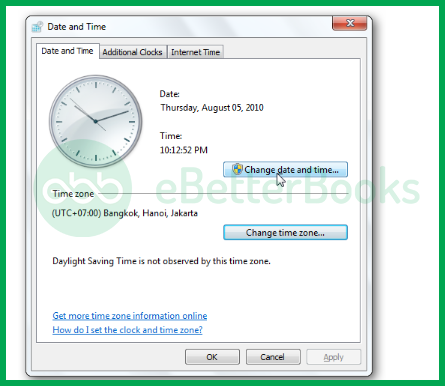
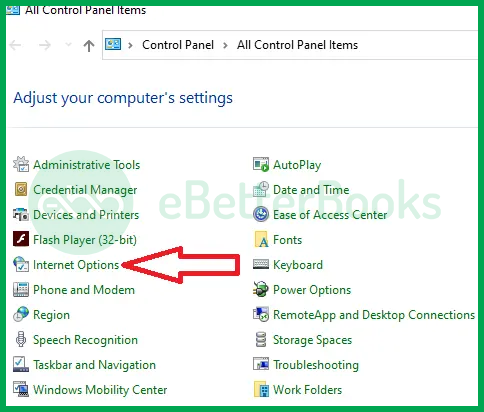
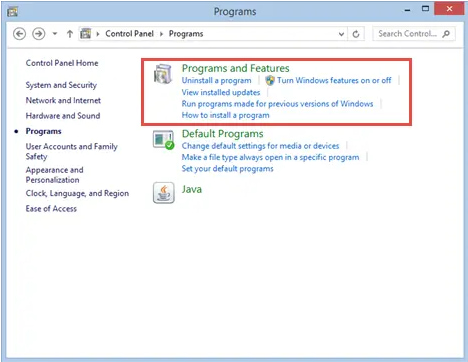
QuickBooks Error 12152 is a payroll update connectivity issue that prevents QuickBooks Desktop from linking to Intuit’s servers, disrupting payroll operations and compliance. It is often triggered by incorrect internet settings, invalid license data, registry corruption, malware, or outdated system frameworks.
A structured troubleshooting approach starting with basic checks like verifying date/time and internet settings, moving to intermediate steps such as repairing QuickBooks and fixing registry entries, and escalating to advanced solutions like reinstalling QuickBooks or restoring Windows ensures efficient resolution.
Preventive measures, including keeping QuickBooks updated, maintaining clean shutdowns, verifying firewall settings, and backing up company files, help minimize recurrence. With proper troubleshooting and preventive practices, businesses can restore payroll updates smoothly, safeguard compliance, and avoid payroll delays.
It is a mandatory security standard.
➜TLS (Transport Layer Security) is the technology that encrypts data sent over the internet.
➜The Requirement: As of recent years, Intuit (and the banking industry) disabled support for older security protocols (TLS 1.0 and 1.1) to prevent data theft.
➜The Connection: If your Windows settings do not have TLS 1.2 checked/enabled, QuickBooks cannot establish a secure “handshake” with Intuit servers, resulting in 12xxx series errors.
Yes, it is a common trigger. VPNs reroute your internet traffic and often change your IP address dynamically. This can look suspicious to Intuit’s security servers or introduce “latency” (lag) that causes the update download to time out. It is best practice to temporarily disconnect your VPN while downloading QuickBooks updates or payroll tax tables to ensure a direct, stable connection.
No, generally not. Error 12152 is a connectivity/application error, not a database error. It means the software cannot talk to the outside world. Your actual financial data (transactions, reports) stored on your hard drive is typically safe and intact. The error only prevents you from getting new data (like tax table updates) or syncing services.
Yes, the error can interrupt payroll updates, preventing QuickBooks from downloading the latest tax tables or processing employee payments accurately.
Yes, QuickBooks Error 12152 can occur if your internet browser settings are incorrect or outdated. Since QuickBooks relies on Internet Explorer for online connectivity, any misconfiguration in the browser can interrupt communication with Intuit’s servers. Resetting or updating the browser settings usually resolves the issue.
Yes, but with limitations.You can typically continue to create invoices, record bills, and run reports offline. You should not process Payroll or File Taxes. Without the update that Error 12152 is blocking, your tax tables will be outdated, leading to incorrect paycheck calculations and potential compliance fines.
Windows updates or background software changes can revert settings. Sometimes a major Windows Update resets Internet Explorer options to their defaults, or a third-party system optimizer “cleans up” files that QuickBooks needs. It is helpful to periodically check that your SSL/TLS settings haven’t reverted if you notice the error return after a few months.


