Excerpt:
QuickBooks Error 6177 occurs when QuickBooks can't locate the company file, typically due to issues like incorrect file paths or network-related problems. To resolve it, ensure correct folder permissions, update QuickBooks, use the File Doctor tool, or move the company file to the local drive. These steps will restore access and improve system stability, allowing seamless operations in multi-user environments.
 Add As A Preferred
QuickBooks Error 6177 is a common file-access issue that prevents users from opening or restoring their company file. It occurs when QuickBooks cannot correctly establish the path to the file, often due to improper logout, file relocation, or server permission problems.
This file path access error occurs when QuickBooks Desktop tries to open a company file but cannot establish the correct route to it. In simple terms, QuickBooks knows the file exists but fails to connect to it through the expected path.
QBGarage, citing Intuit, says Error -6177, 0 means QuickBooks cannot use the path to the company file. A stale or unreachable path stops QuickBooks from opening a file that still exists.
Windows permissions decide whether QuickBooks can reach the folder that holds the company file. Intuit’s final step sets folder permissions to share company files.
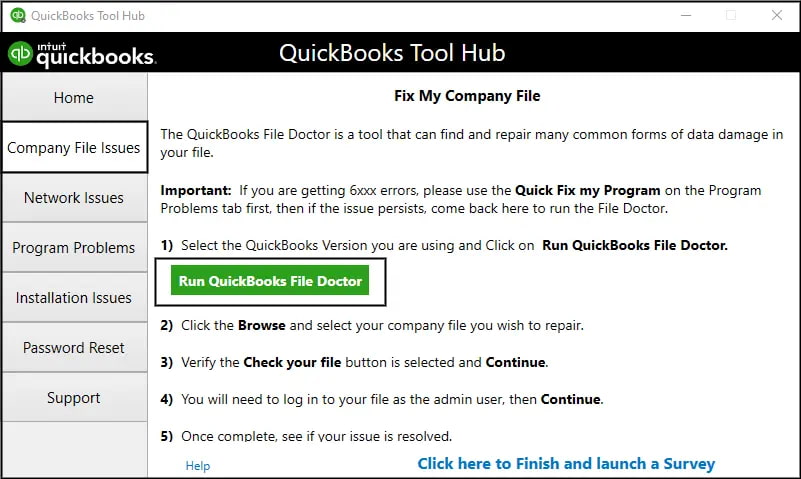
A damaged company file can fail to open even when its path is correct. Intuit’s File Doctor step scans and cleans the file and refreshes its location.
The following is a detailed explanation of troubleshooting steps and they are segregated according to the fixes i.e. Beginner, Intermediate, and Advanced levels, with time estimates for each.
These are simple fixes that any QuickBooks user can attempt without technical expertise.
These steps require basic file handling skills and QuickBooks familiarity.
These are technician-level fixes, suitable for IT admins or advanced users in multi-user environments.
Impact: Automatically diagnoses and repairs file path and network issues.
Error 6177 may seem like a technical glitch, but its consequences can ripple across an organization’s financial workflow. Because QuickBooks is often the central hub for accounting, payroll, and reporting, any disruption in accessing the company file can have serious business implications. The key impacts are as follows:
QuickBooks Error 6177 is not just a minor inconvenience; it directly blocks access to your company file, disrupting accounting workflows and potentially delaying critical financial tasks. At its core, the error stems from QuickBooks’ inability to correctly resolve the file path, often triggered by improper logout, file relocation, or permission misconfigurations.
By following these structured steps, users can resolve the error efficiently, with clear time expectations for each stage. More importantly, adopting preventive practices such as consistent file management, proper logout procedures, and regular backups significantly reduces the likelihood of encountering Error 6177 again.
Moving the file works because it eliminates the “Network” layer from the equation. Error 6177 is fundamentally a communication breakdown between the workstation and the server. By placing the file on the local hard drive (C:), you force QuickBooks to access the file directly via the local disk input/output system rather than sending data packets across your network cables or Wi-Fi.
➜Note: While this is a valid troubleshooting step to rule out file corruption, keeping the file on a local C: drive permanently will break Multi-User access unless that new folder is properly shared and re-mapped for other users.
Yes. While QuickBooks supports mapped drives, they can sometimes disconnect or timeout, leading to Error 6177. Intuit officially recommends using the UNC (Universal Naming Convention) path (e.g.,\\ServerName\QBData\CompanyFile.qbw) because it is a direct address to the server and is less reliant on individual Windows user profile settings.
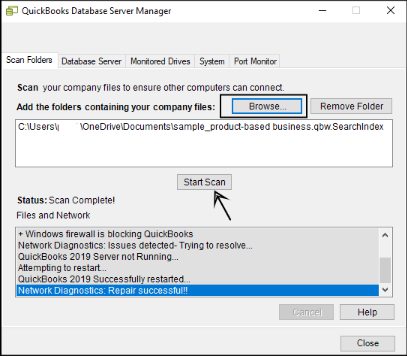
No. The QuickBooks Database Server Manager (QBDBSM) is a server-side utility. It is designed to run only on the computer that physically hosts the company files. Installing or running it on a workstation (a computer that just accesses the file) is unnecessary and consumes system resources without resolving Error 6177. Its sole job is to scan the server’s hard drive and broadcast the file location to the network.
No, Error 6177 is primarily a connection path issue, not a data corruption issue. It means the QuickBooks application on your workstation cannot “see” the company file on the server due to a blocked path or permission error. However, if you frequently force-close QuickBooks (Task Manager) when this error appears, you risk creating data inconsistencies. Always check your Data Safety by running the Verify Data utility once the connection is restored.


