Excerpt:
This article explains the importance of accurately calculating and tracking the Cost of Goods Sold (COGS) for businesses. It helps companies assess profitability, optimize inventory management, and ensure tax compliance by accounting for direct production costs such as labor, materials, and overhead. Proper COGS management can improve pricing strategies, monitor performance, and minimize tax liabilities, ensuring financial accuracy and operational efficiency.
 Add As A Preferred
Cost of Goods Sold (COGS) represents the direct costs incurred by a company in producing or purchasing the goods or services that it sells during a specific period. As a critical expense reported on the income statement, COGS includes only costs directly traceable to the production process, such as the expense of raw materials, direct labor, and manufacturing overhead.
It serves as a fundamental metric for calculating a company’s gross profit (revenue minus COGS), which is essential for determining a viable pricing strategy and assessing operational efficiency. Accurately tracking COGS is not only vital for internal financial management and inventory valuation but is also mandatory for external financial reporting and adherence to tax compliance regulations.
Highlights (Key Facts & Solutions)
The cost of goods sold (COGS) represents the direct expenses incurred in producing an item or delivering a service that a company sells. To determine the cost of goods sold, you need to consider costs like materials, labor, and overhead directly associated with the production process. Knowing the cost of goods sold can help you better manage your inventory, taxes, and business. COGS can also inform a proper price point for an item or service.
The cost of goods sold is an essential financial metric for any business that usually sells goods, whether manufactured or purchased.
This key figure serves multiple critical purposes in business management, which are as follows:
COGS helps businesses identify the actual expenses involved in producing or purchasing the goods they sell. This calculation includes direct costs such as materials and labor, and it’s needed to know what each unit sold actually costs the company.
Businesses can calculate their gross profit by subtracting COGS from sales revenue. This term is fundamental for assessing the profitability of products or services, helping businesses understand which items are contributing most to the bottom line and which may be costing more than they bring in.
COGS is a key metric in tracking financial analysis and business performance. By monitoring changes in COGS relative to sales over time, management can determine trends, control costs, and make informed decisions about production, pricing, and inventory management.
Understanding COGS enables businesses to set prices that cover all production costs while ensuring a profit margin. This is essential for remaining competitive in the market while also sustaining the business financially.
Effective inventory management depends on a clear understanding of COGS. Many businesses use this information to decide how much stock to keep on hand, which products to reorder, and which may need to be discontinued based on cost-effectiveness and sales performance.
COGS is a deductible business expense that can significantly impact the taxable income reported by a company. Accurate calculation and reporting of COGS help businesses maximize their tax benefits, including tax compliance, e-filing, tax regulations, etc.
Unlike COGS, cost accounting is a broader approach with both direct and indirect costs associated with producing a product. This method provides a more comprehensive view of the total expenses involved in running a business.
Cost accounting allows for better allocation of overhead costs, a deeper understanding of profit margins, and more informed strategic planning for the businesses. It helps you to understand the profitability of individual products or services in the context of the company’s overall financial health.
Cost of Goods Sold (COGS) includes materials, direct labor, and production-related overhead. It excludes indirect expenses like distribution, marketing, and costs for unsold inventory.
The cost of goods sold (COGS) may include the following:
The cost of goods sold excludes:
Considering what’s included and what’s excluded, you can determine the cost of goods sold calculation with the following equation:
(Cost of Inventory at the beginning of the reporting period) + (Other Inventory purchased for sale during the reporting period) – (Cost of Inventory remaining at the end of the reporting period) = Cost of goods sold

Cost tracking is an essential metric when you calculate the correct profit margin of an item. Your profit margin is the percentage of profit you earn from each sale. Understanding your profit margins can help you determine whether your products are priced correctly or not and if your business is making money.
Tracking the accurate costs of your inventory lets you calculate your true inventory value, the cost of goods sold, the total dollar value of inventory you have in stock, and your business profitability. In most cases, your Inventory is your largest business asset. When tax time rolls around, you can include the cost of purchasing Inventory on your tax return, which can reduce your business taxable income.
You can record the cost of goods sold as a debit in your accounting journal and then credit your inventory account with the same amount.
For example, a local spa makes handmade chapstick. One batch yields about 500 chapsticks. It costs $2 to make one chapstick. To determine the cost of goods sold, multiply $2 by 500. The spa’s total cost of goods sold for a batch is $1,000.
Their cost of goods sold journal entry might look like this:

Note: The above example shows how the cost of goods sold might appear in a physical accounting journal. The entry may look different in a digital accounting journal.
No matter how COGS is recorded, it is required to keep regular records of your COGS calculations. Like most business expenses, records can help you prove your calculations are accurate in case of an audit. Plus, your accountant will appreciate detailed records during tax time.
In accounting, debit and credit accounts should always balance out. The example above shows that Inventory decreases because, as the product sells, it will take away from your inventory account.
When calculating COGS, the first step is to determine the beginning cost of Inventory and the ending cost of Inventory for your reporting period.
Here’s an example:
Twitty’s Books began its 2018 fiscal year with $330,000 in sellable Inventory. By the end of 2018, Twitty’s Books had $440,000 in sellable Inventory. Throughout 2018, the business purchased $950,000 in Inventory.
Let’s assume the bookshop is using the average costing method when determining their Inventory’s starting and ending cost.
Below we’ve mentioned how you will calculate the cost of goods sold:
($330,000) + ($950,000) – ($440,000) = $840,000 Cost of Goods Sold
Twitty’s Books will then note this amount on its 2018 income statement.
Some service companies may record the cost of goods sold as related to their services. But other service companies—sometimes known as pure service companies—will not record COGS at all. The difference is that some service companies do not have any goods to sell, nor do they have inventory.
Below are the examples of service companies that do have Inventory:
For example, a plumber offers plumbing services but may also have Inventory on hand to sell, such as spare parts or pipes. To calculate COGS, the plumber has to combine both the cost of labor and the cost of each part involved in the service.
Some examples of pure service companies that do not have Inventory such as:
Pure service companies may calculate the “cost of services” or the “cost of revenue.” COGS is not on their income statement.
The formula for calculating Cost of Services in a service-based business is as follows:
Direct Labor Costs +Direct Materials Used +Direct Overhead Cost = Cost of Services
Adding these numbers determines the total cost of services for your service business. This will help you understand the direct costs of providing your services and assess the profitability of your business operations.
To track what you receive from your vendor, you can create a bill from the purchase order if you’ll pay your vendor later. However, if you pay your vendor on the spot, you can create a check or an expense from the purchase order.
When categorizing your purchases in your transaction history, you can categorize them as Inventory. Record as transfer is when you move money or transaction from one account to another. You can create either an invoice or sales receipt so your COGS ( Cost of Goods Sold) will be affected whenever an item gets sold. Before sending a sales transaction, you’ll have to create an account to track your inventory value.
Below are the steps to be followed for the same:
To track inventory value, navigate to the Chart of Accounts, select Current Assets, choose Other Current Assets, and save.
Step 1: Go for the Chart of Accounts
Hit the Gear icon at the top and then choose a Chart of Accounts.
Step 2: Select Current Assets
Press New and click on Current Assets under the Account Type drop-down.
Step 3: Add Other Current Assets
From the Detail Type drop-down, select Other Current Assets.
Step 4: Finishing up
Click the Save and Close tabs.
To track the Cost of Goods Sold, navigate to the Chart of Accounts, select COGS, choose the closest matching type, and save.
Step 1: Go for the Chart of Accounts
Head to the Gear icon at the top and then choose a Chart of Accounts.
Step 2: Select the Cost of Goods Sold
Click + New and then select the Cost of Goods Sold from the Account Type drop-down.
Step 3: Mark the closest type of Cost of Goods Sold
From the Detail Type drop-down, pick the closest type of Cost of Goods Sold that matches your situation. If you’re not sure, use Other Costs of Service – COS.
Step 4: Finishing up
Press the Save and Close buttons.
When you purchase Inventory using Checks, Expenses, or Bills, use the asset account you created to track its value under the Account field. This “transfers” the money into the asset account, increasing the value of your Inventory. However, if you’re using QuickBooks Online Plus, you can use the built-in inventory feature instead of tracking Inventory manually.
Depending on your subscription, if you’re on QuickBooks Online Plus or Advanced, you can add everything you buy and sell in your Inventory into QuickBooks. Then, you can allow QuickBooks to update the quantity on hand as you work, so you don’t have to do them. Once it’s set up, you can easily track Inventory in QuickBooks and products to sales forms. To begin with, turn on the inventory tracking feature.
Here’s how:
Step 1: Go for Account & Settings
Hover over the Gear icon and then choose Account and Settings.
Step 2: Select Sales and Edit
Click the Sales tab and then hit Edit under the Products and Services section.
Step 3: Enable Show Product/Service column
On Sales Forms, turn on the Show Product/Service column. You can also enable price rules if you want to set up flexible pricing for the things you sell.
Step 4: Turn on Track quantity and price/rate and Track inventory quantity on hand
Turn on both Track quantity and price/rate and Track inventory quantity on hand.
Step 5: Finishing up
Press Save and then Done.
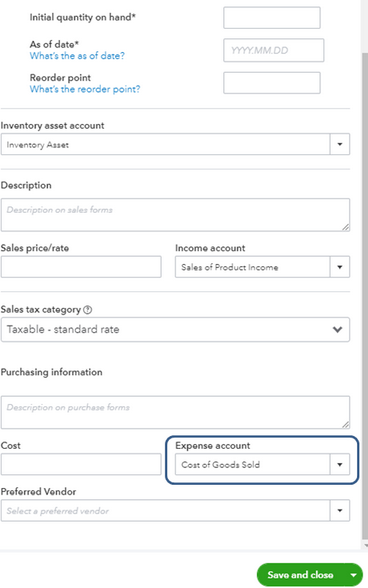
If you’re trying to set up a COGS account for an inventory item, then you can add it under the Expense account.
For this, do the following:
Step 1: Select Products and Services
Navigate to Sales and then click on Products and Services.
Step 2: Enter Product/Service information
Press New and select your preferred Product/Service information.
Step 3: Fill out the necessary details
Type the necessary information and make sure to choose COGS under the Expense account.
Step 4: Finishing up
Hit the Save and Close tabs.
To calculate the Cost of Goods Sold (COGS) from an income statement, adhere to the steps listed below:
COGS= Beginning Inventory + Purchases − Ending Inventory

This method gives you the COGS for the period, reflecting the direct costs of goods that were sold.
Every business that sells products, and some that sell services, must record the cost of goods sold for tax purposes. The calculation of COGS is the same for all these businesses, even if the methods for determining cost (FIFO, LIFO, or average costing method) are totally different from one another. Businesses may have to file records of COGS separately, depending on their business license.
COGS may be recorded on other tax forms for gross profit calculations, too. For partnerships and multiple-member LLCs, record COGS under Income for Form 1065 (partnership tax return). Corporations may record COGS under Income on Form 1120. S corporations may record COGS under Income on Form 1120-S.
Yes, there is a tax deduction for the cost of goods sold. This deduction is available for businesses that produce or purchase goods for sale. The COGS is deducted from your business revenue to calculate the gross profit, which is then used to determine taxable income.
This deduction is typically reported on IRS Form 1040, Schedule C for sole proprietors and single-member LLCs, where it is specifically accounted for in the section detailing income and expenses.
For other business structures, the deduction still applies but might be reported in different forms corresponding to their tax filing requirements. The IRS guidelines on COGS allow businesses to add the cost of products or raw materials, direct labor costs involved in production, and factory overhead in their calculations.
The IRS (Internal Revenue Service) requires businesses that produce, purchase or sell merchandise for income to calculate the cost of their Inventory. Depending on the business’s size, type of business license, and inventory valuation, the IRS may implement a specific inventory costing method. However, once a business chooses a costing method, it should remain consistent with that method year over year. Consistency helps businesses stay compliant with generally accepted accounting principles (GAAP).
The IRS explains costing methods in Publication 538. If an item has an easily identifiable cost, the business may use the average costing method. However, the cost of some items may not be easily identified or may be too closely intermingled, such as when making bulk batches of items. In such cases, the IRS recommends either FIFO or LIFO costing methods.
To determine the average cost of an item, use the following formula:
Avg cost per unit = Total cost of goods purchased or produced in period Number of items purchased or produced in period.
In simple words, divide the total cost of goods purchased in a year by the total number of items purchased in the same year.
FIFO and LIFO inventory valuations differ because each method makes a different assumption about the units sold. To understand the FIFO and LIFO flow of Inventory, you need to visualize inventory items sitting on the shelf, each with a cost assigned to it.
The price of items often fluctuates over time due to market value or availability. Inflation causes prices to increase over time, and this discussion assumes that inventory items purchased first are less expensive than more recent purchases. Since the economy has some level of inflation in most years, prices increase from one year to the next.
The first in, first out (FIFO) costing method assumes two things:
The LIFO method will have the opposite effect as FIFO during times of inflation. Items made last cost more than the first items made because inflation causes prices to increase over time. The LIFO method assumes higher-cost items (items made last) sell first. Thus, the business’s cost of goods sold calculation will be higher because the products cost more to make. LIFO also assumes a lower profit margin on sold items and a lower net income for Inventory.
The last in, first out (LIFO) costing method assumes two things:
The IRS notes the LIFO method has complex rules and requires the completion of Form 970. You only need to file this form with your yearly taxes the first year you use LIFO costing. Two LIFO rules highlighted in IRS Publication 538 are “dollar-value methodology” and “simplified dollar-value methodology.”
Finally, the difference between FIFO and LIFO costs is due to timing. When all inventory items are sold, the total cost of goods sold is the same, regardless of the valuation method you choose in a particular accounting period.
COGS is a financial metric used by companies to determine the direct costs associated with the production of the goods they sell. However, it has certain limitations as compared to more comprehensive cost accounting methods.
Let’s have a look:
COGS includes only the direct costs of producing goods, such as raw materials and direct labor. This focus excludes indirect costs like overhead, administrative expenses, and marketing costs.
Since COGS does not account for all operating expenses, the gross profit (revenue minus COGS) might give an inflated view of overall profitability. Without considering expenses like marketing, R&D, and administration, businesses might not have an accurate measure of how profitable their operations truly are.
COGS can vary significantly from one period to another due to changes in raw material costs, manufacturing efficiency, and production volume. Such fluctuations make it difficult to predict future financial planning, leading to challenges in budgeting and forecasting.
Operational costs such as marketing, sales force expenses, and after-sales support are not included in COGS. These costs can be substantial and are vital for managing sales and the product’s market position. By not including these costs, COGS overlooks essential aspects of the total cost of delivering a product to market.
In service-oriented businesses, where direct costs of services (like labor) may not be as clearly definable as in manufacturing, COGS becomes a less valuable metric. In such cases, comprehensive cost accounting methods that can allocate overhead and administrative costs are usually more accurate and more informative.
Recording COGS in QuickBooks isn’t just about entering numbers—it’s about maintaining financial precision, reducing tax errors, and optimizing decision-making. In this section, we break down 5 critical angles that often go unnoticed but directly affect your COGS accuracy. From financial analysis to reconciliation techniques, these advanced insights will help you avoid costly mistakes and build a reporting system that’s both scalable and audit-ready.
COGS directly impacts 3 core reports in QuickBooks — the Profit and Loss statement, Balance Sheet, and Inventory Valuation Summary. A change in COGS alters your gross profit margins, affects tax liability, and shifts net income, which are all key for business analysis. Inaccurate COGS skews at least 4 financial ratios: gross margin, net profit margin, inventory turnover, and return on sales. QuickBooks uses your COGS entries to calculate monthly profitability trends, track cost efficiency, and guide pricing decisions. If your COGS is off by even 5%, it can distort your financial reporting by 10–20%, making timely and accurate entries essential.
Product-based businesses in QuickBooks track COGS through Inventory Parts, using purchase cost, sales quantity, and inventory adjustments—all auto-linked to financial reports. In contrast, service-based businesses calculate COGS using service items, billable labor hours, and direct material costs, which must be manually assigned to jobs. Product businesses deal with restocking, asset depreciation, and FIFO or LIFO adjustments, while service firms manage labor efficiency, job costing, and time tracking integration. At least 3 workflows differ: item setup, expense allocation, and COGS account mapping. Misalignment in either model causes reporting errors in 2 key areas—gross profit and expense breakdown.
Many businesses make at least 5 frequent mistakes while recording COGS in QuickBooks: using the wrong expense account, skipping inventory setup, misclassifying non-COGS items, not matching invoices to sales, and forgetting adjustments for damaged goods. These errors affect 3 critical outputs—COGS total, gross profit, and inventory balance. Misreporting COGS by even $1,000 can impact tax filings by over $200–$300 depending on your tax rate. Businesses often overlook COGS in service items, leading to underreported costs. Incorrect account mapping results in imbalanced journal entries and flawed financial reports. Prevent these by reviewing COGS entries monthly, reconciling Inventory, and training your team.
To reconcile COGS with inventory reports in QuickBooks, match 3 core figures: COGS total from the Profit & Loss report, Inventory Asset value from the Balance Sheet, and Inventory Valuation Summary. Discrepancies often come from manual adjustments, missing item mappings, or negative inventory entries. Run reports for the same date range, and verify at least 2 filters—item type and transaction source. If COGS doesn’t match inventory movement, check for unlinked purchase orders, zero-cost items, or duplicate entries. Perform monthly reconciliation to avoid reporting gaps, tax miscalculations, and ensure your stock flow matches your expense tracking precisely.
To maintain accurate COGS in QuickBooks, follow these 5 best practices: (1) Use proper item types—Inventory for products, Service for labor, (2) Always map items to a COGS account, (3) Update inventory counts monthly, (4) Reconcile reports quarterly, and (5) Audit all purchase entries for accuracy. Automate recurring purchases using memorized transactions and validate pricing every 30–60 days. Regular reviews catch cost spikes, missing links, and unassigned expenses, which typically affect over 20% of inaccurate COGS reports. Train your staff on correct workflows, and ensure COGS vs Inventory Asset accounts are monitored side-by-side to avoid misstatements.
Beyond basic COGS tracking, businesses need to manage deeper operational variables that affect accuracy, compliance, and long-term profitability. This section uncovers 5 high-impact areas that support better COGS handling in QuickBooks—from audit trails and system integrations to seasonal inventory shifts and budgeting alignment. These insights aren’t just supplementary—they’re strategic tools to help you avoid financial blind spots and build a robust, error-resistant accounting workflow.
Audit trails in QuickBooks help verify COGS by tracking 3 key elements—user activity, transaction history, and modification timestamps. Every time a COGS-related entry is added, edited, or deleted, the audit trail records the exact user, time, and change made. This is crucial during audits, especially when adjustments exceed 5% of reported COGS. Reviewing audit trails monthly helps detect unauthorized edits, duplicate entries, and mapping errors. For businesses with multiple users, enabling role-based access control limits COGS manipulation. The audit log ensures data transparency, supports financial integrity, and protects against internal errors or fraud tied to inventory and expense entries.
Integrating third-party tools with QuickBooks enhances COGS accuracy by automating inventory syncing, real-time purchase tracking, and cost allocation. Tools like SOS Inventory, TradeGecko (QuickBooks Commerce), and Fishbowl sync data across sales, purchases, and stock in real time. This reduces manual entry errors by up to 70%, improves stock valuation accuracy by 30%, and ensures faster COGS updates. These tools support multi-location inventory, batch costing, and barcode scanning, which QuickBooks alone doesn’t handle efficiently. Integration ensures COGS entries reflect actual activity, not estimates, and provides clean, audit-ready data that aligns with both tax compliance and operational insights.
Seasonal inventory changes affect COGS accuracy by creating 3 major fluctuations: purchase volume spikes, cost variation, and inventory rollover errors. If inventory increases by 50% in peak season but COGS tracking isn’t adjusted, profit margins can be misreported by 20–30%. QuickBooks users must align COGS entries with seasonal stock updates, discounted bulk purchases, and return rates. Failing to adjust for off-season shrinkage or overstocking skews both inventory valuation and cost reporting. Use historical trends, update stock counts monthly, and enable alerts for rapid movement items to maintain accurate COGS during seasonal highs and lows.
Internal controls help prevent COGS errors by enforcing 3 safeguards: user access restrictions, multi-level approvals, and monthly transaction reviews. In QuickBooks, limit COGS account access to authorized roles only, which reduces manipulation risks by over 60%. Use audit logs to monitor changes, and require dual approvals for high-value inventory purchases. Set up alerts for negative inventory entries and incorrect item mappings—these are top causes of COGS misstatements. With monthly review checkpoints, you can catch anomalies early, maintain data accuracy, and ensure that every expense linked to COGS is properly classified and backed by documentation.
COGS directly influences 3 major cash flow areas: vendor payments, inventory holding costs, and pricing decisions. If COGS rises by even 10%, cash reserves can drop sharply due to higher procurement and production expenses. In QuickBooks, tracking COGS monthly helps forecast real-time cash outflow, adjust budget allocations, and identify low-margin products. Small businesses often fail to connect fluctuating COGS with seasonal demand or bulk purchase timing, leading to budget overruns. Analyzing COGS trends lets you plan smarter restocking, negotiate better pricing, and allocate funds more effectively—ultimately improving cash flow stability and long-term sustainability.
Calculating and recording COGS in QuickBooks throughout the year can help you determine your net income, expenses, and Inventory. When tax season rolls around, having accurate records of COGS lets you and your accountant file your taxes properly. The term COGS better evaluates how efficient a company is in managing its labor and supplies in the production process, keeping in-check its financial status, performance, and profitability.
The core difference lies in the purpose of the cost:
Tax Compliance: Correct classification is critical because the Internal Revenue Service (IRS) requires only costs related to producing or acquiring the goods sold to be included in COGS. Incorrect reporting—such as misclassifying OpEx as COGS distorts both the Gross Profit and the final taxable income, potentially leading to audit scrutiny, penalties, and interest charges.
Linking an inventory item to both accounts is essential because QuickBooks uses the double-entry accounting system to track the life cycle of the item:
This ensures that the expense of the goods is recorded in the same period as the revenue generated from their sale. Failure to link to the COGS account means the expense is never recorded, leading to an overstated gross profit and an inaccurate tax liability.
The difference lies in the assumption of the inventory flow for calculation:
Tax Preference: During periods of sustained inflation, businesses often prefer LIFO for tax purposes because the higher COGS leads to a lower taxable income. However, the IRS requires a business to file Form 970 to adopt LIFO, and LIFO is not permitted under International Financial Reporting Standards (IFRS).
A hybrid business must separate its costs into two distinct categories for accurate financial reporting:
The formula for the Cost of Services for the service component is:
This separation is necessary because the tangible goods’ costs flow through inventory asset accounts, while the service costs (primarily labor) are often expensed directly, ensuring that the gross profit margin for both the product and the service is accurately reflected.
Reconciliation errors between the Profit and Loss Report (COGS) and the Balance Sheet (Inventory Asset) usually stem from manual interference or incorrect setup:
Accurate COGS is the essential numerator in the Inventory Turnover Ratio, which measures how efficiently a company manages its stock:
A misstated COGS figure (too high or too low) directly results in an inaccurate ratio, skewing operational analysis.
Management uses this ratio to make vital decisions on ordering, storage, and pricing.
The IRS’s Uniform Capitalization (UNICAP) Rules under Internal Revenue Code Section 263A require manufacturers, certain wholesalers, and retailers to capitalize a proper share of certain indirect costs into the cost of their inventory, rather than immediately deducting them as operating expenses.
These costs are capitalized and become part of the Inventory Asset value until the goods are sold, at which point they flow into COGS. Examples of costs frequently required to be capitalized include: