Excerpt:
Accurately recording K-1 income, which represents a share of profits or losses from pass-through entities like partnerships or S-Corporations, is essential for maintaining financial compliance and avoiding tax penalties. This expert guidance provides distinct, verified steps for both QuickBooks Desktop and Online, starting with the critical need to set up a dedicated "Other Income" account to correctly segregate K-1 funds from regular business revenue. Beyond simple data entry, the content emphasizes high-level financial practices necessary for audit preparedness, including the regular reconciliation of the K-1 income account to verify deposits against the official tax form and the use of Class Tracking to separate income from multiple entities. By advising users to consult a CPA for complex tax classifications (e.g., passive vs. active income) and detailing solutions for common errors like unverified entries or failing to record tax assessments, the workflow ensures the financial records align perfectly with IRS compliance standards.
 Add As A Preferred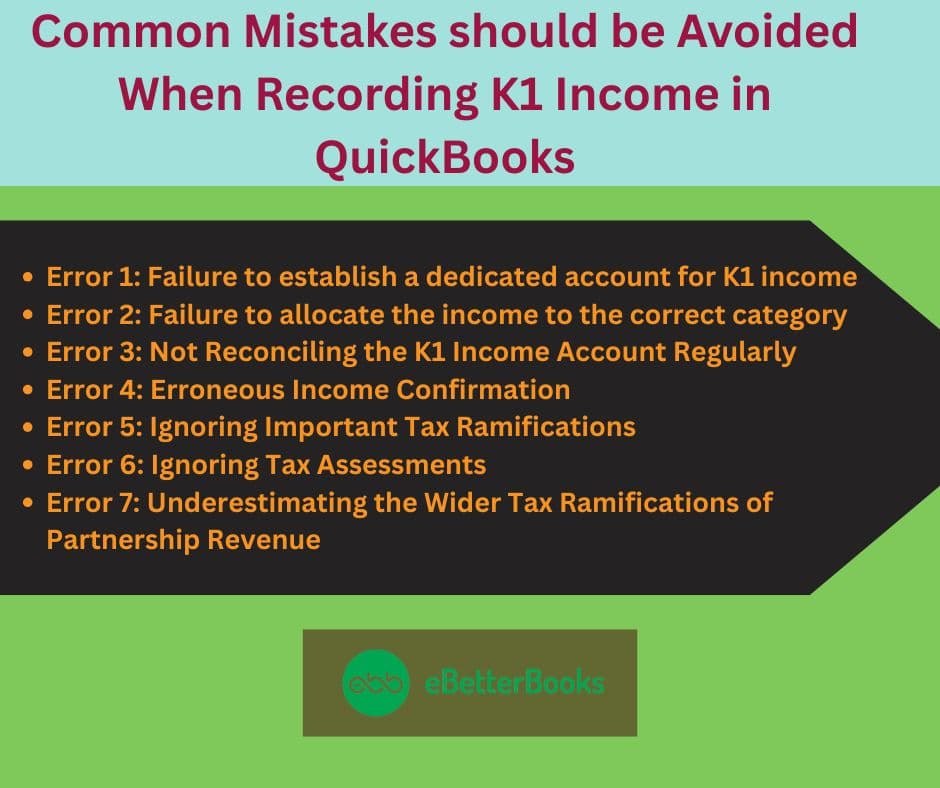
Highlights (Key Facts & Solutions)
Overview
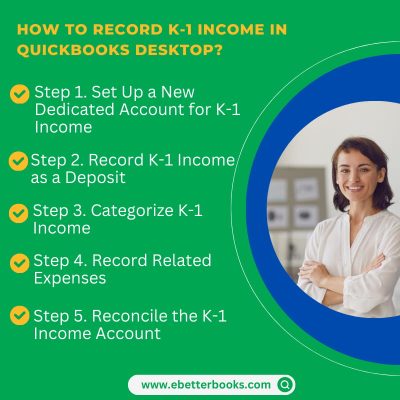
To record K-1 Income in QuickBooks (both Desktop and Online), create a separate account ( dedicated to K-1 income), then mention the income as a deposit, categorize the K-1 income, record the related expenses and reconcile the account.
K-1 income refers to the share of income, losses, deductions, and credits that a partner, shareholder, or beneficiary receives from a pass-through entity. K-1 income is issued to particular tax implications, which vary based on the type of partnership and its tax filing.
The income reported on a K-1 is generally subject to individual income tax rates rather than corporate tax rates, making it essential for partners and shareholders to accurately report this information on their tax filings.
Recording K-1 income in QuickBooks(both Desktop and Online), is essential for accurate financial records and IRS compliance. It saves time, reduces errors, and leads to a smoother tax reporting process while minimizing the risk of penalties or audits.
Recording K-1 income in QuickBooks Desktop is used to track all income distributions received from Partnerships, S-corporations, or Trusts.
There are three primary types of K-1 forms:
It involves setting up accounts, categorizing income and expenses, and reconciling financial records for accurate tax and financial reporting.
Step by Step to record K-1 Income in QuickBooks Desktop
Note: Ensure proper categorization for compliance with financial and tax reporting standards.
Enter the K-1 income as a deposit under the newly created account.
Here is how:
Note: QuickBooks provides tools through which you can categorize and track capital gains and losses accurately.
Regularly reconcile the account to ensure financial accuracy and compliance.
Here is how to do it:
Note: Verify the figure twice against the information on Schedule K-1 to address discrepancies and maintain consistency.
Important Note: At this moment, QuickBooks Online does not support processing Schedule K1. However, you have the option to download the form directly from the IRS official website. After that, run the financial report in your account and utilize the information to manually process the form.
To record K-1 income in QuickBooks Online, create a “K-1 Income” account in the Chart of Accounts. Then, record the income via a bank deposit, and verify it using a Profit and Loss report.
Step by Step to record K-1 Income in QuickBooks Online
Start by signing in to QuickBooks Online and select the company where you need to record K-1 income.
After that follow the below steps:
When recording K1 income in QuickBooks, avoid common errors such as incorrect income confirmation, failing to establish a dedicated account for K-1 income, overlooking critical tax implications, neglecting tax assessments, allocating wrong income to wrong category, and underestimating the broader tax consequences of partnership income.
Failing to accurately verify K1 income can lead to discrepancies in financial records, potentially triggering audits or tax penalties. Overlooking tax implications can result in underpayment or overpayment of taxes, causing financial strain and possible legal issues. Refrain from paying tax assessments to avoid unexpected tax bills or missed opportunities for deductions. Being mindful of these factors ensures accurate recording and reporting of K1 income in QuickBooks.
Mistake: Not having a separate account for K-1 income can create challenges in tracking income and meeting tax obligations, which may lead to revenue discrepancies, reduced financial transparency, incorrect tax liabilities, and missed tax adjustments, resulting in penalties and complicating finances.
Solution: If you failed to establish a dedicated account for K1 income, then, go to the Lists menu and select Chart of Accounts. Click the Account button and choose New. Select the account type (Income or Other Income), name it (e.g., “K-1 Income”), add a description if needed, and save. This will help you track this income source clearly.
Mistake: Assigning K1 income to the wrong category can lead to errors during tax preparation, difficulties reconciling income, limitations with tax software, and potential inaccuracies in tax reporting tools within QuickBooks. This misclassification may result in underreporting or overreporting earnings, complicating financial accuracy and increasing audit risks.
Solution: If you have allocated the wrong income to the correct category, Go to the “Chart of Accounts” in QuickBooks. Create or edit income accounts to match the income types from your K-1. For non-standard income, use a sub-account under “Other Income” for better tracking. Make sure each income type has a corresponding account.
Mistake: Neglecting regular reconciliation of the K1 income account in QuickBooks can cause inaccuracies in financial records and complicate tax accounting. This oversight affects accurate assessment of the partnership’s finances, disrupts income and deduction allocations, and can result in delays and errors in tax filings, impacting compliance and overall financial health.
Solution: To keep your K-1 income updated, reconcile it quarterly or monthly by going to the Banking menu and selecting “Reconcile.” Choose the K-1 income account, compare transactions, and correct any discrepancies like unrecorded income or missed expenses. Once everything matches, complete the reconciliation.
Mistake: Sometimes, businesses enter K-1 income without verifying it against the official Schedule K-1 received, which leads to understatement, overstating of income, reconciliation issues with the IRS, misalignment with tax returns, etc
Solution: S-corp and partnership produce a Schedule K-1, so make sure to double-check the K-1 form from S-corp or partnership and then enter the correct amount into the account. Only enter those records that have been confirmed and verified.
Mistake: If you fail to understand the tax implications of K-1 income, such as passive vs. active treatment of income and employment tax, then it can lead to errors in reporting and unexpected liabilities.
Solution: When recording K-1 income in QuickBooks, use designated accounts like “K-1 Other Income” and add notes for clarity. Consult a CPA to determine if the income is subject to self-employment tax, how to apply losses, and its impact on estimated taxes. T
Mistake: Sometimes, businesses forget to enter or track tax payments or assessments related to K-1 income, creating gaps in expense tracking and misrepresenting net profit.
Solution: Record all tax assessments or payments related to K-1 income under “Tax Expense” or a custom category in QuickBooks, like “K-1 Related Tax Adjustment.” Use Journal Entries for prior-year adjustments, including clear memos with dates and references, to maintain an accurate audit trail and net income reporting.
Mistake: Many users overlook the ripple effects of K-1 income, which can include phase-outs for tax credits, increased exposure to the Alternative Minimum Tax (AMT), or impacts on multiple entities. Recording this income in isolation without understanding its broader implications for the overall tax situation can lead to flawed planning and reporting.
Solution: In QuickBooks, categorize K-1 Inc.” me using class tracking or”memo fields (e.g., passive, rental, guaranteed payments) to help your tax professional assess its implications. Pair K-1 entries with reports like Profit & Loss by Class to see how this income impacts your overall finances and tax position.
Recording K-1 income in QuickBooks offers several advantages for individuals and businesses:
Beyond recording K1 income, QuickBooks offers features like comprehensive general ledger management, tax code integration, and simplified income statement generation for partnership income. Users can create detailed, customizable ledger entries for accurate financial tracking and reporting. The integration of specific tax codes streamlines the allocation of income, expenses, and deductions, making tax reporting less complex. QuickBooks also generates tailored income statements, providing a clear overview of financial performance. These features collectively aid in informed decision-making for managing partnership income.
Using QuickBooks to track expenses and income by class enhances financial planning, informed tax advice, accurate tax liability assessment, and proper segmentation of tax-exempt income within a partnership. This feature provides businesses with a clearer understanding of their financial status, aiding in cost-saving and revenue generation.
Categorizing income and expenses by class simplifies the analysis of different revenue streams’ impacts on overall financial health. Accurate tax liability accounting and segregation of tax-exempt income ensure compliance with tax regulations.
QuickBooks generates comprehensive reports tailored for K1 income, enabling seamless income tracking, meticulous tax record management, and streamlined income tax filing for partnerships. These reports provide a clear overview of the partnership’s financial health, ensuring accurate K1 income recording.
By integrating relevant tax records, users gain insights into tax implications, aiding in informed tax planning and compliance. This consolidation simplifies tax return preparation, reducing complexities associated with income tax filing.
Automating K1 income transactions in QuickBooks streamlines financial management, ensures tax compliance, meets filing deadlines, and provides accurate documentation for recordkeeping. This reduces human error, simplifies organizing and categorizing income and expenses, and creates a solid foundation for tax compliance.
It also allows businesses to manage cash flow and allocate resources strategically and proactively. Automation frees up time for financial professionals to focus on higher-value tasks, enhancing overall financial management efficiency.
To enter other income (loss) that flows to Schedule K or Schedule K-1 in QuickBooks, follow these steps:
For Partnership Schedule K-1
For Other Deductions and Income
Understanding how to record K-1 income in QuickBooks goes beyond basic data entry. The following advanced subtopics explore essential yet often overlooked aspects that impact accuracy, compliance, and tax efficiency. From distinguishing K-1 income from traditional business revenue to managing amended forms and tax implications, each section is crafted to deliver actionable insights. These five focused areas help users prevent costly mistakes, improve record-keeping, and ensure alignment with IRS standards—turning QuickBooks into a powerful tool for managing partnership income with confidence.
K-1 income differs in 3 core ways: source, tax treatment, and tracking method. Unlike traditional business income, K-1 income originates from pass-through entities like partnerships or S-corps—there’s no payroll, just allocated profit shares. Second, it’s taxed at the individual level, not corporate, affecting personal returns directly. Third, K-1 entries require specific categorization (dividends, interest, capital gains), unlike general sales income. In QuickBooks, this means setting up separate income accounts, reconciling with official forms, and ensuring alignment with IRS codes—something not required for regular revenue. Ignoring these differences can lead to 4 major issues: misreporting, penalties, audits, and tax mismatches.
Verifying your K-1 form before entry prevents 3 major problems: incorrect tax filing, misclassified income, and audit risks. Each K-1 line—dividends, capital gains, interest—maps to a specific QuickBooks account, so even a $10 error can misstate profit margins. 70% of K-1-related issues stem from manual entry without verification. Cross-checking ensures amounts, codes, and ownership percentages align with IRS Form 1065, 1120S, or 1041. This step takes less than 15 minutes but avoids weeks of reconciliation later. Accuracy at this stage improves year-end financials, reduces CPA correction fees, and strengthens audit defense. Always double-check before hitting “Save.”
K-1 income directly affects your estimated quarterly tax obligations in 3 key ways: unpredictability, pass-through taxation, and variable income timing. Since K-1 income isn’t withheld like wages, 100% of the tax burden shifts to the individual. Even $5,000 in unexpected K-1 earnings can trigger underpayment penalties if not reported in quarterly estimates. IRS safe harbor rules require 90% accuracy or matching 100% of last year’s liability—missing this with K-1 fluctuations leads to fines. Use QuickBooks reports to forecast K-1 income, update Form 1040-ES estimates, and avoid surprises. Recalculate every quarter if distributions vary.
An accountant adds 3 layers of protection when reviewing K-1 entries: tax code accuracy, category validation, and audit preparedness. 80% of small businesses misclassify at least one K-1 income type—interest, capital gains, or passive income. A CPA ensures each line aligns with IRS standards, QuickBooks categories, and state-specific rules. They also verify matching amounts between K-1 forms and QuickBooks deposits, preventing discrepancies that lead to IRS flags. Quarterly reviews reduce tax-season corrections by 65% and improve estimated tax planning. In complex cases—multi-entity income or amended K-1s—professional oversight becomes non-negotiable. Always consult before filing or reconciling.
Handling amended K-1s in QuickBooks requires 3 steps: locate original entries, adjust figures, and reclassify where needed. If an updated K-1 changes capital gains by even $1,000, failing to revise your QuickBooks records can trigger mismatches with IRS filings. First, identify affected accounts via audit trail or deposit history. Second, use “Edit Transaction” to correct amounts or memo references. Third, document changes with notes and attach the new K-1 as a file. 1 in 5 partnerships issues an amended K-1—missing them leads to inaccurate tax returns and potential penalties. Always reconcile post-adjustment and inform your CPA immediately.
While recording K-1 income accurately is essential, maximizing efficiency and avoiding long-term errors requires deeper operational strategies. This supplementary section explores five advanced practices that support and enhance the K-1 income management process in QuickBooks. From year-end reviews and report generation to team training and software integration, each topic focuses on minimizing mistakes, improving compliance, and streamlining collaboration. These actionable insights help business owners, accountants, and finance teams maintain accurate records, reduce audit risk, and improve tax readiness—turning routine bookkeeping into a strategic advantage.
A year-end review of K-1 income in QuickBooks should focus on 3 priorities: account accuracy, tax alignment, and documentation. Start by reconciling all K-1 income entries against official forms—mismatches over $500 often lead to tax filing delays. Next, verify each income type is correctly categorized (e.g., passive, portfolio, or ordinary income). Use QuickBooks reports to compare distributions with prior-year figures; a 10–15% variation may signal an error or amendment. Finally, attach all K-1 forms to relevant entries and include CPA notes for audit clarity. This review improves filing accuracy by up to 90% and reduces compliance risks.
After recording K-1 income, generate 3 essential QuickBooks reports: Profit and Loss by Class, Income by Account, and Transaction Detail by Account. These reports help detect misclassifications, missing entries, and income discrepancies. For example, the P&L by Class can reveal passive vs. active income splits—critical for tax planning. Income by Account shows if K-1 earnings were routed to the right categories, reducing audit flags by 60%. Transaction Detail helps verify exact dates, memos, and K-1 form references. Running these monthly or quarterly ensures real-time accuracy and simplifies year-end filing. Always export and archive these reports for CPA review.
Integrating QuickBooks with tax software improves K-1 income accuracy, saves time, and reduces manual errors by over 75%. Tools like Intuit ProConnect, Drake Tax, or TurboTax Business allow seamless data import of categorized K-1 entries from QuickBooks. This reduces duplicate entry, ensures income alignment across systems, and supports real-time tax calculations. For example, importing $25,000 of K-1 capital gains directly avoids reconciliation mismatches on Schedule E. QuickBooks’ mapping tools help match income codes with tax software fields, minimizing rework. Integration also enables cross-year tracking of carryovers, losses, and adjustments. Always test imports before filing to avoid syncing issues.
Class and location tracking in QuickBooks helps separate K-1 income across multiple entities, improving clarity, compliance, and financial analysis. Assign each partnership or S-corp a unique class or location—this allows you to track $10,000 from Entity A and $7,500 from Entity B without confusion. It simplifies Schedule K-1 reconciliation and helps identify which income is passive, active, or rental-based. Monthly P&L by Class reports show exact earnings and expenses per source. This method reduces misallocation errors by 65% and supports better forecasting. Always name classes clearly (e.g., “ABC LLC – Passive”) to maintain audit-ready records.
Training your team on K-1 income requires 3 focus areas: form interpretation, QuickBooks categorization, and error prevention. Begin with short sessions on reading Forms 1065, 1120S, and 1041—understanding these improves data accuracy by 70%. Then, teach them to create dedicated income accounts, assign correct classes, and record deposits with memo references. Use real K-1 examples during training to build practical skills. Finally, set up review checklists to catch errors before posting. A well-trained staff reduces entry mistakes by 50%, speeds up reconciliation, and ensures clean finances. Reinforce learning quarterly to adapt to updated tax rules or QuickBooks features.
Managing K1 income is essential for both businesses and individuals. Accurately recording K-1 income in QuickBooks Desktop and Online is vital for maintaining financial records and meeting tax obligations. QuickBooks provides an efficient and accurate method of recording K1 income, streamlining financial management. By following the specific steps for each version, users can effectively input K-1 distributions, improving the tracking of partnership income and losses.
The choice of account type is critical for maintaining accurate financial records and adhering to tax best practices, as K-1 income is fundamentally different from regular business revenue.
Failing to regularly reconcile the K-1 income account in QuickBooks is a critical mistake that can lead to major financial and compliance issues that may be difficult to fix during tax season.
The fundamental difference lies in the level of tax integration and automated form generation supported by each platform.
Class Tracking is a powerful internal feature in both QuickBooks Desktop and Online that allows you to tag transactions based on different segments or projects, which is ideal for isolating income from various K-1 sources.
Using Class Tracking enhances management in these ways:
Entering K-1 income before meticulously verifying it against the final, official Schedule K-1 form is a major cause of financial and tax discrepancies.
The consequences include:
Tax assessments, estimated payments, or state-level entity taxes related to K-1 income must be recorded immediately to maintain an accurate net profit and audit trail.
An accountant is indispensable in the K-1 process, acting as a crucial second layer of verification that ensures your QuickBooks entries are compliant with complex tax codes.
An accountant improves audit preparedness by:


