Excerpt:
QuickBooks Desktop may prompt unexpected logouts due to file corruption, background updates, remote access conflicts, or permission issues. This article helps users identify the root cause—like system backups or session overlaps—and guides them through targeted fixes such as verifying data, checking background processes, and adjusting user settings. It directly addresses the concern of data safety and offers clear steps to restore session stability and prevent future interruptions.
 Add As A Preferred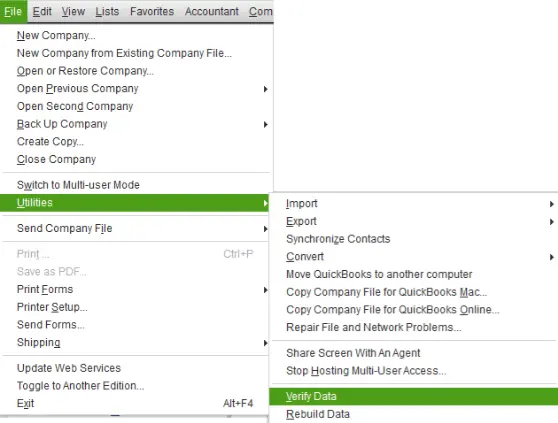
“I’m Cheryl Powell, and I ran into something strange in QuickBooks Desktop this week that I’ve never seen before. I was working on some bank reconciliations and had a couple of reports open when suddenly a pop-up appeared asking me to log out of the company file. It didn’t specify why, just a message saying that I needed to log out, and it caught me completely off guard.
I wasn’t doing anything out of the ordinary — no updates were running that I knew of, and I’m the primary admin on the account. What really concerned me was whether it was a system issue, a remote session kicking in, or some background maintenance from Intuit’s side. I also started wondering: is this a file corruption warning, a sign that someone else is trying to access the file, or just a standard prompt I somehow triggered by accident?
I ended up logging out to be safe, then logged back in after a few minutes and everything seemed fine — but it left me uneasy. I’m in a single-user setup right now, so I don’t think it was a multi-user access conflict. Has anyone else received a similar “Please log out” message in QuickBooks Desktop without any explanation? I’m curious if this is a security feature, a scheduled process, or something I need to investigate further — especially if it could affect the integrity of my data file.”
Hi Cheryl Powell,
You’re not the only one facing this unexpected situation. Many QuickBooks Desktop users report being prompted to log out of the company file without explanation, during tasks like bank reconciliation or report viewing. It often feels sudden and leaves users wondering what triggered the prompt, and whether their data is at risk.
You’ve likely followed the same steps most users take:
You might have several questions like:
This behaviour is more common than it appears and can occur from a range of technical triggers.
Let’s break down why this happens, how to resolve it, and what you need to know:
The “Please log out” message in QuickBooks Desktop typically occurs due to background activity, file inconsistencies, or session conflicts.
Here are the main causes and quick solutions to resolve them:
QuickBooks may request a log-out when it detects issues such as:
Use the built-in Verify and Rebuild Data utility:
System tasks, whether configured manually or initiated by Intuit, can temporarily restrict access to the company file:
Check your system for any scheduled operations:
Concurrent access through remote desktop tools or multi-user mode can result in forced logouts:
Certain actions within QuickBooks may inadvertently initiate a logout event:
To maintain file integrity, reduce access conflicts, and minimise disruptions, particularly in payroll or remote access situations, follow these tips to enhance session stability and limit unexpected logouts:
Yes. If third-party applications are configured to access your company file (e.g., data syncing tools, reporting add-ons, inventory systems), they may initiate actions that temporarily lock the file, prompting QuickBooks to request a log out to prevent data conflict.
No. Payroll schedules and direct deposit processing run independently of your current user session. However, if you are logged out during active payroll edits or while downloading tax table updates, those processes may fail or require restarting.
Yes. Recurring, unexplained log-out prompts could be a sign of deeper file damage, permission misconfiguration, or system-level interference. In such cases, contacting QuickBooks Desktop Support or running a detailed diagnostic through the Tool Hub is advisable.
Yes. Overly strict firewall or antivirus settings may block QuickBooks services (like QBDBMgrN or QuickBooks Update Agent), causing instability or forcing file access shutdowns. It’s important to whitelist QuickBooks processes in your security settings.


