 Add As A Preferred
QuickBooks Desktop Pro/Premier Payroll PIN Recovery and Reset procedures are essential for maintaining secure and uninterrupted payroll processing and direct deposit authorization. The process is critical for preventing compliance violations and employee payment delays that result from incorrect or forgotten credentials. Users can typically reset the Payroll PIN through the in-program account management portal by utilizing their existing PIN and Intuit Account credentials. If the original PIN is unavailable, a manual reset requires the submission of the Direct Deposit PIN Reset Form alongside the company’s Employer Identification Number (EIN) and the signing principal’s government identification. To ensure success, users must verify prerequisites such as Admin access to QuickBooks and an active payroll subscription. Adopting best practices, including regular PIN updates and limiting access to authorized personnel, is strongly recommended to prevent lockouts and security breaches.
Complete these preparatory actions to maintain continuity during the QuickBooks Desktop Pro/Premier Payroll PIN reset process. This section verifies administrative permissions, subscription status, system access, and identification documents to ensure that all prerequisite conditions are established before the Payroll PIN issue is addressed.
Recovering or resetting the QuickBooks Desktop Pro/Premier Payroll PIN requires a verified administrative session and an active payroll subscription to ensure secure credential replacement. This section outlines the authorized procedures that restore the Payroll PIN through system-based reset options and approved manual methods. Each procedure maintains compliance with Intuit’s authentication standards and reestablishes the credential used for direct deposit authorization and payroll transmission.
Reset the payroll PIN by using the Direct Deposit PIN reset form. This procedure applies when the reset within QuickBooks fails due to a lack of admin access or unsuccessful reset attempts.
| Note: This manual process is necessary when unable to reset the PIN in QuickBooks due to lost credentials or access problems. |
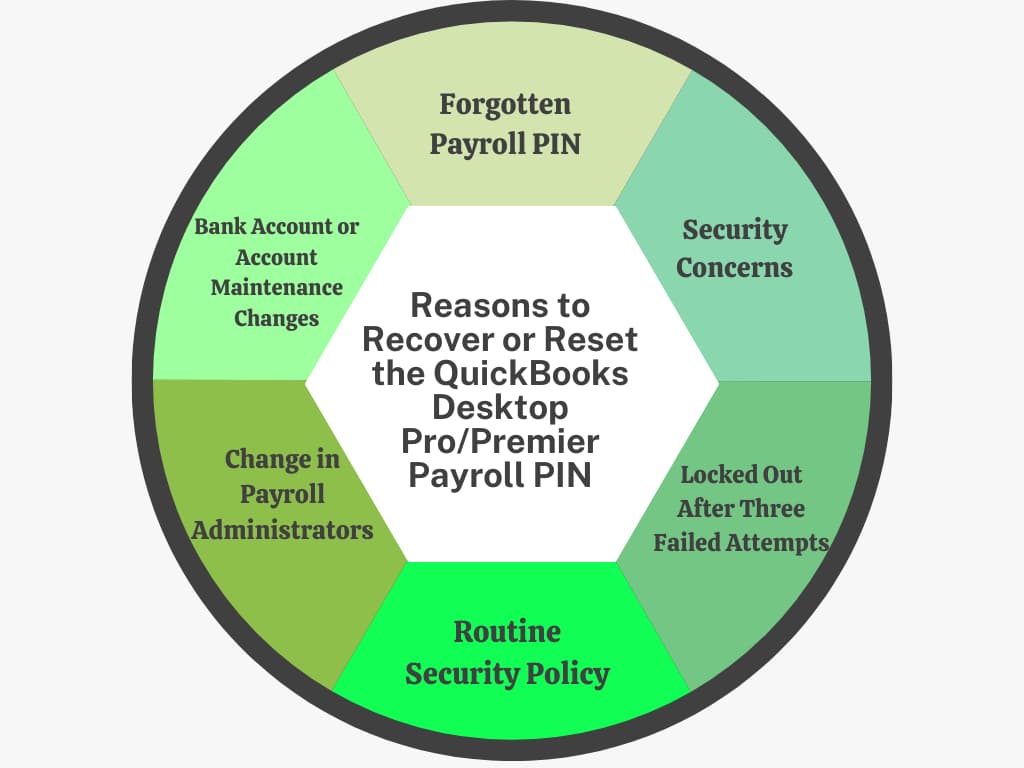
Recovering or resetting a Payroll PIN due to failed logins, administrator changes, and security updates is important for smooth payroll operations and financial data security.
Understanding these reasons helps users to prevent issues and ensures timely payroll and tax processing:
Following best practices for the QuickBooks Desktop Pro/Premier Payroll PIN helps prevent forgotten or incorrect credentials, ensures secure payroll access, maintains compliance with tax deadlines, and avoids disruptions in payroll processing.
QuickBooks Desktop Pro/Premier Payroll PIN reset process restores the authentication credentials needed for secure payroll submission and direct deposit authorization. This article explained the steps to check before resetting the Payroll PIN, how to update it using existing credentials, and how to recover it if the original is lost. It also covered the Direct Deposit PIN Reset Form and the key reasons that may require a reset. Following these steps ensures the Payroll PIN is restored securely and keeps payroll processing accurate and uninterrupted.
The QuickBooks Payroll PIN has strict security requirements to protect sensitive payroll data, often including:
➜It must be 8 to 12 characters in length.
➜It must contain a mix of letters and numbers.
➜Special characters (like !, @, #) are generally not allowed.
➜It cannot be sequential (e.g., 12345678) or repeating (e.g., 11111111).
The QuickBooks Payroll PIN is tied to the integrity and security of the entire company file and its payroll subscription. Intuit requires the Admin user to perform the PIN reset because:
➜The Admin user possesses the highest level of system privileges and control over the company file settings.
➜This requirement prevents unauthorized or lower-level users from compromising the payroll transmission credentials.
➜It ensures the person making changes has access to the Admin password, which is an essential step in verifying identity during the in-program reset process (Case 2, Method 1).
The Direct Deposit PIN Reset Form is a manual verification process necessary when the old PIN is forgotten or access is lost.
➜Processing Time: Intuit typically advises that the manual reset process takes 3 to 5 business days from the time they successfully receive the completed form and supporting identification documents.
➜Payroll Processing During Wait: No, you will likely be unable to send payroll data or direct deposits until the new PIN is issued and updated in your QuickBooks file, as the missing or locked PIN prevents secure transmission. It is crucial to submit the form immediately to avoid payroll delays.
While the core security principles are the same, the navigation paths differ slightly for the Assisted version because Intuit manages some aspects of the payroll data transmission.
Navigation Differences (Reset with Old PIN):
➜Enhanced: Employees > My Payroll Service > Account/Billing Information > Payroll Service PIN section.
➜Assisted: Employees > My Payroll Service > Billing/Bank Information > Service Information tab > Change next to My PIN.
Key Distinction: Assisted Payroll users may have more interaction with Intuit’s dedicated payroll team, especially for bank/billing changes, which affects where the PIN option is located within the service information menus.
To confirm the identity of the signing company principal and ensure the integrity of the payroll credentials, Intuit requires a copy of a valid, government-issued photo identification.
➜Commonly accepted forms of ID include:
➜A current Driver’s License.
➜A valid Passport.
➜A State-issued ID card.
No, unlike some other locked accounts, the QuickBooks Payroll PIN lockout is typically not timed and requires an action to resolve.
The Lockout: The service remains locked indefinitely after the three failed attempts to maintain security.
Resolution: You must use one of the two official reset methods:
➜Method 1: Use the Forgot your PIN? option when prompted for the PIN in the Send Payroll Data window (if you know the Admin password).
➜Method 2: Submit the Direct Deposit PIN Reset Form to Intuit (if the in-program reset fails or the old PIN is forgotten).
QuickBooks uses internal tracking and security certificates to link the payroll service to specific devices for secure transmission.
➜Security Certificates: When payroll is first set up, a secure certificate is installed on the computer to authenticate the device for communication with Intuit’s servers.
➜Troubleshooting: Using a previously authorized computer helps eliminate potential issues related to the security certificate or device verification, ensuring that the only variable being addressed is the PIN itself. It prevents system recognition errors from complicating the credential reset process.


