 Add As A Preferred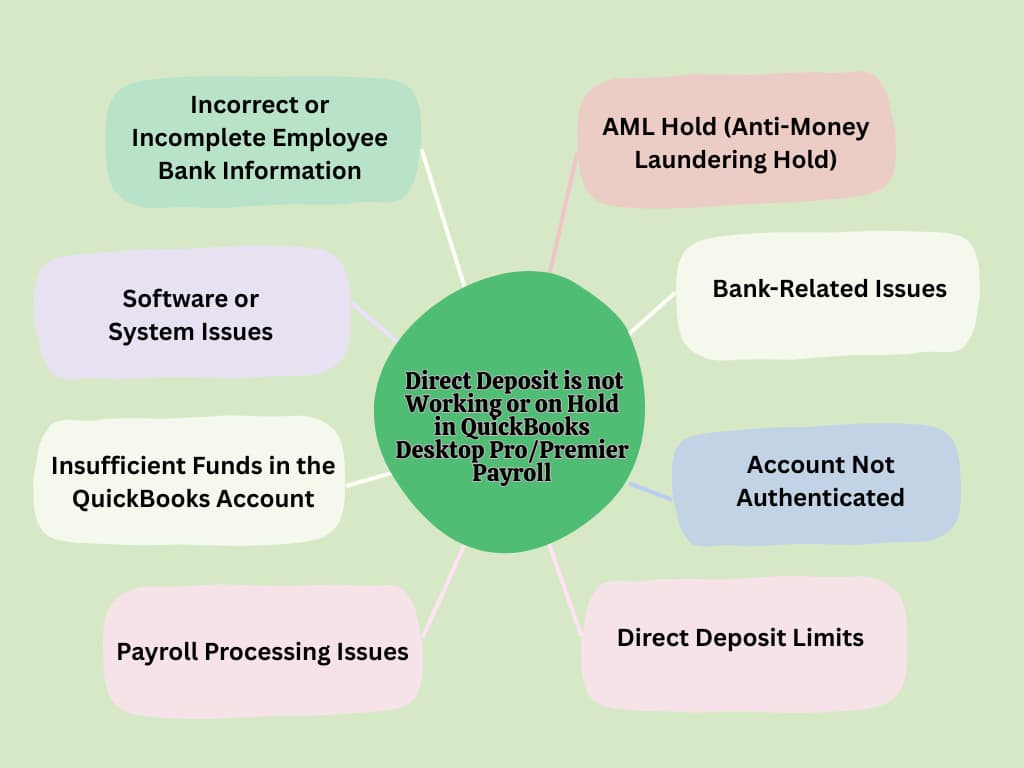
To fix direct deposit errors in QuickBooks Desktop Pro or Premier Payroll, update QuickBooks and the payroll tax table > check the employee’s bank details are accurate and authorized > run the Verify and Rebuild Data utilities to fix file issues.
Direct deposit errors in QuickBooks Desktop Pro/Premier occur due to inaccurate or incomplete employee bank information, insufficient funds, payroll processing issues, or direct deposit limits, which result in missed payroll, compliance risks, potential penalties for late payments, and significant operational inefficiencies.
Resolving these errors restores and simplifies payroll operations, ensures timely and accurate employee payments, reduces the risk of compliance violations, maintains employee trust, and streamlines financial management.
Use this section to quickly identify and fix direct deposit problems in QuickBooks Desktop Pro or Premier Payroll. Each entry connects a known failure like incorrect bank info, funding issues, or system limits to a clear and actionable fix.
| Problem | Fix |
|---|---|
| Incorrect routing or account numbers | In Payroll Setup, confirm bank name, routing number, and account number for every employee. One digit off will trigger a failure. |
| The Employee’s bank holds incoming payments | Ask the employee to contact their bank. Holds may apply to newly opened accounts or large deposits. |
| Intuit flags a transaction due to AML concerns | Contact QuickBooks Support to resolve anti-money laundering (AML) review holds. |
| Insufficient funds in the business account | Before processing payroll, confirm that the account balance covers net pay, taxes, and deductions. If not, direct deposit will be rejected. |
| Outdated QuickBooks or tax tables | Run Help > Update QuickBooks Desktop. Update tax tables under Employees > Get Payroll Updates. |
| Deposit limit exceeded | If the total payroll or per-employee deposit exceeds your Intuit-assigned cap, request a limit increase from QuickBooks Support. |
| Payroll processing errors or unposted transactions | Review payroll status. Recreate rejected payroll if needed and ensure there are no pending transactions. |
Direct deposit issues in QuickBooks Desktop Pro/Premier Payroll are caused by incorrect employee bank information, insufficient funds in the QuickBooks account, pay date timing, problems with the QuickBooks software or payroll tax tables, or exceeding direct deposit limits.
Below mentioned are the consequences of Direct Deposit Not Working or On Hold in QuickBooks Desktop Pro/Premier Payroll:
Direct deposit errors lead to late or missed payroll payments, which break federal and state labor laws. This can lead to fines, penalties, and lawsuits against the employer.
Failed direct deposits stop automated payments, which require employers to issue physical checks or use alternative methods. This disrupts scheduled payroll cycles and increases administrative workload.
Technical issues such as bank account verification failures or software glitches interrupt the payroll processing.
When there are not enough funds for direct deposits, it can cause payroll records to be unbalanced. Failed transactions might also lead to bank fees or the need for reprocessing.
Legacy payroll plans charge a $4 fee for each direct deposit attempt, successful or not. Failed deposits lead to lost fees and possible bank charges. Non-legacy plans have a monthly fee per employee that doesn’t change based on deposit success, but errors can still add costs.
Resolve direct deposit issues in QuickBooks Desktop Pro/Premier Payroll by addressing data errors, adjusting software settings, or verifying account setup. Follow these steps carefully to ensure payroll processes smoothly and to avoid future transaction failures.
Outdated software or payroll tax tables can lead to direct deposit errors. Updating QuickBooks Desktop and the payroll system fixes compatibility and compliance issues, resolving bugs related to missing features, outdated tax codes, or transmission failures.
Incorrect or incomplete employee banking details lead to deposit failures. Verify bank names, account numbers, and routing numbers to ensure QuickBooks processes payments correctly. Once the details are confirmed and the employee verifies a test deposit, direct deposits can continue without issue.
Note: In some cases, QuickBooks may initiate a small test deposit (less than $1.00) to the employee’s bank account for verification. The employee must confirm the test amount before the direct deposit is fully activated.
Running Verify Data helps you detect inconsistencies, and Rebuild Data repairs them by restoring the internal structure of your file. Once repaired, direct deposit processes resume without disruption from data errors.
Direct deposit errors frequently occur when the feature hasn’t been fully activated or when banking details were never properly linked.
Reconnecting your business account and completing activation ensures QuickBooks can securely transmit payroll funds. Once setup is verified and your account is authenticated, the direct deposit function will operate reliably for future payroll runs.
Missing the payroll submission cutoff time or attempting payroll without enough funds in the account are leading causes of direct deposit failures.
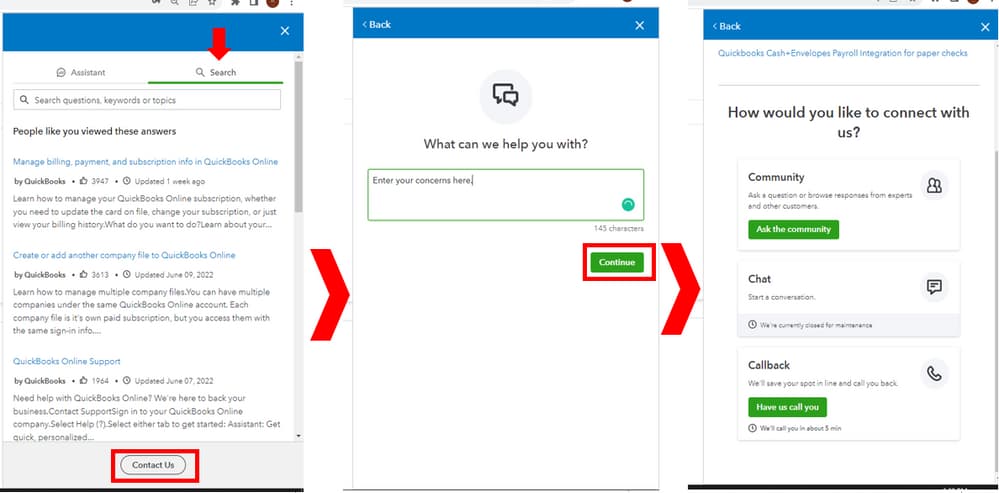
If errors persist, contact Intuit Payroll Support for assistance. Intuit Payroll support can identify hidden misconfigurations or system flags preventing direct deposit, ensuring payroll resumes without further error.
Avoiding direct deposit errors begins before you hit “Submit Payroll.” From verifying employee data to understanding submission windows, these essential pre-checks help you stay compliant, prevent costly delays, and ensure smooth employee payments. Use these targeted insights to fix errors before they happen—not after they disrupt your payroll cycle.
For full protection, activate MFA on both the admin and payroll roles, and avoid using shared login credentials across teams.
Direct deposit is vital, but errors and delays can disrupt your payroll. This guide covers key strategies to secure bank accounts, track payments, manage AML holds, and prepare backup plans. Implementing these practices helps you maintain trust, avoid compliance risks, and keep your payroll running smoothly—even when challenges arise.
Direct deposit failures in QuickBooks Desktop Pro/Premier Payroll typically are caused due to incorrect banking details, insufficient funds, outdated software, authentication issues, or system limitations.
These problems disrupt payroll processing, delay employee payments, and expose your business to compliance risks and financial discrepancies. By proactively updating software, verifying account information, and resolving file or processing errors, you restore full payroll functionality.
Resolving these issues ensures employees receive their pay on time, protects your business from legal issues, reduces operational problems, and ensures accurate financial records.
First, verify the employee’s bank information in QuickBooks for accuracy. Next, ensure sufficient funds are available in your company’s bank account. If these are correct, check for any holds with the bank or contact QuickBooks support for assistance. You may need to issue a manual check to the employee in the meantime.
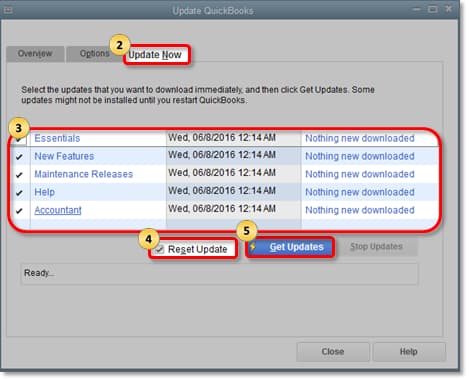
To update QuickBooks Desktop, go to Help > Update QuickBooks Desktop. Under the Update Now tab, select the updates you want to include and click Get Updates. Restart QuickBooks and install the updates when prompted. Keeping your software and tax tables updated helps prevent direct deposit errors.
Early warning signs include discrepancies in employee bank information such as incomplete or incorrect routing and account numbers, which QuickBooks flags during payroll setup. Insufficient funds in the business bank account prior to payroll submission often lead to rejected deposits, signaling financial readiness issues. Additionally, QuickBooks system notifications or alerts about failed or pending payroll actions can indicate underlying problems, allowing you to act before payments are delayed. Studies show that addressing these signs promptly can reduce direct deposit failures by up to 40%, preserving compliance and employee trust.
QuickBooks verifies bank account authenticity by requiring full authentication of the business’s linked bank account before enabling direct deposit services. This includes confirming routing and account numbers and may involve small test deposits to the employee’s bank account, which must be verified by the employee. Common pitfalls include incomplete or incorrect banking details, delays in employee confirmation of test deposits, and mismatches between business records and bank information, all of which can block payroll transactions. Research indicates that about 25% of direct deposit errors arise from such authentication issues, highlighting the need for thorough verification steps.
Yes, direct deposit errors significantly impact employee morale and trust as missed or delayed payments can create financial stress and dissatisfaction. Employees rely on timely and accurate payroll, and failures disrupt this expectation, potentially leading to decreased productivity and increased turnover. Studies reveal that 60% of employees consider payroll accuracy a top factor in job satisfaction, and consistent errors can harm employer reputation, making it critical for businesses to resolve direct deposit issues promptly.
Direct deposit holds triggered by AML reviews typically take 1 to 3 business days to resolve, depending on the complexity of the flagged transaction and responsiveness of the involved parties. QuickBooks works closely with financial institutions to verify suspicious activities, and delays beyond this timeframe may require additional documentation or intervention. Efficient resolution minimizes payroll disruptions, and studies show that prompt AML clearance can reduce payroll delays by up to 35%, helping maintain compliance and operational continuity.
Seasonal cash flow fluctuations can lead to insufficient funds in the business bank account, causing QuickBooks to reject direct deposits during peak low-cash periods. Businesses with uneven revenue cycles may struggle to maintain adequate balances, increasing the risk of failed payroll transactions and associated fees. Studies indicate that companies experiencing seasonal cash shortages face up to a 20% higher rate of direct deposit failures, underscoring the importance of proactive financial planning and timely payroll submission to ensure employee payments are not disrupted.
Small businesses can prevent hitting Intuit’s direct deposit limits by monitoring their payroll volumes and splitting large payments across multiple pay periods or accounts when necessary. Requesting a limit increase through QuickBooks Support before reaching caps can also avoid processing interruptions. Additionally, maintaining accurate and up-to-date employee records ensures deposits stay within authorized thresholds. Data shows that proactive limit management reduces deposit rejections by nearly 30%, helping businesses maintain smooth payroll operations.
Technical delays in payroll processing can lead to inaccurate or incomplete payroll data, which complicates year-end tax reporting and filing. Missing or delayed payroll transactions may cause discrepancies in wage and tax information reported to the IRS and employees, increasing the risk of audits and penalties. Studies show that companies experiencing payroll delays are 25% more likely to face tax reporting errors, making timely resolution of direct deposit and system issues essential for compliance and smooth tax seasons.
Regular data file maintenance, including running Verify and Rebuild utilities, helps detect and fix corruption or inconsistencies that could disrupt direct deposit processing. Maintaining clean and accurate data files reduces errors caused by corrupted transactions or broken links, ensuring smoother payroll runs. Industry reports suggest that consistent data maintenance can lower direct deposit failure rates by up to 35%, improving overall payroll reliability and reducing costly troubleshooting time.
QuickBooks Desktop’s Verify and Rebuild utilities are highly effective tools that detect and repair data file corruption, which is a common source of payroll and direct deposit errors. Studies show that businesses using these utilities regularly experience up to a 40% reduction in payroll processing issues, including failed direct deposits. By restoring the internal data structure, these tools help maintain data integrity, prevent transaction failures, and enhance overall payroll accuracy.
If direct deposit fails repeatedly, employers can issue manual paper checks or use payroll cards as alternative payment methods to ensure timely employee compensation. While these alternatives help maintain payroll continuity, they may increase administrative costs and require adherence to labor laws regarding wage delivery. Compliance risks include potential penalties for delayed payments if alternatives are not promptly executed; statistics reveal that 15% of businesses face fines due to improper payroll fallback measures, emphasizing the importance of swift action.
Employee bank account changes can interrupt direct deposit if updates are not promptly recorded and verified in QuickBooks. Failure to update routing and account numbers or to confirm authorization delays payroll processing and may cause payment failures. According to payroll industry data, nearly 18% of direct deposit errors stem from unreported or late employee bank detail changes, making timely communication and verification crucial for seamless payroll operations.
QuickBooks Desktop processes direct deposit reversals by automatically initiating refunds for failed or rejected transactions, updating payroll records accordingly. To ensure smooth corrections, employers should promptly identify reversal notifications, communicate with employees about payment status, and reissue payments via corrected bank details if necessary. Studies show that timely handling of reversals reduces payroll discrepancies by 30%, enhancing employee satisfaction and maintaining accurate financial records.
Multiple missed payroll cycles due to direct deposit failures expose businesses to legal penalties, increased employee turnover, and damage to company reputation. Late payments can trigger fines under labor laws, and employees experiencing payment delays are 2.5 times more likely to seek employment elsewhere. Additionally, unresolved payroll errors can lead to costly reconciliation issues and strained cash flow, making prompt resolution essential for financial stability and workforce retention.
Companies can use QuickBooks’ built-in notifications and email alerts to monitor payroll submission status, detect pending or failed direct deposits, and receive timely warnings about insufficient funds or system errors. Proactively responding to these alerts enables businesses to address problems before payday, reducing processing failures by up to 35%. Integrating alert management into payroll workflows enhances compliance, minimizes downtime, and improves overall payroll accuracy.
Employee training and clear communication are vital for preventing direct deposit errors, as they ensure employees provide accurate bank details and understand authorization processes. Educated employees are more likely to promptly verify test deposits and report banking changes, reducing setup errors by an estimated 30%. Additionally, transparent communication fosters trust, improves payroll accuracy, and helps maintain compliance with legal requirements.
While the IRS does not mandate direct deposit, federal and state labor laws require timely and accurate payment of wages. If a direct deposit error causes a delay, the immediate requirement is to issue a backup payment (like a manual check) to meet the legal payday deadline. Failure to pay on time, regardless of the cause, can result in state-level wage penalties and exposure to legal claims. QuickBooks Payroll error services are designed to help maintain compliance by calculating taxes, but the business is ultimately responsible for ensuring the employee receives their funds on the designated payday.
If Intuit has accepted the DD transmission but employees receive funds late, the issue is often related to bank posting times, weekends, federal holidays, or the lead-time requirement (generally 2 banking days). You can verify DD processing timelines by checking the Direct Deposit Transmission report under:
Employees > View Payroll Run Status.
You can only void a DD paycheck before 5:00 PM PT, two banking days prior to the paycheck date. This is an Intuit-defined cut-off. To check status:
Employees > View Payroll Run Status → look for “Pending” status.
If the paycheck has already processed, you must correct it with an adjustment payroll instead of voiding.


