 Add As A Preferred
QuickBooks Desktop is a trusted accounting solution for small and mid-sized businesses, equipped with powerful tools for managing finances, processing payroll, tracking expenses, and ensuring tax compliance. However, even the most reliable software can face challenges whether it’s a technical glitch, payroll setup error, data corruption, or subscription renewal issues.
When problems occur, timely support is critical to minimize downtime, safeguard financial data, and maintain compliance with tax regulations. With Intuit official support channels including phone support, live chat, in-product Help menu, community forums, and certified QuickBooks ProAdvisors, you can restore functionality and refocus on running your business smoothly. This guide outlines all the official methods to contact QuickBooks Desktop Support, so you can connect with the right experts and get your business back on track without unnecessary delays.
| Support Method | How to Access | Response Time | Availability |
| Phone Support | Call 1-800-4-INTUIT (1-800-446-8848) | Immediate to a few minutes | Mon–Fri, 6 AM–6 PM PT |
| Live Chat & Callback | Open QuickBooks → Help → Contact Us → Start a Chat / Request a Callback | Immediate (chat) / Scheduled (callback) | Mon–Fri, 6 AM–6 PM PT |
| In-Product Help Menu | Open QuickBooks → Help → Search or Contact Support | Instant (self-help guides) | 24/7 (for guides & articles) |
| QuickBooks Community | Visit community.intuit.com | Variable (depends on responses) | 24/7 |
| Knowledge Base / Articles | Visit quickbooks.intuit.com/support | Instant | 24/7 |
| Certified ProAdvisor | Hire an Intuit-certified accountant or advisor | Varies (by advisor) | Varies (by advisor availability) |
When you’re dealing with critical accounting issues like data corruption, payroll errors, or subscription problems, it’s crucial to know exactly how to reach official QuickBooks Desktop support. Below are all the verified, most effective ways to get expert help:
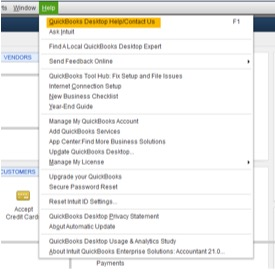
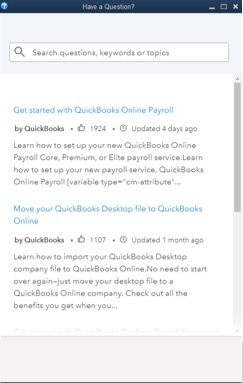
If you can’t find answers to your questions in the Help section, click Contact Us to connect with a QuickBooks expert.
Tip: Check your display settings in QuickBooks Desktop or update to the latest version of the software when the help option doesn’t appear.
Work with an Intuit-certified QuickBooks ProAdvisor, either locally or remotely, for personalized support, software setup, troubleshooting, and ongoing financial guidance. Visit the official QuickBooks ProAdvisor directory to find a professional that fits your business needs.
While QuickBooks doesn’t emphasize social media as an official support channel, some users find help through QuickBooks handles on platforms like Twitter/X or Facebook. For reliable assistance, prioritize official support paths to avoid misinformation.
QuickBooks Desktop Support can require certain information to verify your account and resolve issues, but it’s equally important to protect your sensitive financial and personal data. Providing the wrong details can put your business at the risk of fraud, data breaches, or unauthorized access. Here’s what you should never share and what’s safe to share:
| Full Social Security Numbers (SSN) or Tax Identification Numbers (TIN): | If requested for verification, always mask or partially redact them. |
| Full Bank Account or Credit Card Numbers: | Support agents do not need these for technical troubleshooting. |
| QuickBooks Desktop Passwords: | They may guide you through resetting, but will never ask for your actual password. |
| Private Client or Employee Data: | Such as payroll details, employee SSNs, or raw client financial records. |
| Remote Access Links from Unverified Sources: | Only grant remote access through Intuit’s official tools, such as LogMeIn Rescue initiated from within the support process. |
| QuickBooks License Number & Product Code: | Required for account verification. |
| Error Codes and Messages: | Share them exactly as they appear on your screen. |
| Version & Edition Details: | For example, “QuickBooks Desktop Premier 2024.” |
| General Description of the Issue: | Explain the steps you took before the error appeared. |
To ensure timely assistance, it’s essential to understand QuickBooks Desktop Support’s availability. Let’s have a look at official hours and additional support options for users across regions.
According to Intuit’s support documentation, these are the current support schedules for QuickBooks Desktop editions:
Intuit does not publish holiday-specific support schedules publicly, so expect limited or no coverage on major U.S. holidays. It’s wise to plan ahead if you think you’ll need assistance near those dates.
If your issue arises outside standard hours or during holidays:
Every QuickBooks Desktop edition connects you to official support channels including phone, live chat, in-product Help menu, community forum, and certified ProAdvisors. However, the type of assistance, response time, and level of expertise can vary depending on the edition you’re using. Understanding these differences helps you to get faster solutions and avoid unnecessary delays.
Key Insights:
Businesses using higher-tier editions such as Premier and Enterprise typically receive faster and more specialized support due to the complexity of their operations. In contrast, Pro users usually get standard-tier assistance with typical response times.
Tip: Identifying your QuickBooks Desktop edition and knowing the available support options can save you valuable time and frustration. When reaching out for help, always share your edition, version, and error details to ensure you receive the fastest and most accurate assistance.
Quick access to expert QuickBooks Desktop support helps you to keep your business operations on track, reduces downtime, ensures errors are fixed correctly the first time, minimizes data risks and connects you directly with certified experts who understand your edition and provide accurate solutions right away.
Immediate support ensures quick issue resolution, keeping your accounting workflow uninterrupted and preventing delays in payroll, invoicing, or financial reporting.
Expert guidance ensures that your company files, transactions, and sensitive information are handled safely, reducing the risk of data corruption, loss, or unauthorized access.
Quick support for payroll, tax, and reporting issues helps your business remain compliant with local and federal regulations, preventing costly errors or penalties.
Certified professionals deliver fixes tailored to your QuickBooks Desktop edition Pro, Premier, Enterprise, or Accountant so you get solutions that match your exact business needs.
Expert guidance and troubleshooting not only resolve the current issue but also address root causes, reducing the chances of recurring errors and improving long-term efficiency.
Having trusted expert support available gives you reassurance, reduces stress, and allows you to focus on growth instead of worrying about software-related issues.
QuickBooks Desktop simplifies accounting tasks, but unexpected issues can interrupt your workflow and affect business operations. Knowing when to seek professional support ensures faster resolution, protects your financial data, and helps you stay compliant with payroll and tax regulations.
Contact QuickBooks Desktop Support without delay if:
Pro Tip: If an issue stops you from running payroll, creating invoices, or accessing critical financial records, reach out to support immediately to minimize downtime, avoid missed deadlines, and prevent compliance penalties.
Being prepared before reaching out to QuickBooks Desktop Support makes it easier for experts to diagnose the issue quickly and provide the accurate solutions.
Don’t let technical issues slow down your accounting workflow. Reach out to QuickBooks Desktop Support today to ensure smooth, uninterrupted operations. Use the direct contact options to get fast, expert assistance:
With fast response times and proven resolution rates, you can rely on expert assistance for fast, accurate solutions that keep your business running smoothly without delays or repeated issues.
Disclaimer: eBetterBooks is an independent third-party service provider for accounting and bookkeeping software. We are not affiliated with Intuit® QuickBooks.
You can reach QuickBooks Desktop Support through phone, live chat, or directly from the QuickBooks Desktop software under the Help → Contact Us option.
Support hours may vary depending on your plan and region. Typically, live chat and phone support are available during business hours, while the QuickBooks Help site and community forums are available 24/7.
Keep your license number, product version, Intuit account login details, and error message details ready. This helps the support team resolve your issue faster.
No, Intuit does not provide direct email support for QuickBooks Desktop. Instead, you can use phone, chat, or in-product support for assistance.
Open QuickBooks Desktop, navigate to Help → Contact Us → Search for something else → Start a Message. From here, you can select chat or request a callback to connect instantly with a certified QuickBooks expert.
Basic troubleshooting and general support are free. But, certain services like data recovery, advanced payroll support, or third-party integrations involve additional charges.
If support is closed, you can visit the QuickBooks Support website or QuickBooks Community forum, where you’ll find troubleshooting guides, FAQs, and expert advice available anytime.
Yes, certified QuickBooks experts can assist with troubleshooting and repairing corrupted company files, restoring lost data, and guiding you on preventive measures to avoid future issues.
QuickBooks Desktop Enterprise and multi-user environments often have dedicated priority support lines, allowing faster assistance for complex setups and large-scale business operations.
You can find assistance through the QuickBooks Community forum, the official knowledge base, and the in-product Help menu guides. For more personalized, hands-on support especially for advanced accounting or setup needs, you can also hire an Intuit-certified ProAdvisors.
QuickBooks support connects you to the right help based on your issue, urgency, and plan level.
You ensure effective assistance by evaluating key elements before reaching out.
You can reduce delays when accessing QuickBooks Desktop support by understanding response patterns and preparing in advance.
This approach helps you get timely and effective assistance.
If you need assistance with third-party integrations in QuickBooks Desktop and prefer faster resolution, you can rely on certified third-party support.
They help resolve issues with payment processors, payroll add-ons, or reporting tools, and guide you through compatibility checks and data sync challenges. You also gain access to vendor knowledge bases and documentation for troubleshooting, while QuickBooks support can assist with integration settings.
For complex problems, certified ProAdvisors or the third-party vendor handle escalations. This approach ensures your integration issues are resolved efficiently and reliably.
You gain access to specialized assistance that keeps your accounting software reliable and efficient.
You gain support and features based on your QuickBooks Desktop version, ensuring the right tools for your needs.
Understanding your version ensures you leverage full QuickBooks capabilities.
You can speed up QuickBooks Desktop support by preparing essential information before contacting assistance.
Having these documents on hand ensures faster and more accurate resolutions.
You can access QuickBooks Desktop support based on your region, ensuring help aligns with local business hours and services.
Being aware of regional support ensures you reach the right help efficiently.


