+1-802-778-9005
Home>>QuickBooks Desktop Errors & Their Support QuickBooks Payroll Not Calculating Social Security & Medicare Error?

Quickbooks plays a significant role in calculating payroll but sometimes it  fails to calculate Social Security and Medicare taxes correctly. This error disrupts accurate paycheck processing and compliance with federal tax requirements.

The issue usually stems from incorrect employee setup, outdated payroll tax tables, misconfigured payroll items, or software glitches. In some cases, damaged company files or improper installation can also trigger the problem.

It typically shows up during payroll preparation, when generating paychecks, or while running payroll checkups. Businesses often notice it when deductions for Social Security and Medicare are missing or miscalculated.

QuickBooks may not display a single standardized message for this issue. Instead, users often see discrepancies in paycheck calculations, missing tax deductions, or prompts indicating payroll setup errors.

Ignoring these errors can lead to incorrect W‑2s, faulty 941 filings, IRS penalties, and employee dissatisfaction. Preventive measures like regular updates, accurate employee setup, and routine payroll checkups help ensure payroll runs smoothly and keeps both compliance and employee trust intact.

Common Causes Behind the Issue

Several factors can trigger QuickBooks to miscalculate or omit Social Security and Medicare taxes:

  • Employee setup errors – Tax boxes unchecked or incomplete employee details.
  • Outdated payroll tax tables – IRS/state updates not applied.
  • Incorrect payroll item configuration – Social Security and Medicare items mis‑set.
  • Software glitches or installation issues – Temporary bugs or damaged files.
  • Improper EIN or setup details – Wrong employer ID or missing tax information.

Quick overview of Troubleshooting steps:

LevelStepsPurpose
Beginner (Basic User Checks)– Verify employee setup (ensure Social Security & Medicare are enabled).- Update payroll tax table.- Update QuickBooks Desktop.Catch simple setup mistakes and outdated data issues.
Intermediate (Configuration Fixes)– Review payroll item setup for Social Security & Medicare.- Recreate payroll items if misconfigured.- Run Payroll Checkup tool.Correct misconfigured payroll items and detect hidden setup errors.
Advanced (System & Installation Repairs)– Repair QuickBooks installation.- Rename the CPS folder and re‑download updates.- Temporarily disable User Account Control (UAC).- Validate EIN & company setup details.Resolve deeper system conflicts, file corruption, or installation issues.

Detailed Stepwise Troubleshooting Levels

Beginner Level (Basic Checks)

These are quick fixes that any user can perform without technical expertise:

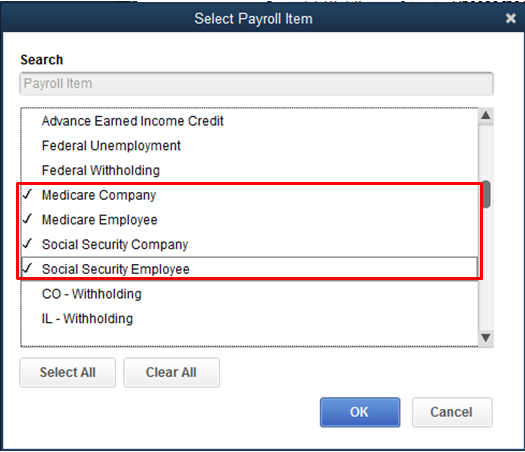
  • Verify Employee Setup → Open Employee Center and confirm Social Security and Medicare are enabled under tax settings.
confirm Social Security and Medicare
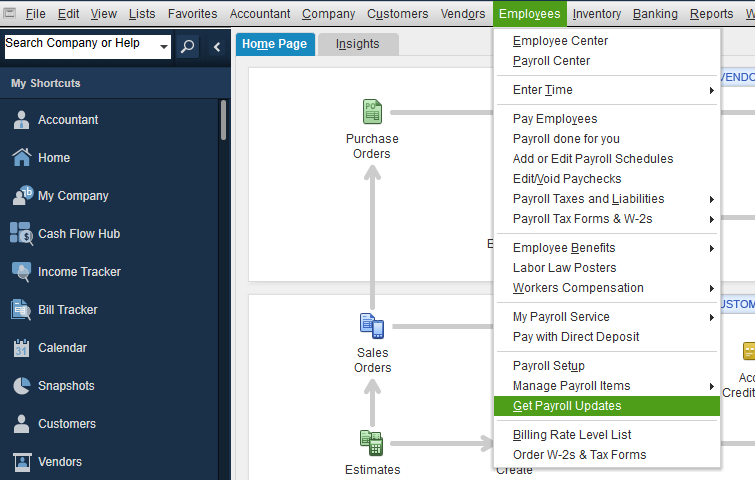
  • Update Payroll Tax Table → Go to Employees > Get Payroll Updates and download the latest tax table.
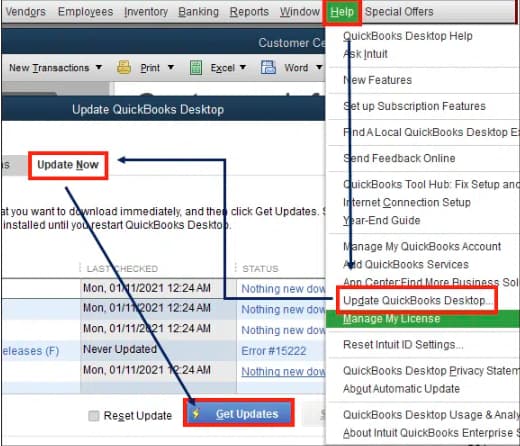
Get Updates
Update QuickBooks Desktop

Intermediate Level (Configuration Fixes)

If basic checks don’t resolve the issue, move to configuration troubleshooting:
  • Review Payroll Item Setup → Inspect Social Security and Medicare items in the Payroll Item List; confirm correct tax tracking type and rates.
  • Recreate Payroll Items → If items are misconfigured, create new ones using Custom Setup and assign them to employees.
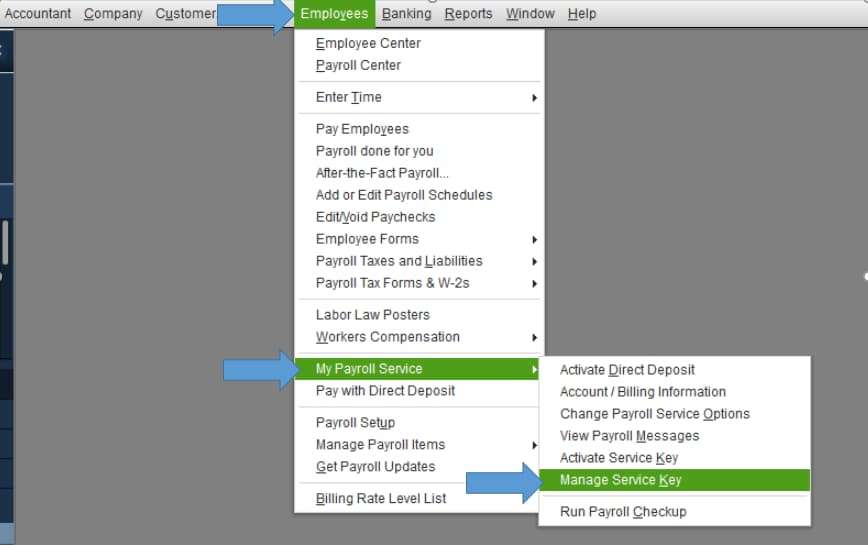
  • Run Payroll Checkup → Use Employees > My Payroll Service > Run Payroll Checkup to scan for inconsistencies and apply recommended fixes.
Manage Payroll Service

Advanced Level (System & Installation Repairs)

For persistent or complex issues, deeper troubleshooting is required:
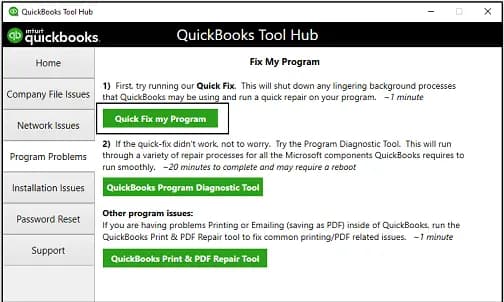
  • Repair QuickBooks Installation → Use Control Panel > Programs > QuickBooks > Repair. If repair fails, reinstall QuickBooks.
Quick Fix My Program
  • Rename CPS Folder → Navigate to C:\Program Files\Intuit\QuickBooks\Components\Payroll\CPS and rename it to CPSSOLD, then re‑download payroll updates.
  • Adjust User Account Control (UAC) → Temporarily disable UAC during payroll updates to prevent Windows from blocking QuickBooks.
  • Validate EIN & Company Setup → Ensure Employer Identification Number and employee tax details are correct and complete.

Preventive Best Practices

  • Keep QuickBooks and payroll tax tables updated.
  • Audit employee setup regularly.
  • Run payroll checkups before major filings.
  • Consult payroll experts for persistent or complex issues.

Conclusion

When QuickBooks fails to calculate Social Security and Medicare taxes, the problem is rarely random. It usually stems from outdated tax tables, incorrect employee or payroll item setup, or software glitches. By following a structured troubleshooting flow starting with employee setup, moving through updates, and ending with system checks most issues can be resolved quickly. Preventive measures like regular updates and audits ensure payroll runs smoothly, keeping both employees and regulators satisfied.

FAQs:

1. What specific FICA tax rates does the Payroll Tax Table contain, and how often must the table be updated?

The Payroll Tax Table is the essential regulatory data source for all FICA calculations, containing specific rates and wage limits mandated by the U.S. government.

  • FICA Tax Components (Employee Share): FICA (Federal Insurance Contributions Act) is composed of two primary taxes, which employers withhold and match:
    • Social Security (OASDI): The employee rate is currently 6.2 percent.
    • Medicare (Hospital Insurance): The employee rate is currently 1.45 percent.
  • Update Frequency: The Payroll Tax Table must be updated at least once per tax year, typically in January, to incorporate new annual wage bases, rate changes, and withholding thresholds mandated by the Internal Revenue Service (IRS). QuickBooks requires an active payroll subscription to receive and install these updates.

2. Why does the Social Security calculation sometimes stop mid-year for an employee, and what must I verify?

Social Security (SS) tax calculation stops automatically when an employee’s cumulative year-to-date (YTD) wages reach the annual wage base limit set by the IRS.

  • Wage Base Limit: The Social Security portion of FICA tax is only withheld up to a statutory annual limit. Once an employee’s gross pay exceeds this limit (e.g., the $176,100 limit for 2025), the SS tax deduction automatically ceases for the remainder of the calendar year.
  • Verification Steps:
    • Run the Payroll Tax and Wage Summary Report to check the employee’s Year-to-Date (YTD) Wages.
    • Compare the YTD total against the official IRS Social Security Wage Base Limit for the current year.
    • Ensure the employee’s Medicare tax continues to calculate, as Medicare does not have a wage base limit and continues indefinitely (with an additional 0.9% high-income rate applied if the employee’s wages exceed $200,000).

3. If the Payroll Tax Table update fails, what are the three primary system checks I must perform?

A failure to update the Payroll Tax Table often stems from common external issues rather than a software defect, requiring the user to verify three core system requirements.

  • Valid Subscription: Confirm the QuickBooks payroll subscription is active and current. An expired or inactive subscription will prevent access to the regulated tax files.
  • Internet/Firewall Settings: Verify a strong and stable internet connection and temporarily disable or configure firewall/security software. Aggressive security settings may block QuickBooks from connecting to Intuit’s update servers, incorrectly flagging the download as a threat.
  • System Integrity: Run the Verify Data and Rebuild Data utilities (located under the File menu) to detect and repair any data damage in the company file that might be interfering with the update process.

4. How do I verify the correct calculation order of payroll items to fix FICA errors?

The order of payroll items is critical because certain deductions are calculated before taxes, impacting the taxable wage base for FICA. Incorrect ordering leads to under- or over-withholding.

  • Verification Steps:
    • Access the Payroll Item List through the Lists menu.
    • Examine the order of items, focusing on items that adjust the taxable wage base.
  • FICA Rule: All pre-tax deductions (like 401(k) pre-tax or medical insurance premiums) must be ordered to calculate before FICA taxes (Social Security and Medicare). If the pre-tax deduction processes after the FICA calculation, the FICA tax will be too high.
  • Correction: Adjust the item order to ensure the taxable wage is accurately reduced before the software calculates the FICA withholding amounts.

5. What is the role of the Automatic Calculation Feature in fixing overpaid FICA taxes?

The Automatic Calculation Feature is a core tool in QuickBooks Payroll that automates the correction of certain rate-based tax overpayments, such as FICA, that often occur due to rounding or minor errors.

  • Mechanism: If an error causes an overpayment of a rate-based tax (like Social Security or Medicare) in one paycheck, the feature instructs QuickBooks to automatically adjust the deduction on the next paycheck.
  • Correction Process: QuickBooks effectively reduces the tax withholding in the subsequent pay run by the exact amount of the prior overpayment, minimizing the need for manual liability adjustments or complex journal entries.
  • Manual Adjustment for Large Errors: For significant overpayments, such as those caused by voided paychecks or duplicate payments, Intuit recommends users use the in-product Resolve feature in the Payments section or contact support for a tax agency refund or credit application.

6. When configuring a payroll item, why is the “Neither” option important for calculation accuracy?

When editing a payroll item in the Payroll Item List, the “Neither” option is crucial for accurately handling flat-rate or non-wage-based items.

  • Calculation Methods: When editing a payroll item, the user must specify the calculation basis:
    • Based on Hours
    • Based on Quantity
    • Neither
  • “Neither” Use Case: The “Neither” option must be selected for any payroll item that is not calculated based on hours worked or a specific quantity. Examples include:
    • Flat-rate monthly deductions (e.g., a $50 club membership fee).
    • Items entered as a direct percentage of Gross Pay.
  • Error Prevention: Selecting the wrong basis, such as “Hours” for a flat-rate deduction, will cause the calculation to fail or produce a zero amount, leading to incorrect net pay.

7. Beyond FICA, what other payroll items are subject to annual legal limits that can cause unexpected calculation stoppages?

In addition to the Social Security wage base, several other common payroll deductions and contributions are subject to annual legal limits, which must be monitored in the Payroll Item List to prevent unexpected calculation stoppages.

  • Common Payroll Items with Annual Limits:
    • Retirement Contributions: Employee and employer contributions to 401(k) and IRA plans are subject to strict annual IRS limits.
    • Health Savings Accounts (HSA): Employee contributions to HSAs have annual limits set by the IRS.
    • State Unemployment Insurance (SUI): State-specific SUI taxes have annual wage base limits, similar to Social Security, after which the tax deduction stops for the year.

Note: If the limit is reached, QuickBooks is programmed to stop the deduction/contribution. Users must verify the limit setting in the item’s configuration to ensure the correct annual cap is being applied.