Excerpt:
If QuickBooks Desktop Enterprise Payroll fails to open or load, the issue is often caused by outdated software, corrupt files, or interference from firewalls or antivirus programs. This guide helps users restore full payroll functionality by using tools like Quick Fix My Program, verifying data integrity, and updating software—ensuring smooth access to payroll tasks such as paycheck processing, tax calculations, and compliance management.
 Add As A Preferred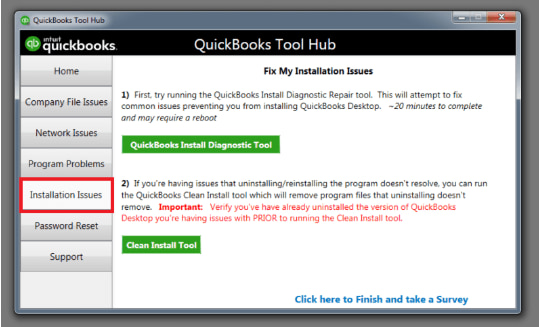
QuickBooks Desktop Enterprise Payroll (QBD Enterprise Payroll) fails to load when update files, installation components, company-file records, permission layers, subscription validation, or firewall rules lose stability. QBD Enterprise Payroll loads only when all operational attributes remain stable, and any instability causes startup delays, unresponsive loading screens, or full module failure.
Payroll-module activation in QBD Enterprise depends on accurate update data, stable installation components, verified company-file records, elevated permission settings, an active subscription, and unrestricted network access. Structural factors such as background-process conflicts, incomplete updates, restricted permission profiles, network irregularities, and incorrect hosting configurations weaken these attributes and prevent the payroll module from initiating its computation and synchronization routines. To better understand and diagnose such issues, you can also refer to a complete QuickBooks error codes list for identifying related errors.
This article describes how each operational attribute affects QBD Enterprise Payroll activation and explains the corrective actions that restore the loading sequence, including update restoration, installation repair, company-file verification, permission correction, network-rule adjustment, and hosting-configuration alignment. The article also presents maintenance steps that preserve long-term loading stability and reduce repeated initialization failures.
QuickBooks Desktop Enterprise Payroll loading issues result from operational factors that influence the module’s initialization sequence. These factors include software conflicts, unstable installation files, incomplete update data, restricted user permissions, inconsistent network connectivity, and hosting-configuration inconsistencies.
For a deeper understanding of such problems and their solutions, you can follow a QuickBooks Desktop payroll errors guide to systematically identify and resolve these issues.
Several factors can contribute to payroll not opening in QuickBooks Desktop Enterprise, including:
QuickBooks Desktop Enterprise Payroll not opening or loading is an issue that results from operational attributes affecting the module’s initialization sequence. The resolution requires restoring update integrity, stabilizing installation components, verifying company-file structure, validating subscription status, adjusting administrative-permission settings, and configuring firewall access to support proper payroll module activation.
Sometimes, a simple restart can resolve temporary glitches. Close QuickBooks completely and reboot your computer, then try opening the payroll feature again.
QuickBooks Tools Hub offers a diagnostic tool called Quick Fix My Program:
Ensure QuickBooks is updated to the latest version:
Corrupt company files can prevent payroll from loading:
Corrupt installation files may cause problems:
Firewall and security software may block QuickBooks:
If all else fails, reinstalling the software can resolve deeper issues:
QuickBooks Desktop Enterprise Payroll loading depends on prompt software updates, accurate company-file verification, an active payroll subscription, correct administrative-permission settings, and firewall configurations that support uninterrupted module initialization.
| Issue | Possible Cause | Recommended Fix |
|---|---|---|
| QuickBooks Payroll not opening | Background app conflict | Run Quick Fix My Program from QuickBooks Tool Hub |
| Payroll features are stuck or crashing | Outdated QuickBooks version | Update QuickBooks via Help > Update QuickBooks Desktop |
| Missing payroll options | Expired or inactive subscription | Verify subscription in CAMPs portal and renew if needed |
| Loading delays or freezes during startup | Corrupt company data files | Use Verify and Rebuild Data from the File menu |
| Payroll won’t respond to clicks | Lack of admin privileges | Right-click QuickBooks icon > Run as Administrator |
| Error loading payroll after update | Firewall or antivirus interference | Whitelist QuickBooks processes or temporarily disable antivirus |
| Payroll is not launching on a multi-user setup | Incorrect hosting configuration | Disable hosting on workstations via File > Utilities |
| Persistent module failures | Corrupt installation | Repair QuickBooks via Control Panel or perform a Clean Install |
| Unusual behavior on one user account | Corrupt Windows user profile | Create and log in with a new Windows admin user |
Related: QuickBooks Payroll Errors
If you are facing similar payroll-related problems along with the loading issue, these errors may also be affecting your QuickBooks Desktop Enterprise Payroll:
| Error | Description |
|---|---|
| QuickBooks Desktop Payroll service server Error | Occurs when the system fails to connect with payroll servers due to network or configuration issues |
| QuickBooks Desktop Payroll direct deposit issues after info | Happens when direct deposit stops working after updating employee or bank information |
| QuickBooks Desktop Payroll Error PS060 | Triggered due to payroll subscription or billing issues, restricting payroll access |
QuickBooks Desktop Enterprise Payroll functions correctly when update data, installation components, company-file records, permission settings, subscription status, and network access are accurate and stable. For users facing technical challenges, leveraging reliable QuickBooks support and troubleshooting resources can help quickly identify root causes and apply the right fixes. To restore the payroll module loading process, repair the update data, stabilize the installation components, verify the company-file records, adjust permission settings, confirm the subscription status, and correct the network and hosting configuration. Install regular updates, monitor system resources, and review configuration settings to maintain long-term stability, ensure reliable payroll-module performance, and prevent repeated loading failures.
QuickBooks Payroll may not work due to expired subscriptions, outdated software, or internet/firewall issues.
QuickBooks may not load due to corrupt program files, low system resources, or conflicting background processes.
This usually happens because of damaged company files, user profile issues, or insufficient admin permissions.
Slow or unresponsive payroll loading is typically caused by background-process conflicts, incomplete updates, restricted permissions, network irregularities, or incorrect hosting configurations.
Yes, damaged or inconsistent company-file records interrupt payroll initialization. Running Verify Data and Rebuild Data usually resolves these issues.


