Excerpt:
Processing vendor payments via direct deposit in QuickBooks Desktop 2024 requires precise configuration of 1099 contractor profiles and an active payroll subscription. Failures typically stem from improper vendor setup, such as neglecting to mark a contractor as 1099 eligible or failing to enter a valid Tax ID. Beyond profile settings, technical barriers like outdated payroll tax tables, incorrect system time, or data integrity issues within the company file can cause the software to freeze or block transmissions. Resolving these issues involves a systematic approach of verifying vendor tax settings, updating payroll software, and utilizing the Verify and Rebuild Data utilities to repair underlying file damage. Maintaining a two business day lead time for submissions is essential to meet the processing deadlines required by the ACH network.
 Add As A Preferred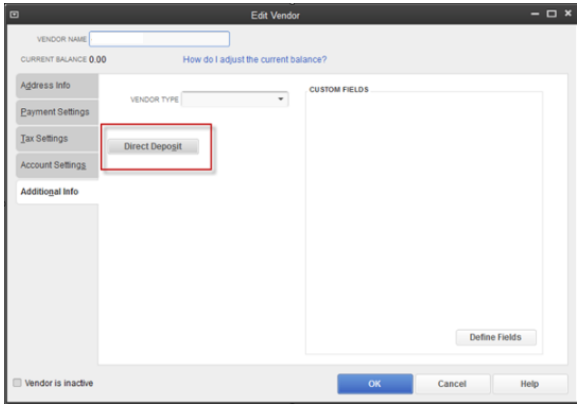
Highlights (Key Facts & Solutions)
“Hi, I’m Shawna. I’ve been using QuickBooks Desktop 2024 to manage payments for my business, but recently I ran into a problem trying to send a vendor payment through direct deposit.
The vendor’s banking info is all set up and verified, and I’ve processed similar payments before without issue. But now, when I try to send the payment, the system either freezes or just refuses to process it — and it doesn’t give me any meaningful error to troubleshoot from.
I’ve already double-checked my payroll subscription status, confirmed that QuickBooks is fully updated, and even ran a company file verification — but still no luck. Everything looks fine on paper, yet the payment won’t go through.
This is time-sensitive because the vendor is expecting payment today, and I don’t have another way to send it right now. If anyone has experienced this in QuickBooks Desktop 2024 or knows a quick fix, I’d really appreciate some immediate help. This delay is putting my vendor relationship at risk, and I need to get this resolved ASAP.”
Hi Shawna,
Thank you for reaching out—and I completely understand how stressful it can be when the system freezes without warning and your vendor is waiting. It’s a high-pressure situation, and it’s absolutely valid to feel overwhelmed.
From what you’ve shared, I can see you’ve already taken all the right steps: verifying your vendor’s banking information, confirming your payroll subscription is active, updating QuickBooks Desktop 2024, and even running a company file verification. That’s a solid checklist, and you’re on the right track.
Despite that, if the issue still persists—where the QuickBooks freezes or won’t process the vendor payment without any clear error, it’s understandable to feel stuck. You’re not alone in this, and we’ll go through a few troubleshooting steps to help you fix it. You’ve already done a lot—now let’s close the gap and get this resolved quickly, so your vendor relationship remains strong and intact.
QuickBooks Desktop 2024 may block or delay vendor payments due to several technical or system-related issues. These include stuck background processes, outdated payroll updates, damaged company files, or interference from antivirus or firewall settings. In some cases, unsent payroll data or a corrupted installation can also prevent payments from going through, even when no error message appears.
If QuickBooks Desktop is freezing or refusing to send vendor payments, there are a few system and software-level fixes that can help. To successfully send vendor payments via direct deposit in QuickBooks Desktop 2024, your independent contractors must be properly configured as 1099 vendors. If not set up correctly, QuickBooks will either freeze, show transmission errors, or fail to process the payment.
If a vendor isn’t set up properly for 1099 tracking, QuickBooks won’t process direct deposits for them.
When you start tracking contractors for 1099 payments, QuickBooks will start tracking their payments behind the scenes. When you’re ready to file your 1099s, just add the tracked payments to the form.
If you see the error message: “The vendor payment transmission failed”, this is caused by one or more of your independent contractors not marked as 1099 vendors.
Note: You can only send direct deposits to 1099 contractors, not vendors.
Next, mark your vendors as eligible for 1099s:
To remove the direct deposit option for non-1099 vendors, follow these steps.
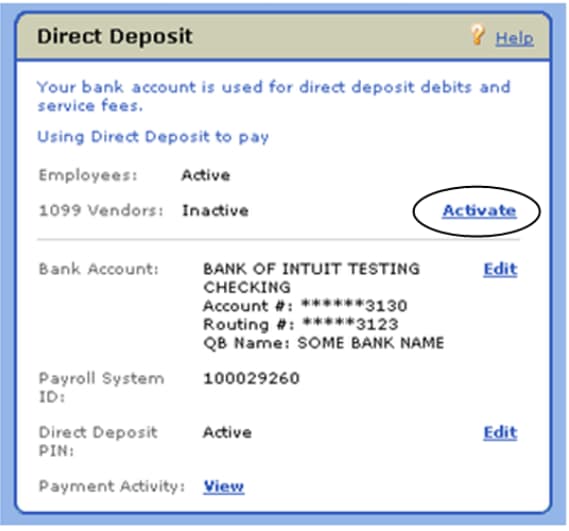
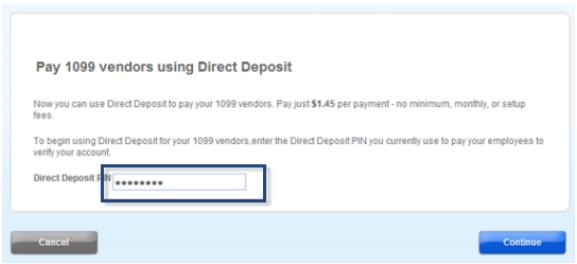
Before signing up for Intuit Direct Deposit service, make sure your vendor is a 1099 independent contractor and you have an active payroll subscription. If you’re using QuickBooks Desktop Payroll Basic, Standard and Enhanced, direct deposit for paying employees must be active to activate paying 1099 vendors. Follow these steps to sign up direct deposit for independent contractors:
Now, you’ll be able to start setting up your independent contractors for direct deposit.
Important: Before paying contractors, ensure your company is set up for direct deposit and you’ve collected their bank account details.
To add your independent contractor bank info for direct deposit, follow these steps:
Note: Split direct deposit payment isn’t available for independent contractors.
Note: If you don’t see an email address or the email address is incorrect, update it under the Address Info tab.
Before paying your contractor through direct deposit, ensure you’re using the latest version of QuickBooks Desktop.
Important: To process a direct deposit, the pay date must be set at least two business days ahead. If it isn’t, QuickBooks will automatically adjust it to the next available eligible date to pay via direct deposit.
Note: QuickBooks selects the Online Payment checkbox If you’ve entered your contractor’s bank details.
Note: If you accidentally close the window, go to the Employees menu and click on Send Payroll Data.
If your contractor setup is correct but payments still freeze, fail to transmit, or show no error — try these additional technical fixations:
Outdated payroll tax table updates can prevent and block vendor payments.
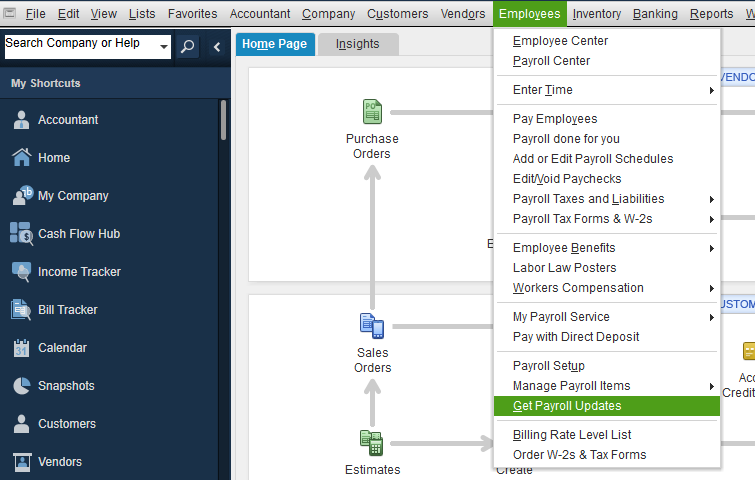
An incorrect system date or time on your computer can interfere with the update process.
The verify tool finds the most common issues in a company file, and the rebuild tool fixes them.
Note: Contact the QuickBooks Support Team before you rebuild your data in case you use Assisted Payroll.
Note: Don’t replace your existing company file. You need to re-enter the info into your company file since the backup was created.
Check the different direct deposit (DD) payroll statuses to find out where it’s at in the process.
Note: Direct Deposit submissions must be sent by 5 PM PT, 2 business days before payday.
Maintaining smooth vendor payments in QuickBooks Desktop 2024 requires proactive system management and accurate data entry. Follow these future tips to minimize errors, prevent freezing, and ensure your payments are processed without delays.
Shawna, handling vendor payments in QuickBooks Desktop 2024 can sometimes feel overwhelming—especially when direct deposits freeze or fail without clear warning. But you’re not alone in this. The key is to stay proactive by keeping your software, payroll tax tables, and direct deposit settings updated. Always verify contractor banking info, and try to schedule payments at least two business days in advance.
Most payment issues have a clear fix—and you’re already well on your way by identifying the causes and applying the right steps. Make it a habit to back up your company file before sending payments, and use the “Send Payroll Data” screen as a final checkpoint.
And If things go wrong again, don’t worry—I’m here to guide you through it. Whether it’s another payment glitch or just a quick follow-up, feel free to reach out for accurate, timely support.
The Direct Deposit option is unavailable if the vendor is not correctly classified as an independent contractor or if your payroll subscription is inactive. QuickBooks restricts direct deposit specifically to 1099 eligible vendors.
QuickBooks Desktop 2024 does not support same-day direct deposit for 1099 contractors. The system requires a lead time to ensure funds are verified and transferred through the ACH network.
If a check remains in the Online to Send status, it means the transaction is recorded but hasn’t been transmitted to Intuit’s servers for processing.
Freezing during transmission is often caused by an outdated payroll tax table or interference from background security software blocking the connection to Intuit’s servers.
QuickBooks Desktop currently limits 1099 contractor direct deposits to a single bank account per vendor profile.
You can track the progress of funds through the Payroll Run Status tool to verify that the money was successfully offloaded and distributed.
A single-vendor failure usually indicates an issue with that specific vendor’s bank details or an incomplete 1099 profile.


