 Add As A Preferred
Migrating your financial data in QuickBooks is more than a routine technical task. It’s about ensuring your business records remain accurate, secure, and uninterrupted. A smooth conversion protects years of financial history, prevents costly data errors, and gives you confidence that your accounting system is ready to support future growth.
Even small mistakes during migration can lead to data loss, corruption or compliance risks,which may disrupt your day-to-day business operations. That’s why it’s important to rely on official Intuit channels or certified experts for assistance. With insights from certified QuickBooks ProAdvisors and industry experts, businesses can transition smoothly, minimize downtime, and keep their books accurate and secure.
QuickBooks Data Conversion Support is a specialized service that helps users transfer their financial data safely between different QuickBooks versions or from another accounting platform into QuickBooks.
It covers tasks like upgrading company files to newer Desktop versions, moving data between QuickBooks Desktop and QuickBooks Online, migrating from third-party software and fixing compatibility issues during transition. The ultimate goal is to maintain data accuracy, integrity, and usability so your business runs without disruption.
QuickBooks offers official support channels to help with file repairs, upgrades, and migrations. Use these trusted ways below to connect with experts and ensure your data conversion is handled securely.
| Method | How to Access | Best For | Response Time | Availability |
| Phone Support | Call 1-800-4-INTUIT (1-800-446-8848) | Urgent or complex conversion issues | Immediate (during business hours) | Mon–Fri, 6 AM–6 PM PT |
| Live Chat | QuickBooks Desktop → Help → Contact Us → Start Chat | Quick, guided, step-by-step assistance | Within minutes | Mon–Fri, 6 AM–6 PM PT |
| Support Ticket / Email | Submit request via Intuit’s Customer File Exchange portal. | Large files or advanced migrations | Typically 1–2 business days | 24/7 (online submission) |
| Certified ProAdvisor | Find experts on the ProAdvisor Directory | Industry-specific expert guidance | Varies (usually scheduled per client availability) | Depends on advisor availability |
| Community Forum | Post Questions on the QuickBooks Community | General advice from peers or reference materials | Depends on community activity | 24/7 (peer-driven) |
QuickBooks Data Conversion Support helps you understand which services are included in the process and which limitations apply. Below is a clear breakdown of what is covered and what isn’t.
QuickBooks Data Conversion Support ensures your files are transferred securely and correctly. This section explains the verified ways to contact support through official channels, certified ProAdvisors, community forums, and in-product help options.
You can reach QuickBooks Data Conversion Support by calling 1-800-4-INTUIT (1-800-446-8848). This method is best for urgent or complex conversion issues. Phone support provides immediate assistance during business hours, Monday to Friday, from 6 AM to 6 PM PT.
Note: Always verify the number through Intuit’s official website to avoid scams.
Live chat support is accessible directly within QuickBooks Desktop, allowing you to connect with certified QuickBooks experts in real time.
This method provides quick guidance, step-by-step troubleshooting, or clarifying data conversion processes, typically responding within minutes, available Monday to Friday from 6 AM to 6 PM PT.
For large files or advanced migration requests, you can submit your query via Intuit’s official Customer File Exchange portal after receiving a Data Services case number and PIN via email. This method is especially useful for handling large files or complex conversions that may not be efficiently supported through live chat or phone. Email/support ticket submissions are available 24/7 and typically receive a response within 1–2 business days.
Work with an Intuit-certified QuickBooks ProAdvisor, either locally or remotely, for personalized support, software setup, troubleshooting, and ongoing financial guidance. Visit the official QuickBooks ProAdvisor directory to find a professional that fits your business needs.
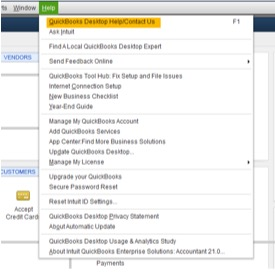
Step 1: Open QuickBooks Desktop (Pro, Premier, Enterprise, or Payroll).
Step 2: Click Help (?) menu at the top of the interface.
Step 3: Select QuickBooks Desktop Help/ Contact Us.
Step 4: Enter your question, topic or a relevant keyword you need help with.
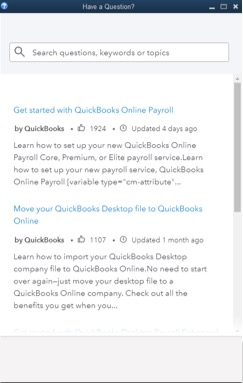
Step 5: Log in to your Intuit account and select any one:
If you can’t find answers to your questions in the Help section, click Contact Us to connect with a QuickBooks expert.
Tip: Check your display settings in QuickBooks Desktop or update to the latest version of the software when the help option doesn’t appear.
QuickBooks Data Conversion Support is designed to help you handle tricky situations where moving, upgrading, or repairing your data becomes too complex to manage on your own. Reach out to QuickBooks Data Conversion Support under the following circumstances:
Proper preparation ensures your data conversion process is smooth, efficient, and secure. Having the right details ready helps the support team understand your situation quickly, avoid delays, and minimize the risk of errors during conversion.
Following proven best practices helps minimize errors, protect your financial data, and ensures a smooth transition between QuickBooks versions or platforms.
Working with Intuit-certified QuickBooks ProAdvisors or trusted third-party specialists ensures your data conversion is accurate, secure, and efficient. Certified experts follow industry best practices, minimize the risk of errors, and provide professional guidance tailored to your business needs.
With the right guidance and certified QuickBooks data conversion support, you can protect your financial records and avoid costly errors. Whether you’re upgrading versions, moving from Desktop to Online, or migrating from another accounting platform, official support ensures your financial data remains accurate and protected.
If you’re unsure about the conversion requirements, access the verified Intuit support links above or schedule a free consultation to get expert guidance tailored to your business needs.
Disclaimer: eBetterBooks is an independent third-party service provider for accounting and bookkeeping software. We are not affiliated with Intuit® QuickBooks.
The duration depends on your file size, complexity, and the number of transactions. Small or straightforward files may convert in a few hours, while large files with many transactions or lists can take one to two business days.
Basic conversions or simple upgrades may be included with Intuit support. However, complex migrations such as large files, third-party software transfers, or cross-platform conversions often require paid assistance from certified experts.
Some preferences, templates, or customizations might reset during conversion. It’s recommended to review all company settings, templates, and reports after the migration to ensure everything functions as expected.
Yes, QuickBooks Data Conversion Support can help migrate data from third-party accounting platforms like Sage, Quicken, or Excel. Compatibility varies, so working with certified experts ensures accurate transfer.
Yes, always create a secure backup of your company file before starting the conversion. This ensures your data is protected in case of unexpected errors or issues during the migration process.
If errors arise, QuickBooks support agents or certified ProAdvisors can troubleshoot and repair damaged files, resolve compatibility issues, and guide you through the conversion process. Providing error messages, system details, and company file information in advance helps to speed up the resolution.


