Excerpt:
This article guides you on restarting your system in safe mode, a key troubleshooting tool for resolving software and hardware conflicts. By loading only essential drivers, safe mode helps identify and fix issues, including preventing QuickBooks Unrecoverable errors. It provides step-by-step instructions for launching Windows 7, 10, and 11 in safe mode, enabling you to resolve system errors efficiently and get your software running smoothly.
 Add As A Preferred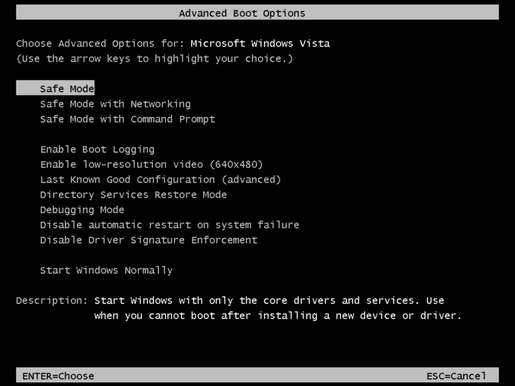
Safe mode is a feature that allows the Windows operating system to load with a minimal set of drivers. It uses the most basic versions of drivers and restricts the loading of drivers for peripherals such as printers, CD drives, tape backup systems, networks, or sound cards.
By limiting the number of variables in the computer system’s operation, safe mode provides an ideal environment for identifying and resolving hardware and software conflicts/errors. This is why applications like QuickBooks operate smoothly in safe mode – they open with only the essential drivers needed to run the program.
If a recently installed program, device, or driver is preventing Windows from running properly, starting your computer in safe mode can help you identify and remove the problematic issues. Windows safe mode aids in loading the Windows operating system with only the necessary drivers. It doesn’t require any specific driver version to load.
It restricts the use of irrelevant drivers, aiding in the resolution of any issues encountered when opening the software. Allowing the system to troubleshoot any issues that may arise when opening any software.
Additionally, launching QuickBooks in safe mode can prevent the occurrence of Unrecoverable errors.
To restart your system in safe mode, complete the following process:
To initiate the process of running Windows 7 in safe mode, follow the following steps:
To initiate the process of running the system in safe mode, follow the following set of steps:
Once Windows reboots and the Advanced Startup Settings menu is displayed, proceed with step 3 from the previous instructions as required.
If you have followed the above set of steps thoroughly, then by now, you can easily launch Windows in safe mode.
➜Safe Mode loads only the absolute minimum required drivers and services to run Windows, making it impossible to connect to the internet, network drives, or other computers.
➜Safe Mode with Networking loads those same minimum drivers plus the drivers and services necessary to enable network connectivity (like Ethernet or Wi-Fi). If you need to access a QuickBooks company file stored on a server or a shared network drive while troubleshooting, you must use Safe Mode with Networking.
Yes, you can run the QuickBooks Desktop application in Safe Mode. The purpose of using Safe Mode is to check if the issue (like an Unrecoverable Error) is caused by a third-party driver or startup application that is not loaded in this minimal environment. If QuickBooks opens and works fine in Safe Mode, you’ve confirmed that a non-essential program or driver is the culprit.
Once the system functions normally in Safe Mode, users can apply Microsoft-recommended isolation techniques such as:
➜Re-enabling startup programs selectively
➜Checking the Windows Event Viewer
➜Reviewing recently installed drivers or updates
➜This avoids directly repeating “how to enter Safe Mode” while supporting the environment around it.
No, running in Safe Mode does not affect your user profile, personal files, or installed programs. Safe Mode is a temporary diagnostic state of the operating system. When you restart the computer normally, all your usual settings, applications, and files will load exactly as they were before.
To exit Safe Mode, simply Restart your computer. When Windows restarts, it will automatically load all the standard drivers, services, and startup programs, returning your system to its normal operational state. You do not need to make any changes in the System Configuration utility (msconfig) unless you initially entered Safe Mode through that utility.
In standard Safe Mode, Windows loads only essential drivers. Network adapters, Bluetooth devices, or certain keyboard drivers may not function unless using Safe Mode with Networking. This FAQ clarifies expected limitations without overlapping restart steps.


