Excerpt:
Setting up a Health Reimbursement Arrangement (HRA) in QuickBooks, including the Qualified Small Employer HRA (QSEHRA) and Individual Coverage HRA (ICHRA), demands precise adherence to accounting and tax regulations. Businesses must first secure all required legal documents, such as the Plan Document and Summary Plan Description (SPD), mandated by the Department of Labor . Once compliant, the setup in QuickBooks Desktop requires employers to create a payroll item where the liability and expense accounts are the same to ensure the contribution tracks correctly for W-2 reporting (Box 12, Code FF) without affecting the profit and loss statement. In QuickBooks Online, the correct Reimbursement pay type must be used and manually updated for fluctuating monthly allowances. Understanding the strict W-2 reporting requirements for QSEHRA versus the no-reporting rule for ICHRA is essential for avoiding penalties that can be levied by the DOL for missing documentation.
 Add As A Preferred
Highlights (Key Facts & Solutions)
Overview
A Health Reimbursement Arrangement (HRA) is an account funded by employers that allows employees to be reimbursed tax-free for eligible medical expenses.
Expenses such as premiums, deductibles, and copayments, up to a specified annual limit, effectively allow employers to contribute to their employees’ healthcare costs without requiring financial input from the employees.
While an HRA allows an employer to manage employee healthcare expenses, it also permits reimbursement for any qualified medical expenses incurred by the employee. In this case, QuickBooks eases this through the flexibility of tracking the reimbursements together with processing of payroll data.
Make sure your HRA complies with the legal requirements and has easier processes when you’re using QuickBooks Desktop or QuickBooks Online. In this guide, we are going to outline how to set up an HRA on both platforms to help your business and your employees take advantage of this service.
Health Reimbursement Arrangement is one of the most beneficial programs that allows you to enjoy flexible and reasonable health-related benefits tailored for employees and employers.
With the help of HRA, employers offer all their employees a monthly allowance in the form of health insurance and medical expenses. Also, you get a cost-controlled option so that you can manage your expenses accordingly and your employees can meet their health care requirements. So basically, it’s like a win-win situation for both parties.
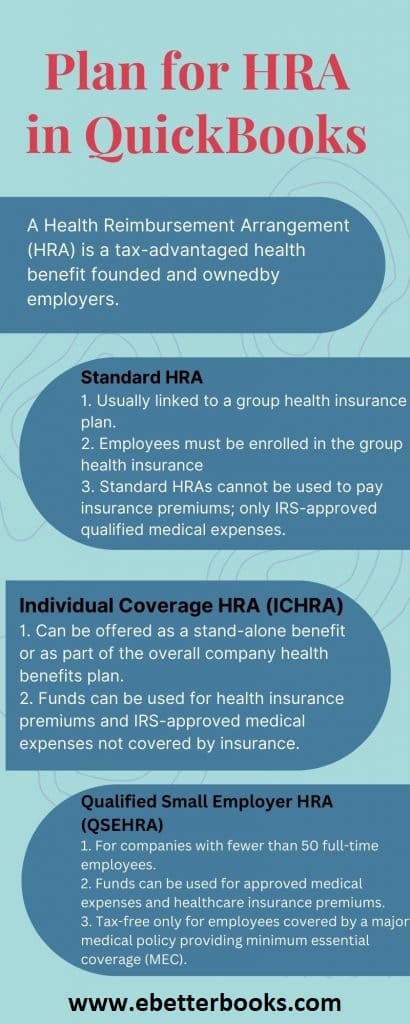
There are two types of setup HRA in QuickBooks, such as QSEHRA and ICHRA, and every HRA provides different kinds of benefits to their employers and employees rely on the size of the organization you are working in.
It’s an acronym for Qualified Small Employer Health Reimbursement Arrangement (QSEHRA), also known as small business HRA, designed for employers with 50 full-time employees. All your full-time employees are eligible to participate in this type of reimbursement regardless of their insurance status. So, it can be a nice choice if you have multiple employees with various insurance requirements.
No employer can offer employees more than the maximum limit as the QSEHRA allowance amount is covered at a certain annual limit. However, QSEHRA does not set any minimum allowance limit, so you can select any amount you want to offer to the employees provided that you are not crossing the maximum annual limit.
This is a type of HRA that all sizes of organizations can offer. It provides stand-alone advantages to its employees. You can use this option for employees of different classes who are not qualified for the group health plan, including seasonal workers or part-timers.
In contrast to QSEHRA, there is no annual limit for the allowance amount, so you can offer any amount that goes more than the QSEHRA allowance limits.
To set up tax-free reimbursement for QSEHRA & ICHRA, you must record the new payroll item and adjust payroll liabilities.
Below are the steps to do so:
Note: If you are creating more than one payroll item to track QSEHRA payments, continue using this account for liability and expense accounts. Under Profit & loss statements, you need to set liability and expense accounts showing a zero amount at the beginning. It lets you track QSEHRA payments for W-2 reporting purposes without affecting your financial reports.
From now on, the amount tracked with the new tax-tracking type will be reported on Box 12 of Form W-2 code FF.

To record the QSEHRA and ICHRA tax-free reimbursements, you just need to choose your employee’s name from the Employee section and record the additional pay types for reimbursement.
To know more, perform the following instructions:
In the employee’s details, locate the Pay section and click Edit.
If you’re using Intuit Full Service Payroll and the reimbursement option is unavailable, contact Payroll Support for further assistance.
Once all changes are made, press OK to save and exit the settings.
Select the name of the employee for whom you want to set up the reimbursement pay type.
Click the Edit (pencil) icon next to the Pay section.
After this, you can do the following:
Step 1: Enter the reimbursement amount to add it to your employee’s paycheck.
Step 2: If required, you can change the amount every month, especially if the reimbursement amount won’t be fixed each month.
Step 3: When the reimbursement is successfully added, you can also assign it to another employee.
After assigning the reimbursement to your employee, verify your accounting preferences to be sure it is posted correctly in the account for exporting purposes.
Almost most reimbursements linked with QSEHRA are tax-free; only one type of allowable reimbursement must be taxed.
Taxable Reimbursements are often reported as income and taxed like regular Wages with income & payroll taxes withheld, including premiums paid pre-tax through a spouse’s employer for a group plan that can be reimbursed on a taxable basis parallel to QSEHRA.
You can add this when needed by setting an “other earnings” type for each employee with taxable reimbursements.
To add the Other earnings pay type for the selected employee, check out the steps listed below:
From the left-hand navigation bar, select Employees.
Choose the name of the employee for whom you want to set up the pay type.
Click the Edit button to update the employee’s details.
If you need to add more pay types, click Add other earnings type and configure as needed.
Once all the details are set, press Done to save and exit.
This is how you can record the Other Earnings for your employees.
QuickBooks has a unique tracking code for QSEHRA reimbursements if you want to track. It is to be noted that it won’t affect the money transfer to happen, but it automatically populates QSEHRA reimbursements on your employees’ W2s at the end of the financial year. Always remember what you send on the W-2 for QSEHRA is the amount offered and not the amount claimed. This will display on Box 12, Code FF.
To record a health insurance reimbursement in QuickBooks, follow these steps based on whether you are using QuickBooks Online (QBO) or QuickBooks Desktop.
As an employer, you are required to go through the below-given steps when providing HRA to your employees.
Let’s proceed:
There are three types of HRAs available, including as follows:
HRA has flexible group health insurance plans, and you have an option to customize the benefit with this depending on which type of HRA you choose.
You can decide things like:
Your start date will be the date when HRA will begin. The plus point is that HRAs can initiate at any time, so if you’re in a hurry to get something in place, you don’t need to wait for an enrollment period to get started.
However, if you wish to start your plan in the middle of the year, you can pick the date of your choice accordingly, but it is recommended to start it in January so your plan year matches up with the calendar year.
You will have to cancel your organization’s group policy or remove your employees’ class from the policy based on the HRA you want to offer.
For instance, if you provide a QSEHRA, you must cancel any existing group policy in the first place. In case of ICHRA, you’re allowed to keep your group policy but ensure that the employees receiving the ICHRA are not eligible for the group plan.
You need to generate legal plan documents and make them available to all your employees, including a plan document and a summary plan description outlining your plan details.
It may be possible that most of your employees have never used an HRA earlier, so you need to clearly communicate the benefits of the HRA you are offering to them. Like, how it works and when it will start. Even if you opt for QSEHRA or ICHRA, you must provide the resources to help your employees purchase individual health insurance.
So when you setup HRA in QuickBooks, you can get benefits for health or medical expenses every month. Also, you can apply for reimbursement after adding the HRA (QSEHRA or ICHRA). However, if you are still in doubt or not so confident to go for it alone, immediately reach out to our customer service to be familiar with all the HRAs criteria.
Contact one of our accounting experts at +1-802-778-9005 if you have a specific question.
The distinction between Qualified Small Employer HRA (QSEHRA) and Individual Coverage HRA (ICHRA) is significant for both the employer’s flexibility and employee’s tax reporting:
When you set up the HRA as a Company Contribution payroll item in QuickBooks Desktop, you must assign the exact same account (e.g., HRA Employer Contribution) for both the Liability Account and the Expense Account.
This accounting practice is necessary to:
HRAs are classified as employee welfare benefit plans under federal law, making legal documentation mandatory under the Employee Retirement Income Security Act (ERISA).
While most reimbursements under Qualified Small Employer HRA (QSEHRA) are tax-free, an exception requires reimbursement to be treated as taxable income:
If your HRA allowance varies (e.g., due to mid-month enrollment or plan changes), you should bypass the recurring setting and manually enter the figure during each payroll cycle.
This prevents common payroll errors associated with forgetting to update a static recurring amount.
If you are using Intuit Full Service Payroll (an older QuickBooks Payroll platform) and the standard Reimbursement pay type is missing or cannot be edited under the employee’s pay settings, you are restricted from modifying complex payroll items directly.
If you are using QuickBooks Online (QBO) strictly to record the financial payment of a medical reimbursement outside of a formal payroll run, you have two primary accounting methods:


