Excerpt:
Managing security deposits in QuickBooks is a critical compliance task requiring the funds to be strictly classified as a Liability because they are legally owed to the tenant until earned. To ensure accuracy and adhere to local laws, businesses must record received deposits using the Make Deposits feature, crediting a dedicated Security Deposit Liability Account, and keeping the funds in a segregated bank account. When a deposit is legitimately retained, it must be reclassified from Liability to Income using a Journal Entry, a vital process for recognizing revenue only when earned and avoiding premature tax payment. Furthermore, legal mandates regarding return timelines, interest accrual, and cap limits must be tracked alongside the financial records to prevent penalties and litigation.
 Add As A Preferred
Highlights (Key Facts & Solutions)
Overview
Recording a Security Deposit in QuickBooks helps businesses track liability and handle tenant or customer transactions more precisely.
Security deposits refer to money given to a lender, landlord, or seller of a house as a guarantee or security against potential damage, non-compliance with the terms of the lease, non-payment, or loan default.
Security deposits are mostly present in rental agreements for real estate and equipment, serving to safeguard the receiving party from potential losses.
A security deposit in QuickBooks is treated as an asset for a tenant. To record it, simply create an “Other Asset” account named “Security Deposits” and assign it to the payment. This helps you track the deposit as part of your assets in QuickBooks.
The security deposits are considered as a “liability” and not as an “income” from the business point of view. They are recorded under the “liability side” of the balance sheet.
You generally don’t include security deposits on your income side if you are required to return them to the tenant at the end of your lease. You might have to keep a certain part of the security deposit for a part of it in case of:
To the extent that the security deposit reimburses these expenses, do not consider that amount in income if your practice is not to deduct the cost of repairs as expenses.

Accurately recording and managing security deposits in QuickBooks is essential for clean financial records. Businesses often make mistakes like misclassifying deposits, mixing funds, or skipping customer links. Understanding proper handling, forfeiture, reconciliation, automation, and multi-currency management ensures precise accounting and smooth audits.
Many businesses make 3 key mistakes when recording security deposits in QuickBooks. First, they record deposits as income instead of liabilities, which can cause inaccurate balance sheets. Second, they mix deposit funds with operating cash, making it harder to track and reconcile. Third, they skip linking the deposit to the correct customer or vendor profile, which leads to missing records during refunds. By fixing these 3 errors, you ensure clean financial data, accurate tax reporting, and faster audit preparation. Always use a dedicated liability account, keep funds in a separate bank account, and document each transaction properly.
When a security deposit is forfeited, follow 3 clear steps in QuickBooks. First, reclassify the deposit from liability to income to reflect it as business revenue. Second, create a journal entry that credits the liability account and debits the appropriate income account. Third, update customer records to note the reason for forfeiture, such as early lease termination, unpaid rent, or damages. This process ensures accurate financial statements, compliance with tax laws, and a clear audit trail. Always store supporting documents like lease agreements, invoices, and damage reports to justify the forfeiture in case of disputes or inspections.
To reconcile security deposit accounts, follow 3 critical steps. First, match all deposit transactions in QuickBooks with bank statements to ensure no missing or duplicate entries. Second, verify that each deposit is linked to the correct customer or vendor account for accurate tracking. Third, review the liability balance and confirm it matches your separate security deposit bank account. This reconciliation process helps prevent accounting errors, supports accurate financial reports, and simplifies tax preparation. Perform this check monthly for smooth year-end closing and maintain a detailed reconciliation report for audits or internal reviews.
Automation in QuickBooks can streamline security deposit management in 3 major ways. First, set up recurring transactions for deposits from long-term tenants or clients to save manual entry time. Second, use automated reminders to track refund dates, ensuring timely returns and avoiding penalties. Third, integrate QuickBooks with payment gateways to automatically record deposits as liabilities. This approach reduces human errors, speeds up data entry, and ensures consistent compliance. Always review automated settings monthly to confirm accuracy, and keep backup records in case of technical issues or system updates that could impact tracking.
Managing multi-currency security deposits requires 3 key actions. First, enable the multi-currency feature in QuickBooks to record deposits in the customer’s currency. Second, set up a dedicated liability account for each currency to avoid conversion confusion. Third, use QuickBooks’ real-time exchange rate updates to track gains or losses when converting deposits. This ensures accurate financial statements, proper tax reporting, and easier reconciliation. Always review currency rates before refunds, as fluctuations can impact the final amount. Maintain detailed records of original deposit amounts, conversion rates, and payment dates for transparency and audit readiness.
Security deposit management varies widely across regions, with legal limits, storage requirements, and refund deadlines differing significantly. Proper handling, including dedicated accounts and staff training, ensures compliance and transparency. Integrating QuickBooks with property software further streamlines processes, while deposit data aids in accurate financial planning.
Security deposit laws vary in 3 critical ways across states and countries. First, some regions cap the maximum deposit amount a landlord can collect, often between one to three months’ rent. Second, many laws require deposits to be stored in interest-bearing accounts, with interest paid back to tenants annually. Third, strict timelines exist for returning deposits, usually 14–60 days after a lease ends. In QuickBooks, tracking these legal requirements ensures compliance, prevents penalties, and builds trust with clients. Always check local regulations before recording, holding, or refunding a deposit, and document compliance for legal protection.
Maintaining separate bank accounts for security deposits offers 3 major advantages. First, it prevents accidental use of deposit funds for operational expenses, protecting you from legal disputes. Second, it simplifies reconciliation, as the account balance should always match your QuickBooks liability records. Third, it enhances transparency during audits, making it easy to prove funds are untouched. Open a dedicated account solely for deposits, link it in QuickBooks, and record every transaction with clear descriptions. Review the account monthly to confirm accuracy, and avoid mixing even small operational payments with deposit funds.
Training staff on security deposit recording requires 3 focused steps. First, create a simple step-by-step guide with screenshots showing how to record, refund, and reclassify deposits in QuickBooks. Second, conduct regular workshops or online sessions to update them on policy changes, tax rules, or QuickBooks features. Third, assign one staff member as the deposit compliance lead to review entries and correct mistakes promptly. This approach ensures consistent accuracy, reduces errors, and speeds up month-end reconciliation. Always provide real case examples during training to make the process relatable and easy to follow.
Integration between QuickBooks and property management software offers 3 key benefits. First, it syncs tenant data and deposit transactions automatically, eliminating manual entry errors. Second, it enables real-time tracking of deposits, refunds, and forfeitures across multiple properties. Third, it consolidates financial and rental data for faster reporting and tax preparation. Choose software that supports QuickBooks integration, set clear mapping for liability accounts, and test the sync before going live. Regularly monitor data flow to ensure accuracy, and keep backup records in case of sync issues or software updates.
Security deposit data can improve financial forecasting in 3 ways. First, tracking total deposits helps estimate future refund obligations and plan cash flow accordingly. Second, analyzing forfeiture trends can highlight recurring issues, such as high tenant turnover or property damages. Third, monitoring deposit growth over time can indicate business expansion or contraction. In QuickBooks, use custom reports to pull deposit-related figures and integrate them into your budgeting process. Regularly review this data quarterly to adjust forecasts, allocate resources wisely, and strengthen overall financial planning.
By properly recording the security deposit in QuickBooks, businesses can manage transparent and well-organized financial records. This procedure makes sure that all accounting standards are followed properly without any dispute.
A security deposit is classified as a Liability because it represents funds that the business is legally obligated to return to the tenant or customer at a future date.
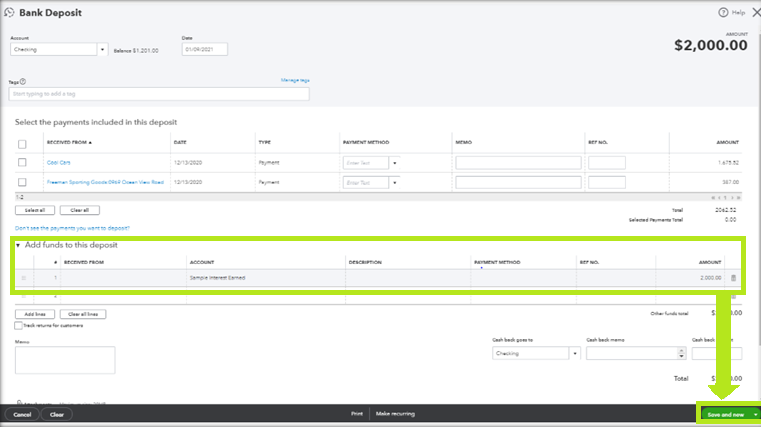
In QuickBooks Desktop, receiving a security deposit must be recorded using the Make Deposits feature to correctly increase both the bank asset account and the deposit liability account.
The necessary entry is:
Using this process ensures the transaction shows up on the bank statement for reconciliation.
Maintaining separate bank accounts for security deposits is crucial to prevent the commingling of funds, which is often required by state and local laws and ensures accounting transparency.
A forfeited security deposit, where the tenant fails to comply with the lease and the business retains the funds, requires a specific two-step reclassification process to move the funds from liability to revenue.
If a portion of the deposit is kept to pay for property repairs, the transaction should reflect that the retained deposit is income that offsets the expense of the repair, maintaining accounting integrity.
Mismanagement of security deposits often stems from a lack of adherence to fundamental accounting and legal principles.
The three most critical mistakes are:
Tracking the amount is insufficient; businesses must manage three compliance factors tied to the deposit that vary significantly by state or country.
When you put down a security deposit for a leased office, equipment, or rental building, accounting standards require you to record the transaction as an asset rather than an immediate expense. Because the landlord or vendor is expected to return these funds at the end of the lease term, the money remains a financial resource belonging to your business.
To record a security deposit you put down in QuickBooks Desktop or QuickBooks Online, follow this two-part procedure:


