Excerpt:
Recording asset sales in QuickBooks ensures accurate financial reporting, compliance, and effective asset management. By calculating depreciation, using appropriate QuickBooks tools like the "Fixed Asset Item" and "Sale of Assets" accounts, and tracking gains or losses, businesses maintain clear, up-to-date records. This process helps companies manage asset values, track transactions, and make informed financial decisions, ultimately enhancing financial transparency and decision-making.
 Add As A Preferred
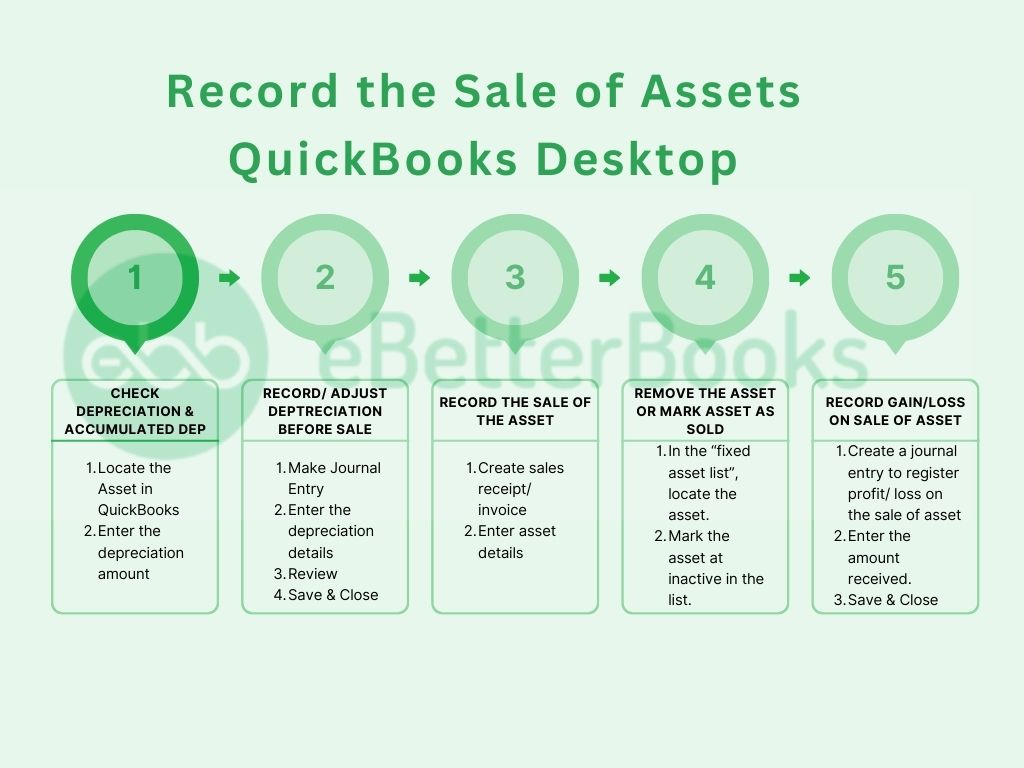
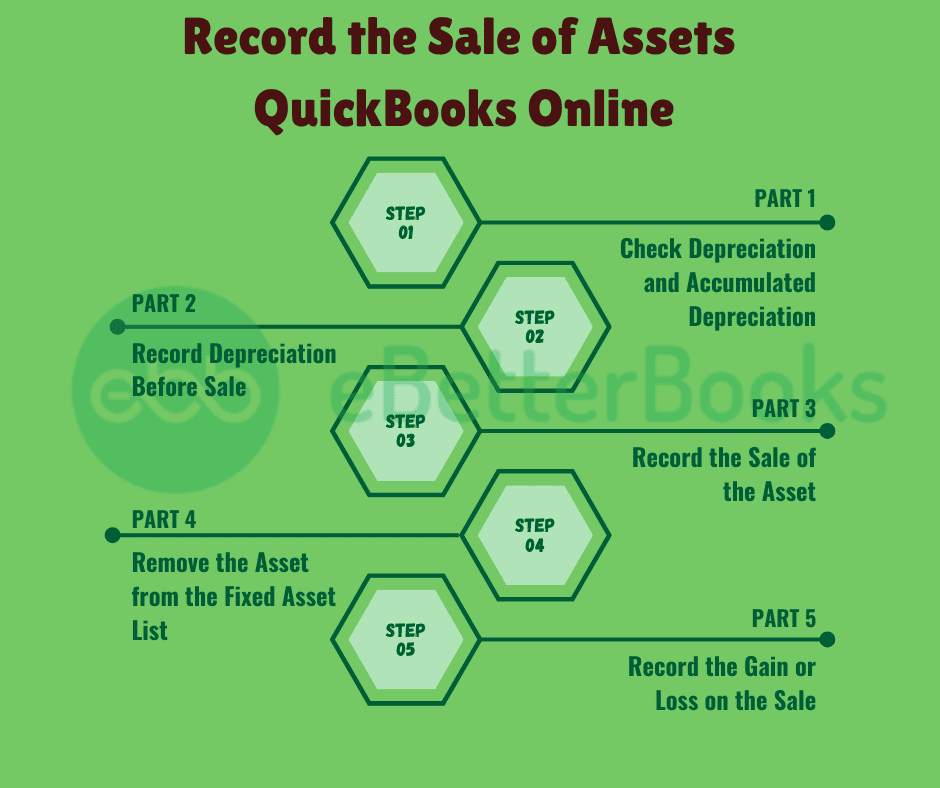
Recording the sale or disposal of a fixed asset within QuickBooks Desktop and Online is a vital financial procedure that ensures the integrity of the balance sheet. The process is systematically completed through five core stages: accurately calculating and posting any remaining depreciation up to the day of sale; recording the sale proceeds via an invoice or sales receipt; formally removing the asset from active records by marking it as inactive; and preparing a final, balancing journal entry to eliminate the asset’s original cost and accumulated depreciation, thereby recognizing the resulting gain or loss. This content provides detailed, expert-level instructions for both QuickBooks platforms, emphasizing that the final journal entry must balance the accounting equation. Furthermore, the material extends beyond basic sales to cover complex transactions, including the proper method for recording trade-in allowances and navigating sales tax obligations, providing comprehensive guidance necessary for accurate financial reporting and compliance.
Highlights (Key Facts & Solutions)
Recording of asset sales begins with the calculation of depreciation. So, first, calculate both depreciation and accumulated depreciation and then start with the journal entry.
Depreciation is important to record as it helps businesses determine the current value of an asset after all the wear and tear incurred during the accounting period.
In accounting, it’s crucial to mark the asset as “inactive” when selling it. All these transactions are recorded in a journal entry that includes the record of gain or loss.
Calculate an asset’s depreciation and accumulated depreciation before selling it. This step is crucial for accurate financial reporting.
Record depreciation to reflect the asset’s decreasing value over time. Use a journal entry for this purpose.
Properly recording the sale ensures accurate financial records.
Removing the sold asset from the list ensures accurate asset tracking.
Recording the gain or loss on the sale of an asset is crucial for facilitating better strategic planning and resource allocation. It is not necessary for the sold asset to be sold at a profit. Sometimes, businesses also sell assets at a loss.
Put the Gain/ Loss information. [ It will include the following:
Note: If there is a gain on the sale, credit the Gain on Sale of Asset account for the difference. If there is a loss, debit the Loss on Sale of Asset account for the difference.
It’s important to calculate depreciation and the accumulated depreciation before being able to sell an asset.
Another journal entry was used to note down the asset’s depreciation.
Ensure the sale is recorded properly in a way that reports on changes in asset value.
The disposal of the sold asset helps in avoiding overstatement of assets.
By properly entering the asset sales in QuickBooks, you will be confident that your financial statements are updated and accurate. Here are some useful tips for recording asset sales:
The first step is to create an account in the Chart of Accounts to record revenue from asset sales. Credit transactions in the Fixed Asset account make it easier to categorize particular transactions and thus simplify reporting.
Through QuickBooks’ Class Tracking feature, you can sort your asset sales by various classes, such as departments. This enables you to view sales historically per category or from different perspectives regarding the sale of assets from different subdivisions within the business.
Make sure you adjust for any amount accumulated from depreciation before selling an asset. Recording depreciation will clarify the financial records and allow you to properly estimate the sale’s effect on the company’s balance sheet.
QuickBooks has a check called Fixed Asset Item that is suitable for creating and selling fixed assets. This tool assists in controlling the number of ledger entries and adjusting depreciation on the sale to record the correct amount and in compliance with accounting standards.
When dealing with property or even vehicles, you can use the Other Charge Item. This feature enables you to follow through on costs that cannot be grouped under ordinary groups to enhance your financial reports.
The company should open a Sale of Assets account to record the money received from sales of its assets separately from other receipts.
It keeps records of expenses and incomes without complications and is useful when preparing specific financial statements on request.
Recording asset sales isn’t always straightforward—especially in real-world cases like partial disposals, trade-ins, or grouped transactions. This section covers advanced subtopics that go beyond the basics, helping you navigate complex sale entries, prevent reporting errors, and maintain clean financials. Mastering these scenarios ensures your QuickBooks data stays accurate, compliant, and audit-ready.
Selling only a part of an asset? QuickBooks doesn’t allow splitting assets directly, so you need to create 3 key entries. First, allocate the original cost and accumulated depreciation between the sold and retained portions using journal entries. Second, record the sale as usual, but only for the sold portion’s value. Third, adjust the remaining asset value in the Fixed Asset Item List to reflect updated cost and depreciation. This ensures accurate financials, audit clarity, and future depreciation tracking. By separating values precisely, you avoid overstated assets and maintain real-time reporting integrity. Always review your gain/loss entries carefully.
When trading in an old asset for a new one, you must record 3 separate values in QuickBooks. First, determine the book value of the traded asset (original cost minus accumulated depreciation). Second, create a journal entry to remove the traded asset and record any gain or loss. Third, record the purchase of the new asset, subtracting the trade-in allowance from the total cost. This method keeps balance sheets accurate, depreciation aligned, and tax reporting clean. Never skip tracking trade-in discounts—they impact your asset base, financial statements, and depreciation calculations going forward.
When selling an asset with sales tax, you must track 3 separate components: the sale price, sales tax collected, and gain or loss. Start by enabling sales tax in QuickBooks, then use Sales Receipt or Invoice to record the sale, applying the correct tax rate. Second, post the tax portion to your Sales Tax Payable account. Third, ensure your journal entry reflects only the asset’s net book value versus sale proceeds to capture the true gain/loss. This process ensures tax compliance, clean financial reporting, and accurate liability tracking—especially crucial during audits or tax season.
Selling multiple assets as a group? You need to perform 3 organized steps in QuickBooks. First, break down each asset’s original cost and accumulated depreciation individually, even if sold together. Second, record a separate line for each asset in your journal entry or sales form to ensure transparency. Third, allocate the total sale amount proportionally across the assets to compute accurate gains or losses. This method supports clean reporting, easier audits, and precise depreciation history. Never lump grouped sales into one entry—doing so hides critical data and leads to misstatements in your financials.
Made a mistake while recording an asset sale? QuickBooks allows you to reverse it with 3 corrective actions. First, locate and delete the incorrect journal entry or sales form linked to the sale. Second, restore the fixed asset’s value by manually re-entering original cost and accumulated depreciation in the Fixed Asset Item List. Third, re-record the correct sale details using accurate depreciation, sale amount, and gain/loss entries. This ensures error-free books, clean audit trails, and compliance with accounting standards. Avoid partial edits—always perform a full reversal to maintain transaction integrity.
Beyond basic entries, effective asset sale recording in QuickBooks requires strategic awareness. This section offers practical guidance, advanced tools, and common pitfalls to help you manage fixed assets with confidence. By applying these insights, you ensure accuracy, compliance, and financial clarity—even in complex or high-volume scenarios.
Disposal and write-off may seem similar but involve 3 key differences in QuickBooks. Disposal means selling, trading, or retiring an asset, where value exchange occurs, and a gain or loss is recorded. Write-off, on the other hand, applies when an asset is damaged, obsolete, or stolen, with no sale involved—only a loss is recorded. In disposal, you adjust both the Fixed Asset and Accumulated Depreciation accounts. In a write-off, you bypass income accounts and directly debit Loss on Asset Write-Off. Understanding this ensures accurate entries, prevents tax issues, and maintains balance sheet integrity.
To reflect asset sales in reports, follow 3 integration steps in QuickBooks. First, tag every journal entry or invoice with relevant classes, locations, or custom fields for traceability. Second, use pre-built reports like “Profit and Loss” and “Fixed Asset Listing” to track gains, losses, and book value changes. Third, customize your dashboard using filters to show asset disposal trends, depreciation impact, and cash inflows. This integration boosts financial visibility, executive insights, and faster decision-making. Always refresh your reports after entries—real-time syncing ensures you’re not relying on outdated numbers.
Auditing asset sales? Stick to 3 core practices for a smooth year-end close. First, reconcile all asset sale entries with supporting documents—sales receipts, depreciation schedules, and journal entries. Second, ensure each sale has a matching gain/loss entry and updated Fixed Asset List. Third, compare balance sheet changes against prior periods to flag discrepancies. These steps offer clean audit trails, reduce compliance risks, and ensure accurate tax filings. Don’t forget to lock your books post-review—this prevents future edits and preserves data integrity during audits.
Need advanced control over fixed assets? Combine QuickBooks with third-party tools using these 3 integration steps. First, sync asset data using export/import features or direct app integrations like Asset Panda, Sage Fixed Assets, or NetSuite. Second, manage depreciation schedules, asset locations, and warranty info outside QuickBooks for deeper visibility. Third, post summarized entries back into QuickBooks to maintain concise ledgers while preserving detailed tracking elsewhere. This method ensures scalable asset tracking, enhanced reporting accuracy, and audit compliance. Always validate sync settings—one mismatch can distort both depreciation and disposal entries.
Avoiding errors in asset sale entries? Watch out for these 3 common mistakes. First, never skip recording accumulated depreciation—it distorts gain/loss calculations. Second, don’t record the full asset value as income; always offset it with depreciation and book value adjustments. Third, avoid forgetting to mark the asset as inactive after sale—this causes asset overstatements. These oversights lead to misleading financials, tax issues, and failed audits. Always double-check journal entries, run post-sale reports, and consult depreciation schedules before finalizing transactions.
One of the most important steps in keeping correct financial records is entering the sale of an asset into QuickBooks. Ensure that QuickBooks has all information accurately entered, including the sale price, any accrued depreciation, and the asset’s disposal. A journal entry must be made to remove the asset from the balance sheet and record any profit or loss from the sale.
By taking these actions, you can make sure your records are current and adhere to accounting rules while appropriately reflecting the effect of the asset sale on your financial statements.
To record the sale of an asset in QuickBooks Desktop, follow a structured five-step accounting process:
Using this method ensures you know exactly how to record an asset sale in quickbooks without distorting your financial reports.
Entering the sale of assets requires clearing the balance sheet account while correctly capturing cash flow and capital changes. Users can learn how to sell an asset in quickbooks by following these steps:
This step-by-step process ensures full compliance with standard accounting principles and year-end reporting requirements.
To record the sale of a fixed asset in QuickBooks via a general journal entry, you must remove the asset’s original cost and accumulated depreciation from your balance sheet while recording any cash received and the resulting gain or loss.
Follow these steps to complete the entry correctly:
Still have questions? Explore our detailed FAQs.


