Excerpt:
Correctly recording credit card cash back rewards in QuickBooks is crucial for maintaining accurate financial records and optimizing business savings. The standard accounting best practice recommends treating cash back as a contra-expense rather than taxable income, which provides a clearer view of net spending and avoids inflating revenue on the Profit and Loss statement. This process requires users of both QuickBooks Desktop and Online to set up a dedicated account, typically categorized as an Other Current Asset, to track rewards separately. Implementing advanced techniques such as sub-accounts for multiple credit cards and utilizing Class or Location tracking enhances financial insights, improves budgeting, and ensures compliance for effective expense optimization.
 Add As A Preferred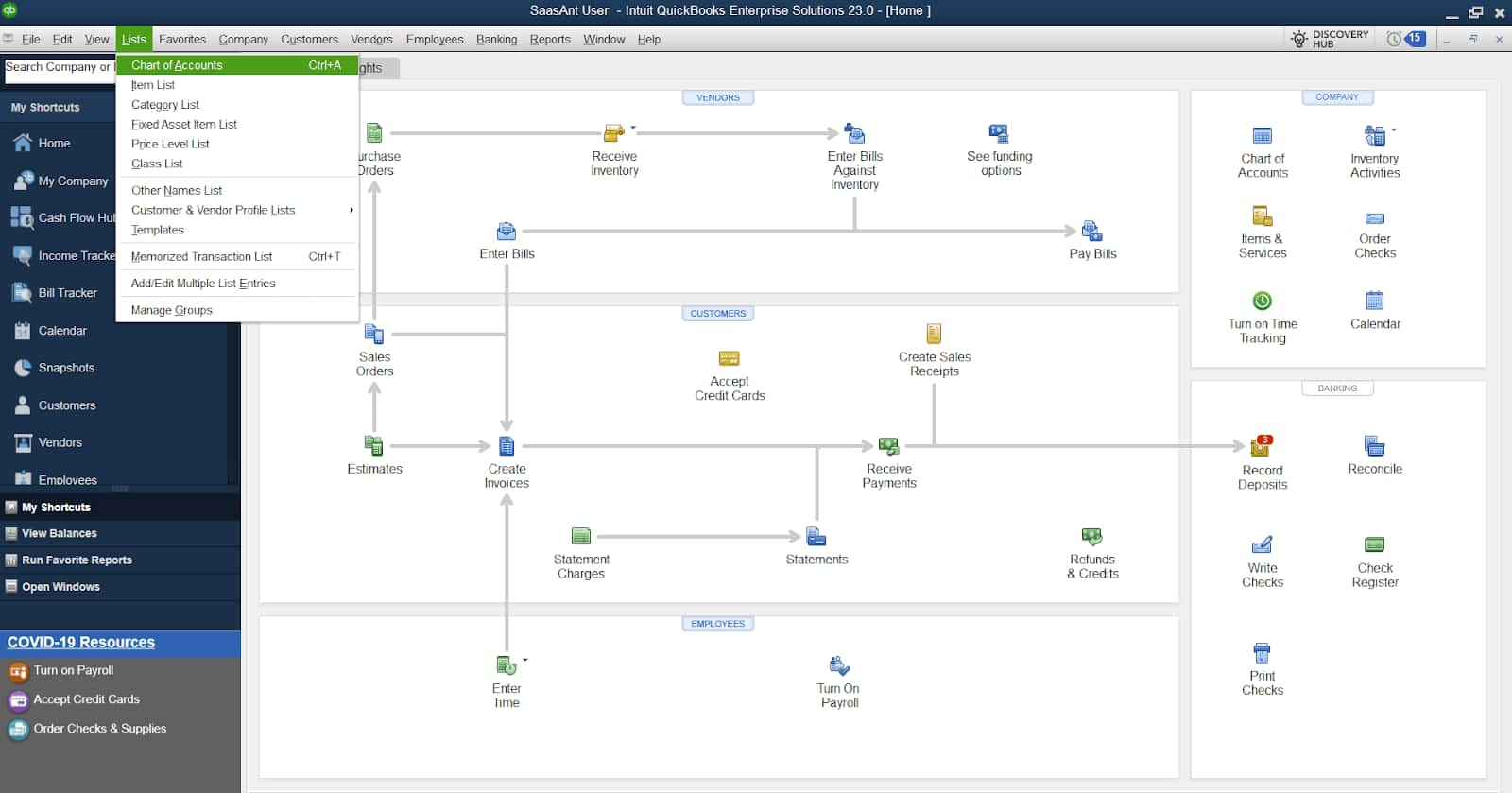
Highlights (Key Facts & Solutions)
Overview
Recording cash-back rewards in QuickBooks correctly is essential for maintaining accurate financial records and supporting better financial management.
Cash-back rewards are one of the main and most attractive options, along with credit cards, which can be used to compensate for costs or add to savings.
Cash-back rewards function as a “contra-expense” on the profit and loss statement, showing a reduction in expenses rather than income.
Whether you use QuickBooks Desktop or QuickBooks Online, you should document these kinds of rewards well to provide the correct picture of your financial situation.
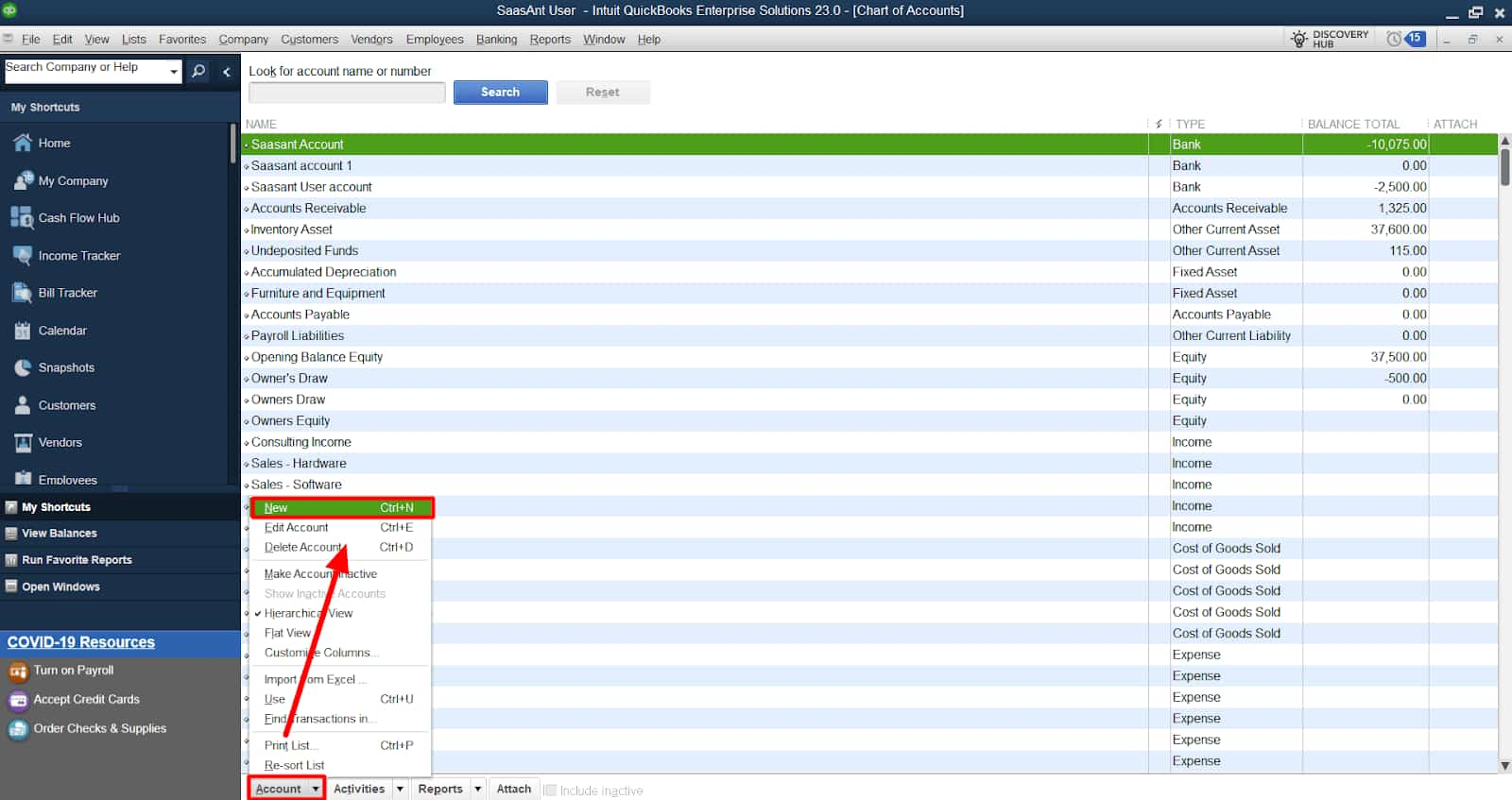
Step 1: Access the Chart of Accounts
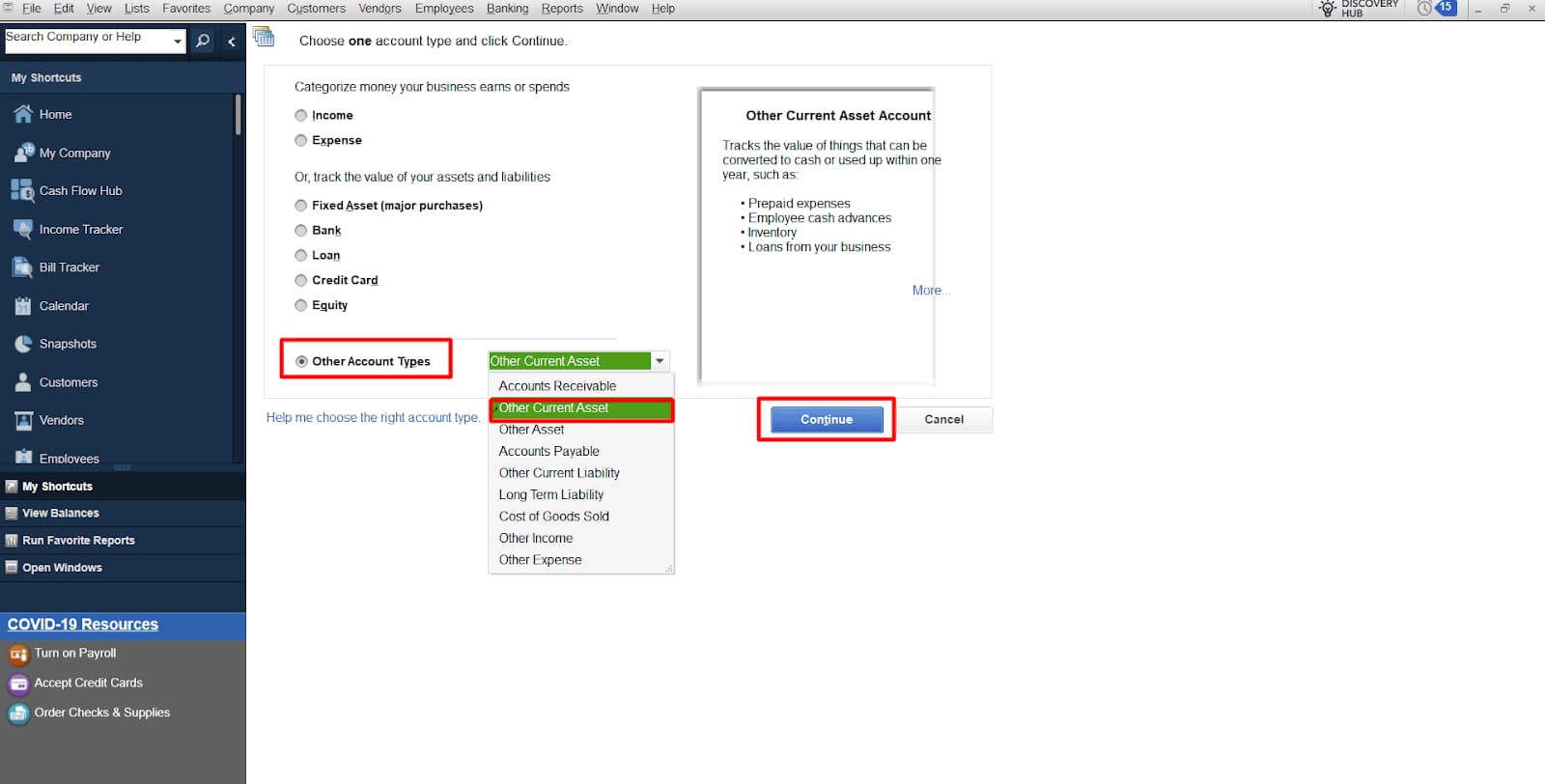
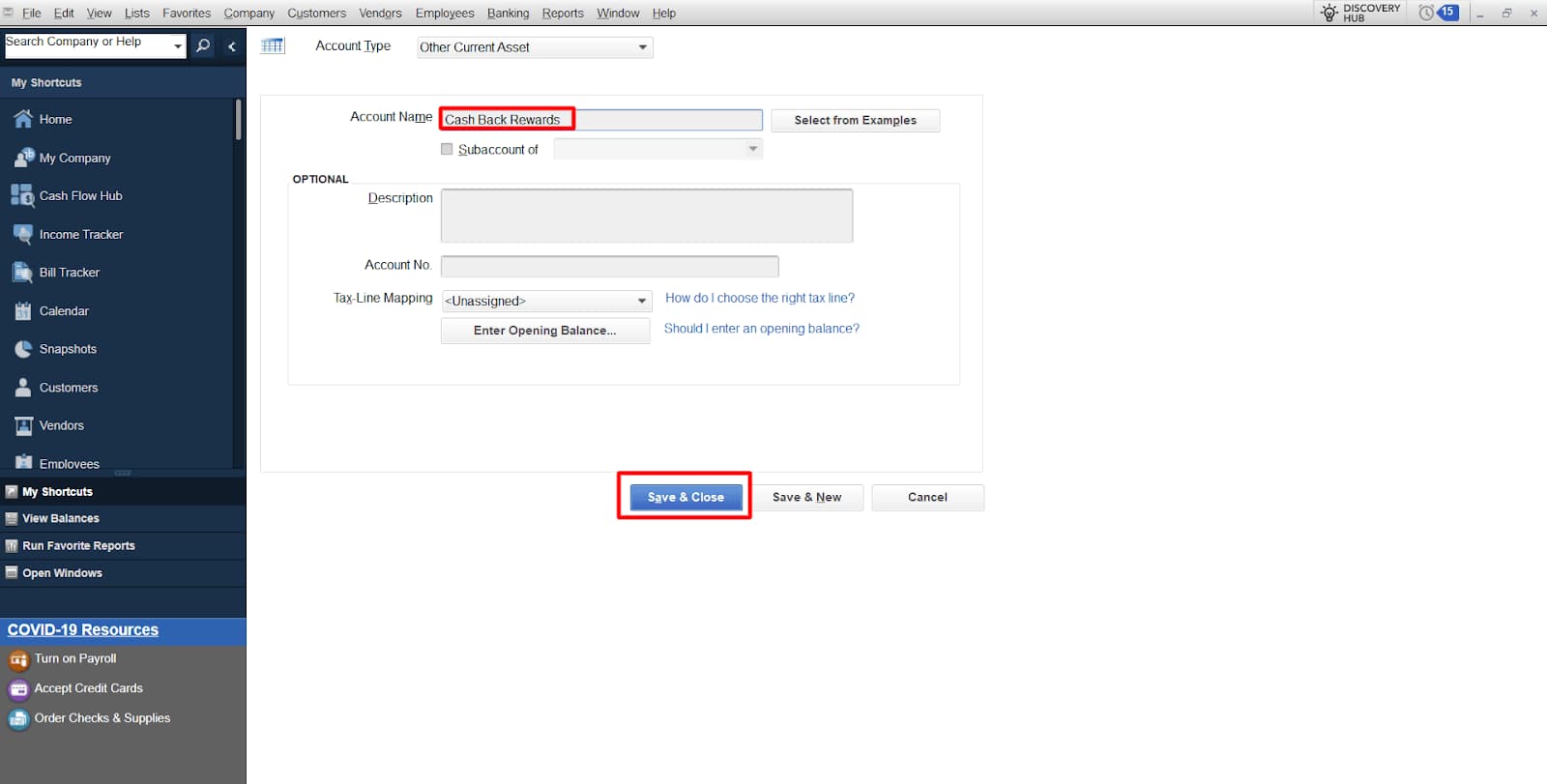
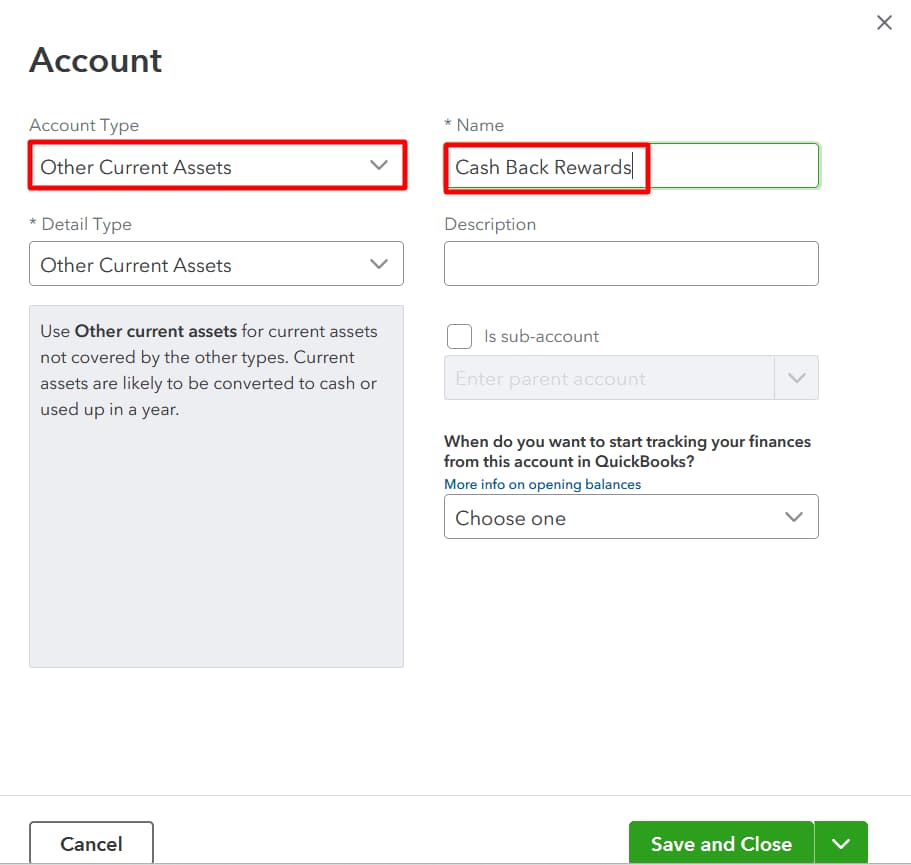
Step 2: Set Up the New Account
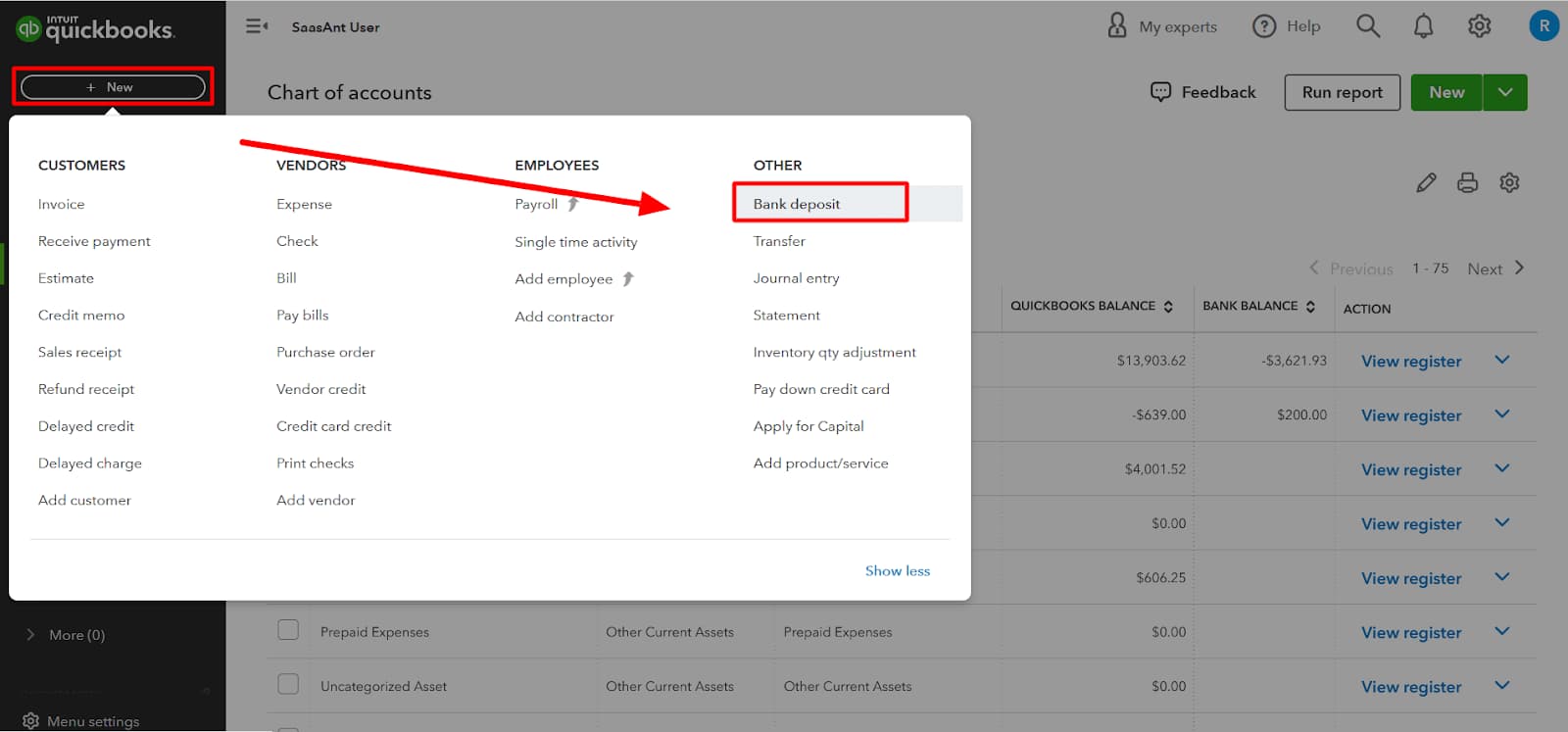
Step 1: Open the Credit Card Charges Entry Screen
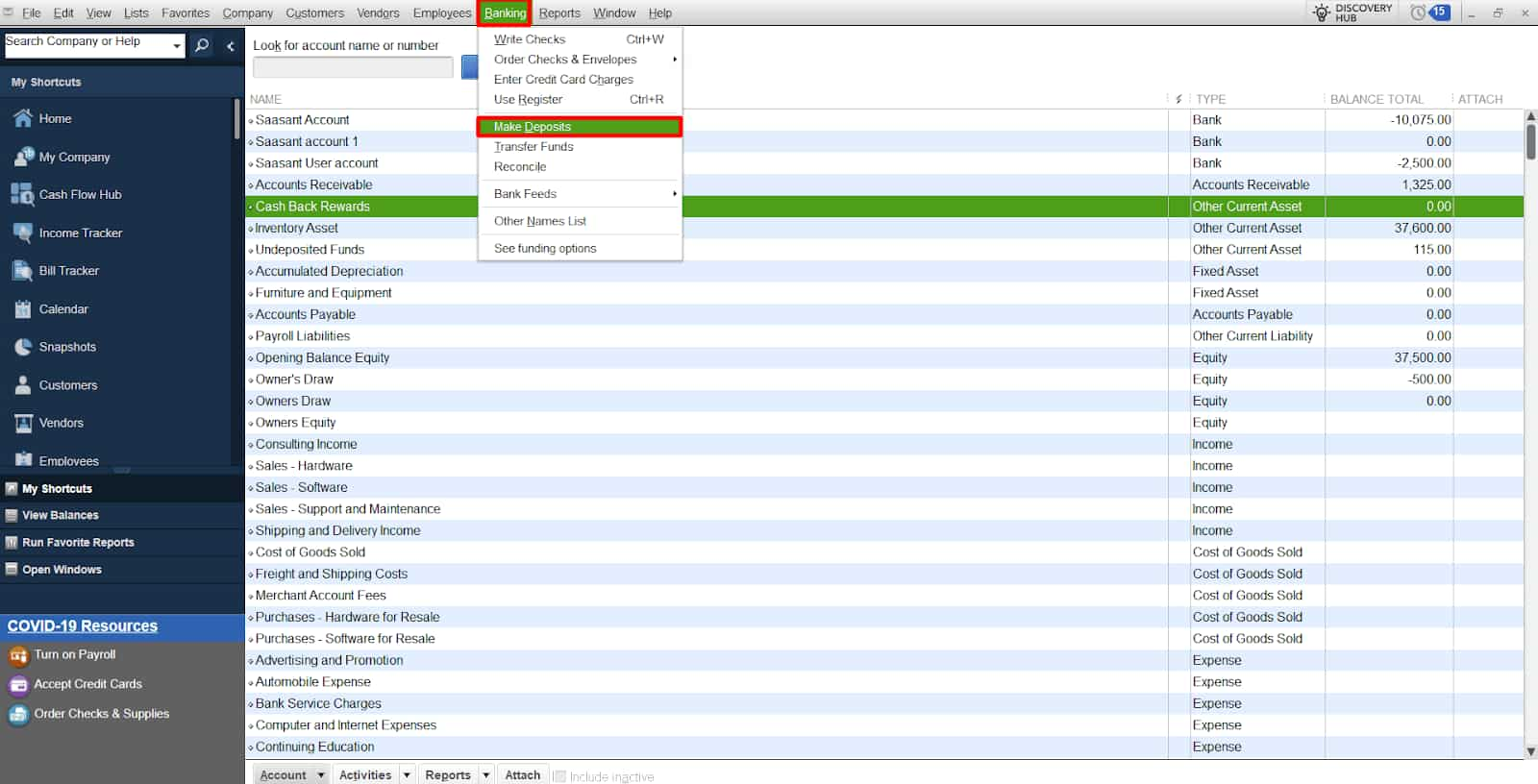
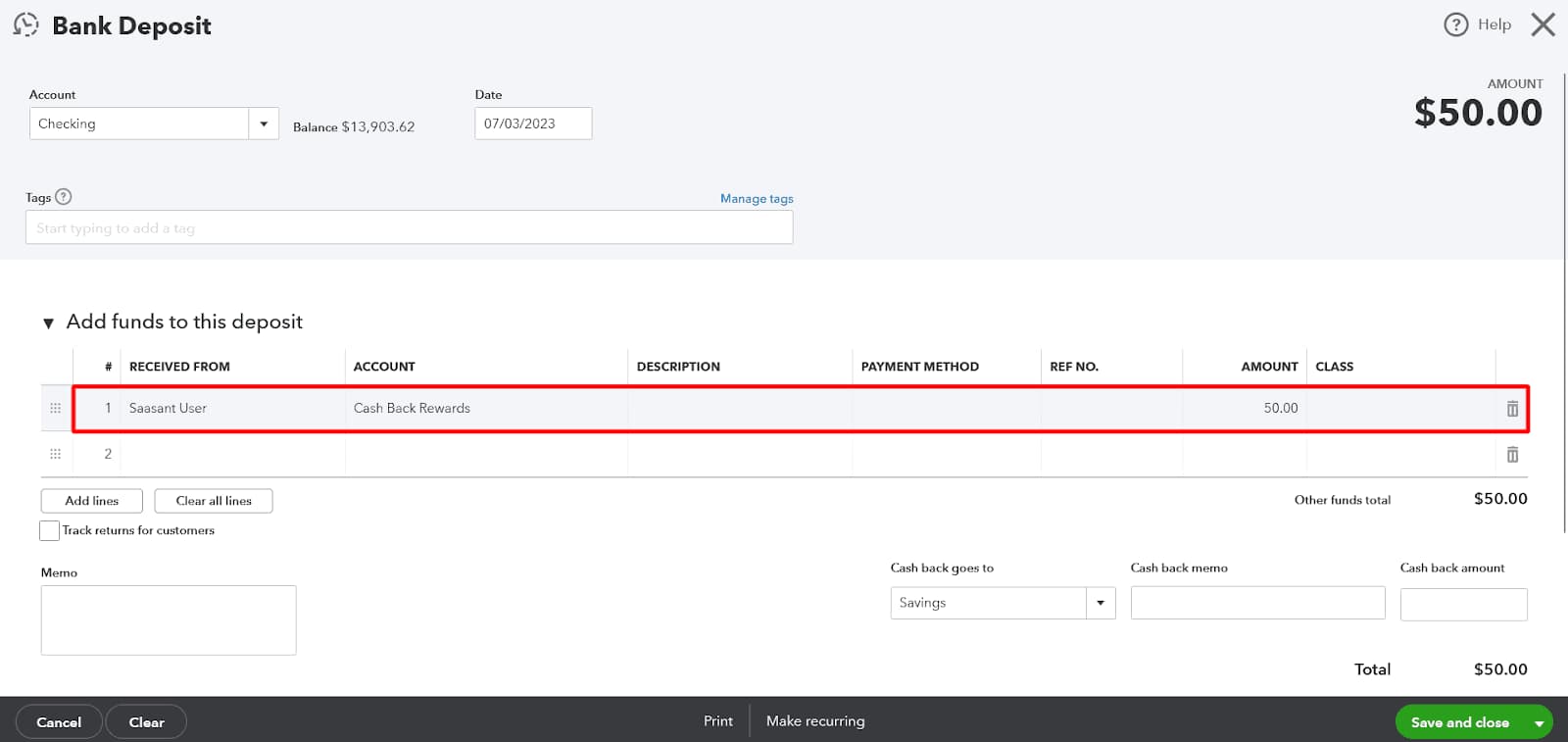
Step 2: Enter the Cashback Transaction
Step 3: Save the Transaction
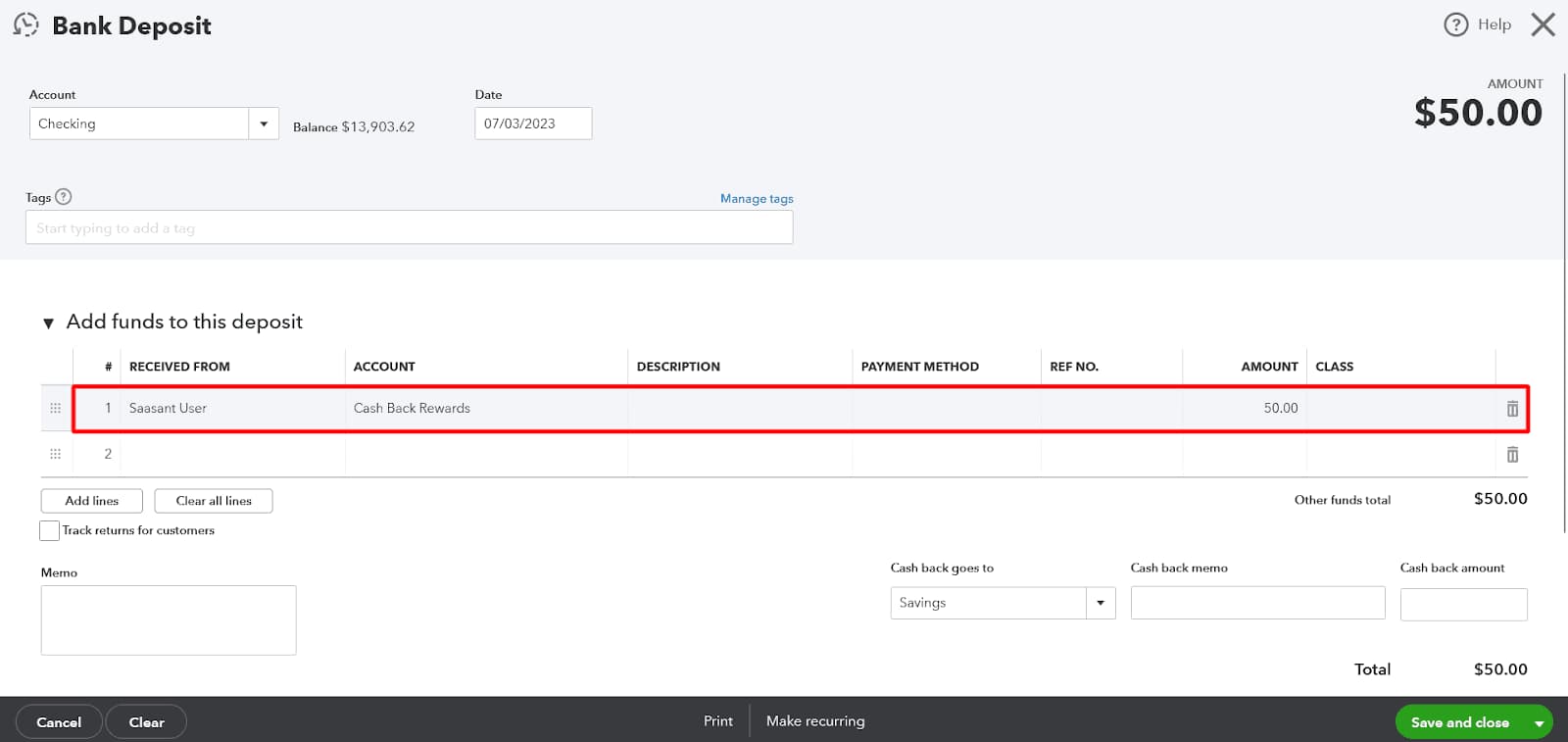
After you’ve recorded the deposit, you must apply the cash-back incentives to the proper spending account.
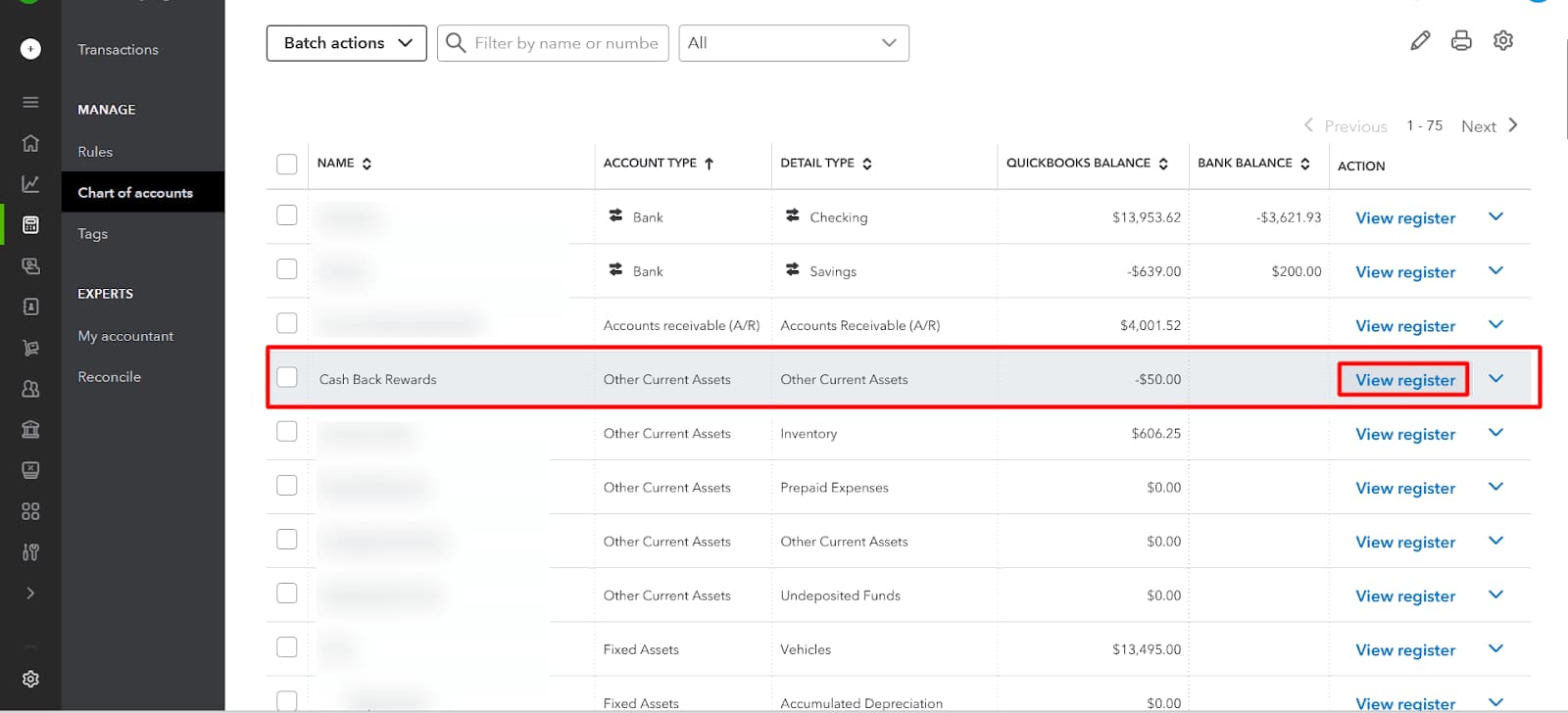
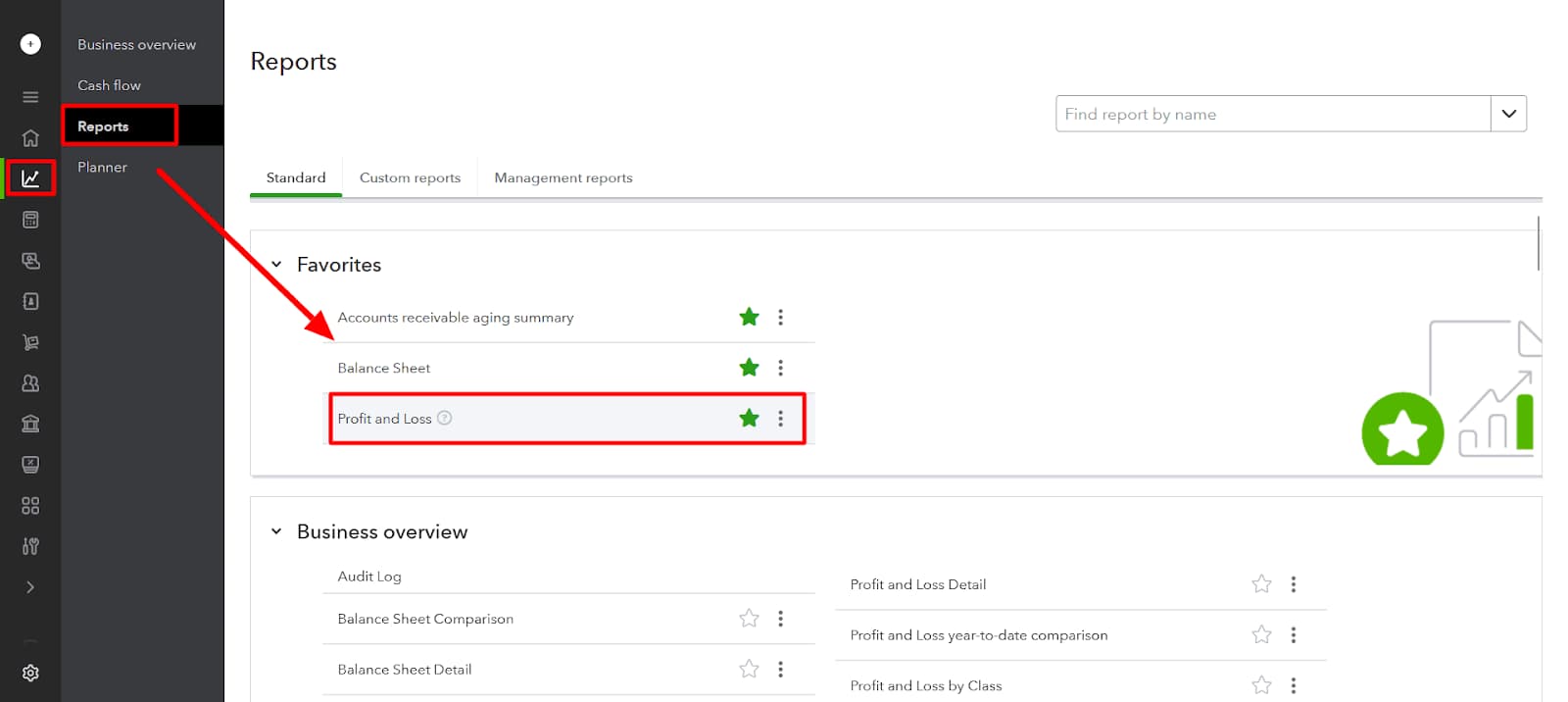
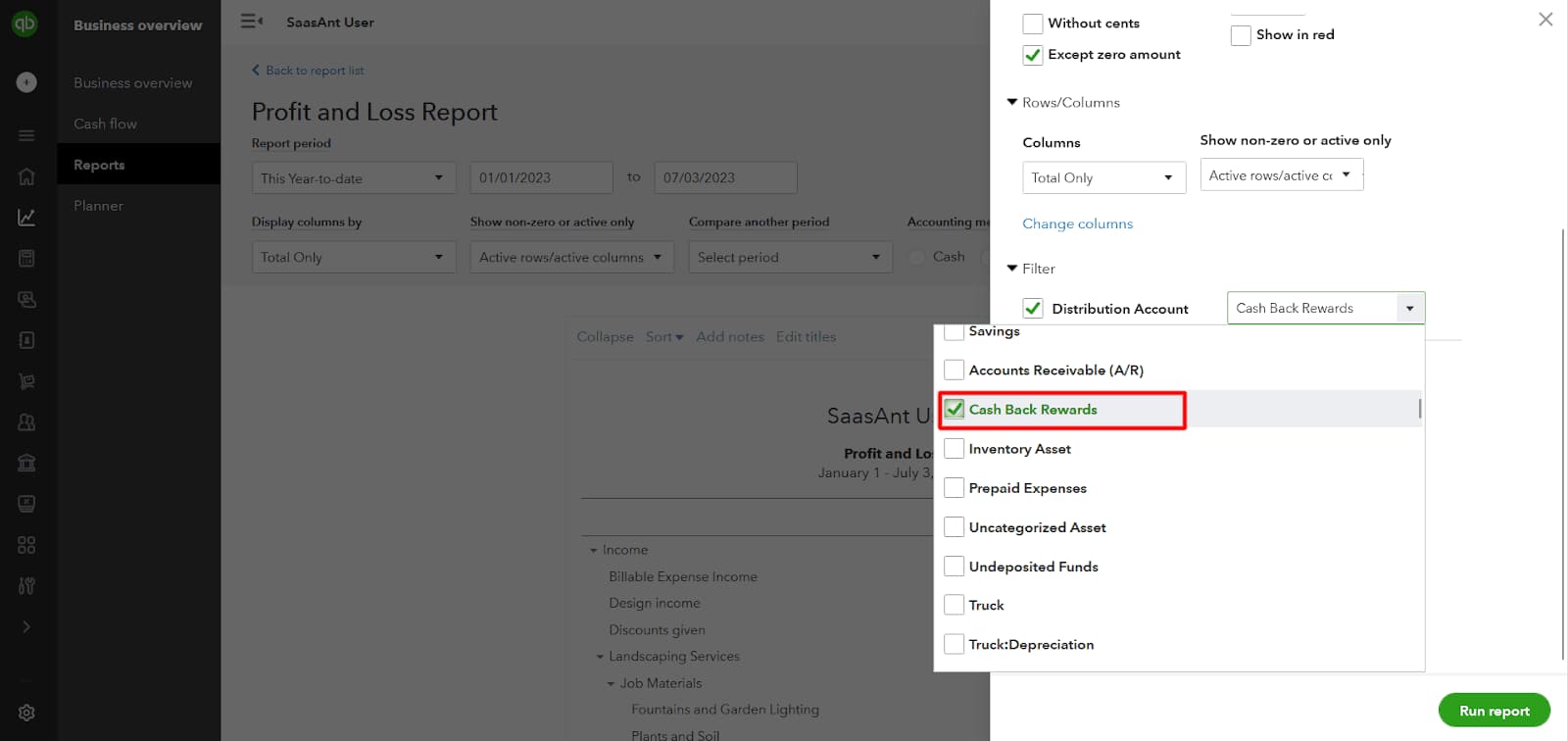
To examine the classification of cashback rewards:
To help improve your record keeping, you should open a separate account on QuickBooks online for your cash-back earnings.
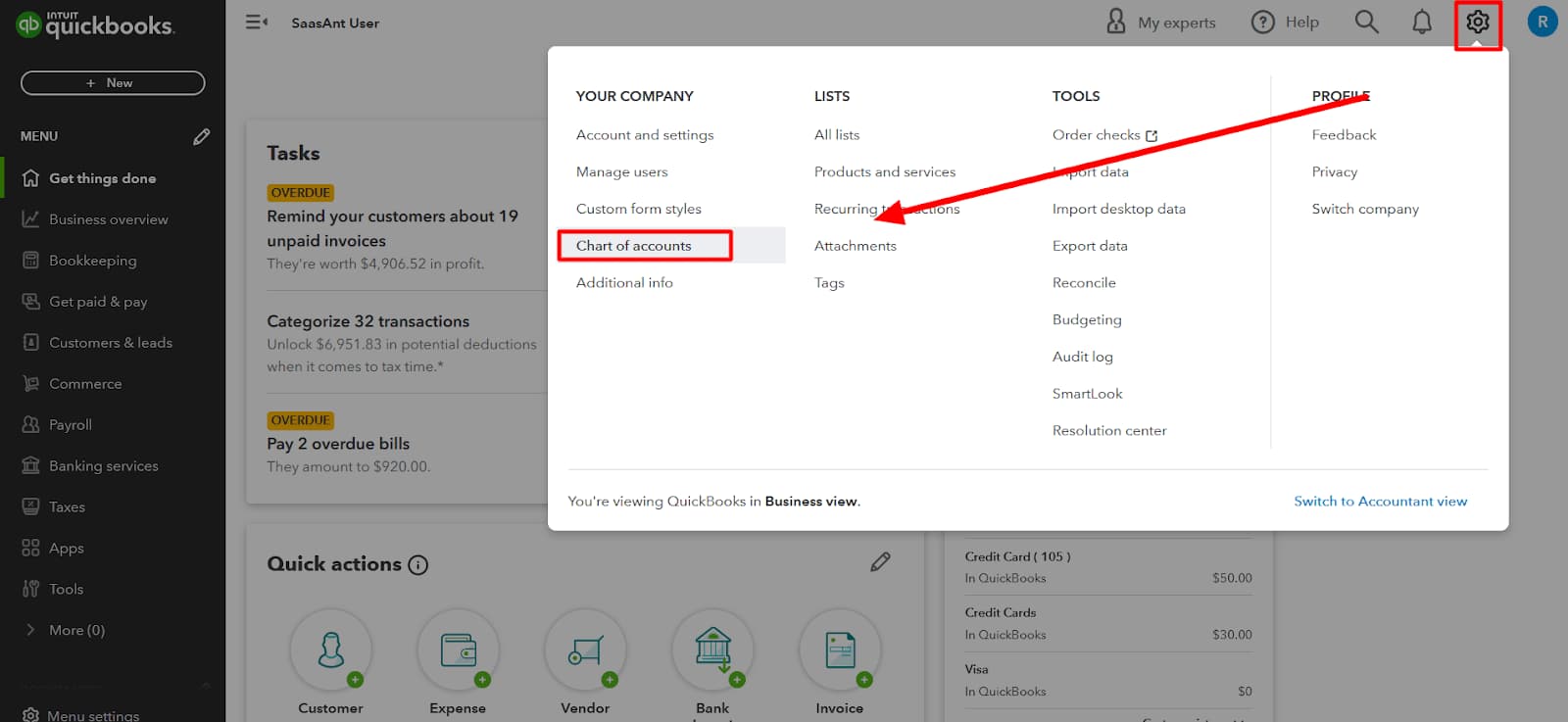

If you get any form of cash back on your credit card, be sure to enter it as a deposit to QuickBooks Online.
After you’ve recorded the deposit, you must accurately classify the cash-back benefits.
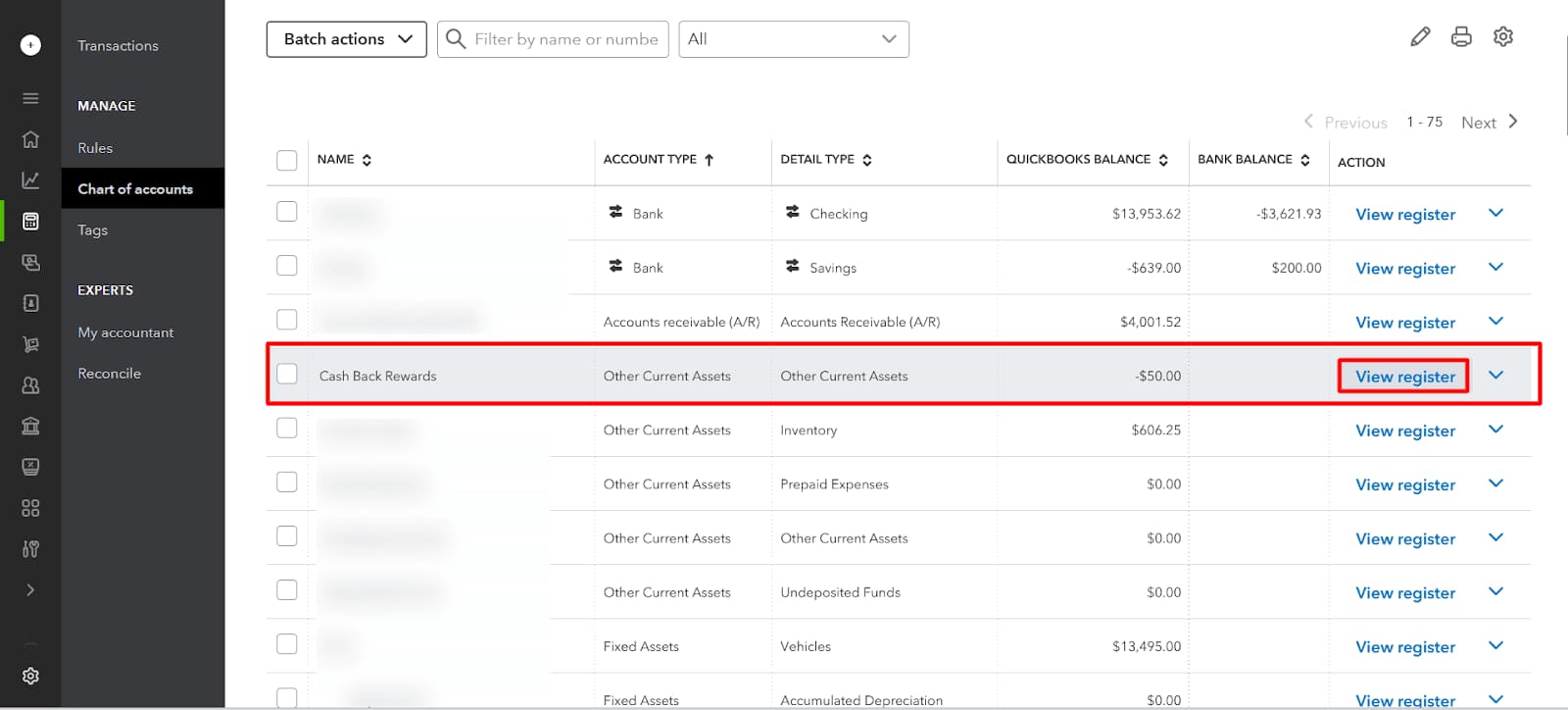
Making sure that cash-back rewards are correctly categorized requires routinely going over reports in QuickBooks Online.
Recording Cash Back Rewards is important for several key reasons:
Recording credit card cashback rewards correctly in QuickBooks is crucial for maintaining precise financial records and optimizing business savings. Whether you use QuickBooks Desktop or Online, understanding how to categorize these rewards—as income or contra-expense—impacts your profit reports, tax calculations, and budgeting. Avoid common errors, track rewards from multiple cards separately, and leverage advanced tools like class and location tracking for deeper insights. This guide breaks down essential strategies to help you record, reconcile, and analyze cashback rewards efficiently, empowering you to make smarter financial decisions and maximize business benefits.
Recording cashback as income increases your total revenue, shows up on your Profit & Loss report, and may affect tax calculations. On the other hand, treating it as a contra-expense directly reduces your reported expenses, gives a clearer view of net spending, and usually avoids taxable income classification. For example, $200 cashback recorded as income may inflate profit, while the same amount as contra-expense offsets original costs. Most businesses prefer contra-expense for accurate cost tracking, cleaner reports, and audit readiness. Choose the method based on tax advice, reporting preference, and accountant recommendations for compliance and clarity.
Entering cashback as regular income instead of non-taxable contra-expense is a frequent mistake that can lead to overstated profits, incorrect tax filings, and confusing reports. Many users skip setting up a dedicated account, which causes poor categorization, unclear transactions, and reconciliation issues. Another error is recording cashback without linking it to the original expense, resulting in loss of context, tracking accuracy, and reporting value. Avoid mixing cashback from personal cards, as it creates compliance risks, data pollution, and audit concerns. Always review entries for consistency, correct account types, and transaction history alignment.
To track cashback from multiple cards, create individual sub-accounts under a parent “Cashback Rewards” account for clear segmentation, source tracking, and organized records. Assign each card’s rewards to its respective sub-account to avoid data overlap, ensure transaction clarity, and simplify monthly reconciliation. Use card-specific payee names, descriptions, and memos to maintain transaction history, category alignment, and audit trail. Running reports with filters by sub-account provides insights into which card delivers more rewards, helps in expense allocation, and supports smart financial decisions. Structure and naming should remain consistent, intuitive, and report-friendly.
Always match cashback entries with bank deposits to avoid ledger mismatches, statement discrepancies, and false balances. Use the transaction date, exact amount, and payee name from your credit card provider to ensure data consistency, audit accuracy, and record transparency. Reconcile monthly by comparing your QuickBooks register, bank feed, and credit card statements to catch missing entries, duplicate deposits, or wrong categorizations. Tag each cashback with a memo, assign it to the correct account, and include it in your bank reconciliation workflow. Consistent checks lead to error-free books, cleaner reports, and stronger financial control.
Enable Class and Location tracking in QuickBooks Online to separate cashback by department, project, or business unit, improving reporting depth, expense mapping, and performance analysis. Assign each cashback entry a class to identify where the reward originated, ensuring operational clarity, cost-center alignment, and strategic insight. Use locations to track cashback geographically or by branch, helping with regional comparisons, cashflow trends, and location-level decisions. This setup is ideal for companies with multi-entity operations, allowing them to maintain organized books, create custom reports, and gain actionable data visibility from cashback activities.
Cashback rewards offer more than just savings—they can significantly impact your business’s financial health when managed correctly in QuickBooks. Beyond basic recording, understanding how cashback affects financial reports, budgeting, and expense optimization is crucial. Integrating automation and leveraging expert advice ensures consistent categorization and tax compliance. This guide explores advanced strategies to help you streamline cashback tracking, improve reporting accuracy, and make smarter financial decisions. Empower your bookkeeping with these practical tips to maximize cashback benefits and maintain robust, audit-ready accounts.
Cashback rewards affect your financial reports by reducing expenses or increasing income, depending on how you record them. When logged as contra-expenses, cashback lowers your total costs, improving net profit visibility on the Profit & Loss statement. If recorded as income, it raises revenue figures, which can distort profitability and tax obligations. On the Balance Sheet, cashback accounts appear under current assets or income accounts, influencing your company’s financial position. Accurate categorization ensures clear reports, better financial analysis, and compliance. Understanding these impacts helps you make informed decisions and maintain trustworthy financial statements.
Integrating cashback tracking with QuickBooks budgeting tools helps businesses monitor savings against planned expenses effectively. By linking cashback accounts to specific budget categories, you can compare actual savings versus budgeted amounts, improving cost control. This integration aids in forecasting future cashback benefits based on spending patterns, enhancing cash flow management. Using QuickBooks reports alongside budgets allows you to identify areas where cashback contributes most, enabling smarter allocation of resources. Regularly updating budgets with cashback data ensures your financial planning is realistic, transparent, and aligned with business goals for improved profitability.
Automation rules in QuickBooks Online save time by automatically categorizing frequent cashback deposits. By creating rules based on transaction descriptions or amounts, cashback entries are assigned to the correct account without manual input. This reduces errors, speeds up bookkeeping, and ensures consistent categorization for accurate reporting. Automation helps maintain up-to-date records, simplifies bank reconciliation, and frees up resources for strategic tasks. For businesses with multiple credit cards, automation rules can differentiate cashback sources, enhancing tracking and financial clarity. Implementing these rules improves efficiency and keeps your cashback rewards properly managed.
Cashback rewards play a key role in optimizing business expenses by effectively reducing net costs. When tracked accurately, these rewards highlight spending categories that yield the highest returns, enabling smarter purchasing decisions. By analyzing cashback data, businesses can negotiate better vendor terms or shift budgets toward high-reward areas. This process improves cash flow management and increases overall profitability. Consistent monitoring of cashback helps identify unnecessary expenses and maximizes the value extracted from everyday purchases. Leveraging cashback insights turns routine spending into a strategic tool for cost efficiency and financial growth.
Consulting a CPA is essential when unsure about the tax implications of recording cashback rewards in QuickBooks. CPAs provide expert guidance on whether cashback should be treated as taxable income or a contra-expense, ensuring compliance with current tax laws. They help interpret complex regulations that vary by jurisdiction and business type, reducing the risk of audits or penalties. A CPA can also advise on best practices for record-keeping and reporting, optimizing your financial statements and tax returns. Early consultation saves time, prevents costly errors, and aligns your bookkeeping with legal and financial standards.
Businesses must record cash back rewards in their QuickBooks accounting software to maintain complete records of all incoming auxiliary income and gains. Cash-back rewards are recorded as revenue in the company’s books of accounts and are shown in the Statement of Profit and Loss as income received.
The distinction lies in how the transaction impacts your Profit and Loss (P&L) statement and tax liability.
Most CPAs recommend the Contra-Expense method for better financial reporting and audit readiness.
For the Contra-Expense method, you should avoid using a standard Income account type. The generally accepted practice is to set up the Cash-back Rewards account under Other Current Asset or sometimes Other Income (depending on your Chart of Accounts structure).
Setting the account type correctly is crucial for:
The most common mistake is entering the cash back as regular income without linking it to the original expense category. This results in:
To avoid this, always set up a dedicated Cash Back Rewards account and, during reconciliation, ensure the reward is categorized to that specific account, not a generic sales account. Use a detailed memo referencing the original credit card payment or the source of the reward.
To maintain clear segmentation and simplify audit trails, you should create a structured Chart of Accounts using sub-accounts.
The recommended structure is:
Assign each reward transaction to the specific sub-account. This allows you to run reports and analyze which card provides the highest net savings.
Class and Location tracking are essential for businesses with multiple departments, projects, or branches.
You should use these features when you need to answer questions such as:
Assigning a specific Class or Location to the reward transaction provides deeper financial insights and supports accurate budgeting and profitability analysis across different business segments.
Accurate categorization is vital because it directly affects reported financial health.
On the financial reports:
While the Contra-Expense method is standard, you must consult a CPA in the following specific scenarios:
A CPA ensures your recording method is compliant with the latest federal and local tax regulations, protecting your business from audit risks.


