Excerpt:
QuickBooks Time simplifies workforce management by offering efficient time tracking, scheduling, and payroll integration for small businesses. It reduces manual data entry, streamlines payroll processing, and provides real-time insights into employee hours and project progress. With mobile and desktop access, GPS tracking, and seamless integration with QuickBooks, it ensures accurate billing, labor costing, and payroll management, saving time and improving business efficiency.
 Add As A Preferred
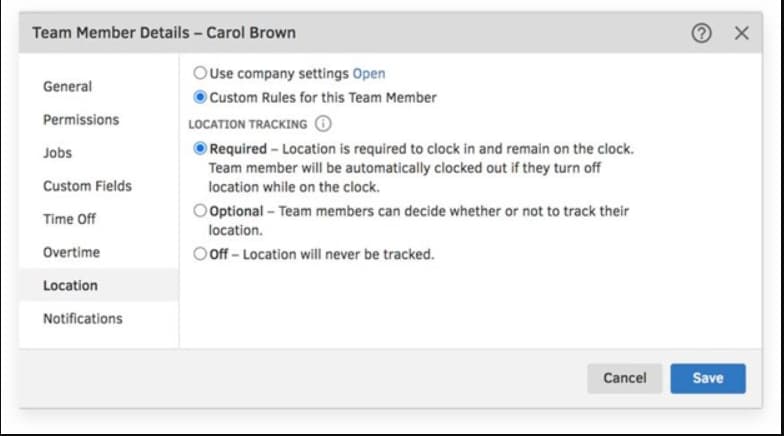
QuickBooks Time is a cloud-based time tracking solution designed to streamline workforce management for businesses of varying sizes, automating payroll, invoicing, and job costing. It integrates seamlessly with QuickBooks Online and is compatible with QuickBooks Desktop for Windows via the Web Connector tool, although it lacks direct integration with QuickBooks Desktop for Mac. The system is available in Premium and Elite tiers, with the Elite plan adding crucial features for field teams, such as project estimates versus actuals comparison and geofencing. Employees use the QuickBooks Workforce app to track time, utilizing GPS and the photo-capturing Time Kiosk for accountability, which helps minimize errors and boost billable time. While the service is highly rated and offers bundled savings with QuickBooks Payroll, companies should note the separate pricing structure (a base fee plus a per-user fee) and the need for specific integration workarounds for Desktop versions.
Highlights (Key Facts & Solutions)
For small businesses, managing teams, scheduling tasks, tracking employees’ hours, handling payroll, invoicing, and ensuring efficient project management can be tough tasks. QuickBooks Time reduces manual data entry and streamlines payroll processing, which saves both time and money.
QuickBooks Time is cloud-based time-tracking software that automates regular time, overtime, double overtime, and workers’ time off. It seamlessly integrates with QuickBooks Online, which ensures smooth accounting processes.
QuickBooks Time can be accessed via a web dashboard or the QuickBooks Workforce app on Android and iOS mobile devices. It features time tracking, payroll integrations, and customizable reports that help with workforce management.
QuickBooks Time simplifies time tracking, enhances workforce management, and integrates seamlessly with other QuickBooks products. Once the QuickBooks Time app is linked to your QuickBooks Online subscription, you can initiate the customization process. This entails:
Time Tracking: Employees use the QuickBooks Time mobile app or web interface to clock in and out. They can also track time spent on specific tasks, projects, or clients. The app captures GPS location for accurate time tracking.
Scheduling and Shift Management: Managers create schedules, assign shifts, and notify employees in QuickBooks Time. Employees receive shift alerts and can accept or decline shifts. Real-time visibility helps avoid overstaffing or gaps.
Job Costing: With QuickBooks Time, you can assign labor costs to specific jobs or projects, track hours worked, and allocate costs accurately. You can also generate reports for better project management.
Payroll Integration: QuickBooks Time syncs seamlessly with QuickBooks Payroll. Employee hours, overtime, and paid time off (PTO) data flow directly into payroll. Eliminates manual data entry and reduces errors.
Invoicing and Billing: Billable hours are automatically calculated based on tracked time. You can generate invoices directly from the app, improving accuracy and streamlining client billing.
Reporting and Insights: Access real-time reports on employee hours, project progress, and costs. Make informed decisions for resource allocation. Gain insights into workforce productivity.
QuickBooks Time offers flexible plans designed to streamline time management for small businesses. It offers two pricing tiers: Premium and Elite, both of which include a generous 30-day free trial.
| Plan | Base Fee | User Fee | Features |
| Premium | $20/month | $8/user/month | Workforce mobile appStreamlined payroll and invoicingJob and shift schedulingCustomized reportsSee who’s workingTime off managementAlerts and notificationsPhoto attachmentTime kioskUnlimited customer support |
| Elite | $40/month | $10/user/month | Workforce mobile appAll Premium BenefitsMileage trackingTrack project progress to planProject estimates vs actualsProject activity feedTimesheet signaturesGeofencing |
QuickBooks Time provides simple solutions to meet your time tracking needs, whether you’re managing a small business, a mid-size company, or a freelancer.
QuickBooks Time offers special pricing for companies with over 50 users. However, it does not offer any discount for annual payments. Here’s what you need to know about their plans:
Administrator Role: All plans come with one administrator role. This person manages everything related to time tracking.
Additional Admins: If you need more administrators, QuickBooks Time will charge you extra fees.
Manager Permissions: Managers can track, edit, and approve time, but they don’t have scheduling permissions.
Note: QuickBooks Time offers a 30-day free trial and requires no credit card to use QuickBooks Time Software
QuickBooks Time helps businesses with efficient tools, making workforce management smoother and more effective. It is a time-tracking software designed to streamline employee time management.
Here are some of its key benefits:
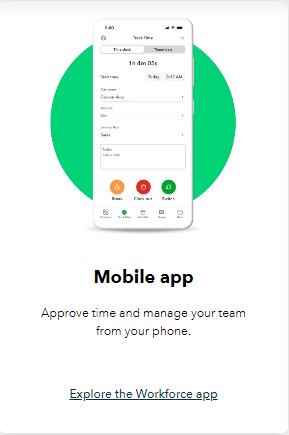
QuickBooks Workforce app is specifically designed for QuickBooks Payroll and QuickBooks Time (formerly TSheets). It serves as a centralized platform where teams can conveniently view pay information and track time.
Employees can access pay stubs, clock in and out, submit paid time off requests and manage job schedules. Employers can approve timesheets, monitor work status, and track vacation accruals. The app streamlines payroll processes, integrates with other software, and provides detailed time logs for labor disputes and audits.
The QuickBooks Workforce mobile app lets businesses manage employee hours, schedules, and paychecks all in one place. Companies using QuickBooks Time and QuickBooks Online Payroll can now seamlessly manage W-2 forms and paychecks using this app.
If you’re a QuickBooks Time admin, you’ll need to adjust some settings and permissions to ensure your team can use the QuickBooks Workforce app. While contractors can’t view their pay information on the app, they can still track their time.
QuickBooks Time is a time-tracking software that brings changes in how businesses manage their work hours.
Whether you’re a small business owner or part of a large enterprise, QuickBooks Time offers essential features to streamline your operations:
QuickBooks Time Online Payroll is a comprehensive solution that combines time tracking, payroll management, and human resources (HR) functionalities. This integration streamlines payroll processing by eliminating manual time entry and reducing errors.
QuickBooks Time provides accurate tax calculations for payroll. It handles payroll taxes, ensuring compliance and accuracy. You can pay your team via direct deposit, and the system supports same-day deposits. The pricing plan includes a 30-day 30-day free trial with no credit card required.
The QuickBooks Online Payroll Premium bundle charges $8 for every user on per month basis, along with a base fee of $75 per employee per month.
The QuickBooks Online Payroll Premium + Simple Start bundle costs $8 per user per month, along with a base fee of $105 per employee per month.
QuickBooks Time integrates with multiple payroll and accounting software, allowing you to export hours worked for payroll, invoicing, and job costing quickly and easily.
With QuickBooks Online Essentials, Plus, Advanced, Accountant, or QuickBooks Online Payroll Premium or Elite, your team members can track time with QuickBooks Time. This integration allows you to import timesheets from QuickBooks Time to other third-party software for invoicing and labor costing.
The integration allows the QuickBooks Workforce mobile app to access employee time data. It’s the only time tracker that works inside QuickBooks.
QuickBooks Time integrates with any QuickBooks Desktop account except for QuickBooks Desktop for Mac.
This table is according to October 2024…
| Top Rated Sites | Ratings |
| G2 | 4.5/5⭐ |
| SoftwareAdvice | 4.7/5⭐ |
| TrustRadius: | 6.8/10⭐ |
| Capterra | 4.7/5⭐ |
| GetApp: | 4.7/5⭐ |
| Play Store | 4.5/5⭐ |
| App Store | 4.6/5⭐ |
QuickBooks Time excels at tracking employees’ physical locations, especially if you’re also using QuickBooks.
It is evident that the product was developed with that core in mind. After that, there is a layer of scheduling, time tracking, and payroll interfaces. If you require this set of features, the solution is robust and reliable.
It’s not as good as it once was, or rather, the competition has quickly caught up. Numerous reports of the mobile app’s instability, poor user experience, poor customer service, and comparatively high cost make it much more difficult to defend using QuickBooks Time.
QuickBooks Time, also known as QuickBooks Timesheets, is a time-tracking tool for managing work progress. It simplifies business processes by allowing businesses to monitor employee working hours, schedule shifts, and track project progress.
QuickBooks Time streamlines time management with features like employee scheduling, job costing, and integrated payroll and invoicing. Whether accessed via smartphone, tablet, desktop, or laptop, it saves stakeholders time and money.
QuickBooks Time is designed to integrate with both QuickBooks Online and QuickBooks Desktop. The integration process for QuickBooks Desktop requires using the QuickBooks Web Connector tool to sync data between the two applications.
Crucially, while QuickBooks Time integrates with QuickBooks Desktop for Windows, it does not officially support direct integration with QuickBooks Desktop for Mac. This is a key distinction for Mac users considering the software.
Yes, the Elite subscription tier of QuickBooks Time includes advanced project management and job costing features. This allows users to:
The QuickBooks Workforce app is the centralized mobile platform for employees and contractors to manage their time and pay details, while the web dashboard is primarily for administrators and managers.
Employee Functions (Workforce App):
Administrator/Manager Functions (Web Dashboard & Admin View):
While QuickBooks Time is a robust platform, some users report ongoing issues related to app performance and the complexity of support. The most frequently cited user pain points include:
For companies requiring services for over 50 users, QuickBooks generally requires direct contact with their sales team to negotiate custom, enterprise-level pricing.
Regarding standard pricing and discounts:
The Time Kiosk is a digital punch clock software designed to run on a single, stationary device (like a tablet or desktop) in a central location. It helps prevent “buddy punching” (where one coworker clocks in for another) by utilizing a mandatory photo capture feature.
How it works:
No. The primary function of the QuickBooks Workforce app is to serve as a hub for W-2 employees to view pay stubs, W-2s, and detailed payroll information when the company uses QuickBooks Payroll.