 Add As A Preferred
QuickBooks Time Login Troubleshooting is essential for quickly restoring employee time-tracking functionality, addressing issues primarily stemming from incorrect credentials, browser data conflicts, and connection problems. The initial troubleshooting sequence should always prioritize verifying the official Intuit login URL and leveraging the one-time code feature for secure access. Browser issues are best resolved by testing the login in an Incognito or Private window to bypass corrupted local cache and cookies, which frequently cause login loops . For persistent errors, users must ensure security software (firewall/antivirus) is not blocking communication ports and, as a last resort, proceed with the uninstallation and reinstallation of the desktop application only after confirming all local data has been successfully synchronized to the cloud.
*.intuit.com) to the security software’s exceptions list.Like other software, users come across several errors while using QuickBooks Time.
There are a couple of factors that may give rise to this login error; all are described below:
If you’re using QuickBooks Time to manage the time and attendance of your employee, you may probably end up with login issues that prevent you from accessing your account. Such problems can be annoying, especially if you must run the payroll on time. Here’s what type of errors you may notice at the time of login.
Struggling with QuickBooks Login Issues? Don’t panic here are some common methods listed that will surely help you to fix the issue without any hassle.
Let’s carry out each one:
Sign in Using a One-time Code
Did you forget your password or need help while logging in? Just relax; we can send a code to your registered mobile number or email so you can log in without any hassle. Below we’ve explained how to reset your password using computer and mobile devices.
On a Computer
On a Mobile Device
Update your Credentials once signed in
If you have already signed in but wish to change or edit your sign-in info, including your password, here are the steps to do so.
On a Computer
On a Mobile Device
Usually, the browsers store data, cache, cookies, and history, which sometimes creates QuickBooks login issues. But when you use a Private window, your data is never saved, and it helps identify such login issues. To open a Private window, you can use the following shortcut keys that vary depending on your browser.
QuickBooks Time comes up with various features, and its compatibility with multiple browsers makes it more efficient among users. The names of such browsers are Internet Explorer, Firefox, Safari, and others. So if you’re having trouble when accessing QuickBooks Time using your current browser, you can try another one. Once you switch to a different browser, check whether the issue still stands on its ground or not.

If you find that your browser is full of cache data and cookies, then it can slow down your performance and prevent you from accessing different websites in your system. Hence, deleting the browser’s history may resolve your issue. Below are the steps that need to be followed.
On Google Chrome:
On Safari:
On Microsoft Edge:
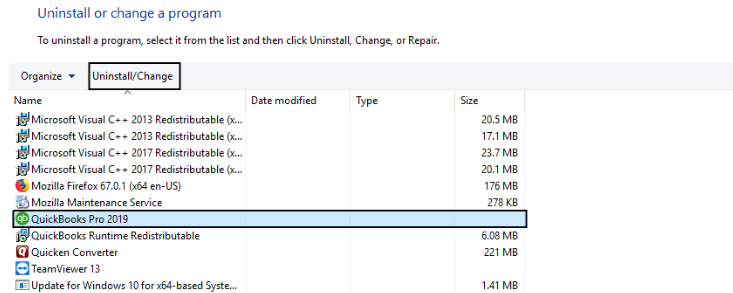
At times, the issue lies in the QuickBooks software, which may lead to QuickBooks login issues. Therefore, you must uninstall the application and try logging in from scratch to tackle the problem. Below are the steps to perform uninstallation and reinstallation of the software.
QuickBooks Uninstallation
QuickBooks Reinstallation
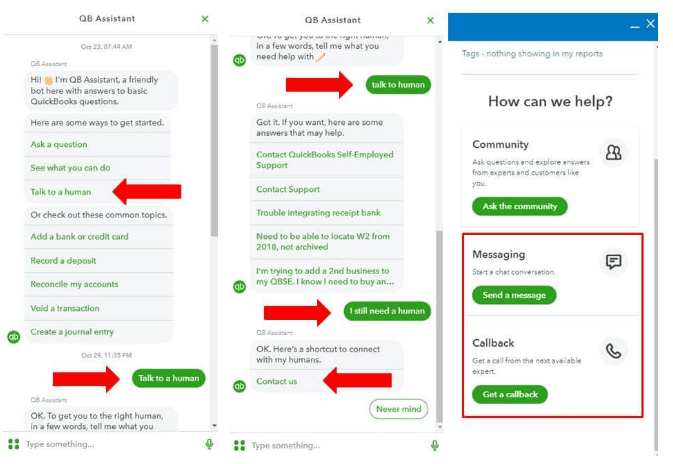
If not any solution works out, you can speak up with accounting experts to get your login-related queries answered.
Here’s how:
We believe you can now efficiently tackle QuickBooks time login issues and access your account without facing any trouble. But if you are still facing any kind of issues with your software and need professional assistance, regarding accounting, bookkeeping & accounting software-related issues then feel free to get in touch with us at +1-802-778-9005, or you can mail to us at: support@ebetterbooks.com
The single, correct official URL to access the QuickBooks Time service is tsheets.intuit.com.
The most secure and immediate method to regain access is by using the one-time verification code feature provided by Intuit.
Using a Private (Chrome, Edge, Safari) or Incognito (Firefox) window eliminates two primary culprits of cloud-based login failure: corrupted local data and authentication conflicts.
The fastest way to open a Private or Incognito window varies slightly by browser and operating system:
Security software may block the login page if it misidentifies the QuickBooks Time server communication as a threat, particularly after an update to the security program or the browser.
*.intuit.com, *.tsheets.com) to the security software’s exceptions list before re-enabling it.If a standard cache clear fails, you should target the most persistent data components: site-specific cookies and hosted app data.
The essential first step is to ensure all local time data has been successfully synchronized and uploaded to the cloud server before removing the application.


