Excerpt:
Addressing the "QuickBooks Sync Manager Not Working Error" involves specific, file-level troubleshooting applicable only to legacy, unsupported versions of QuickBooks Desktop, as the Sync Manager was officially discontinued by Intuit in 2015. For users encountering errors like 2014, 17_7300, or 5_13944, solutions often require bypassing file corruption by renaming the Sync Manager folder to SyncManager.old , or manually ending essential QuickBooks processes like QBW32.exe via the Windows Task Manager to allow file access . Furthermore, firewall exceptions must be configured for all related executable files and Intuit server URLs to restore data connectivity, as this legacy system relied on less secure, file-based synchronization, which was ultimately replaced by modern, real-time cloud services.
 Add As A Preferred
Highlights (Key Facts & Solutions)
SyncManager.old to force the system to create a clean folder upon restart.QBDBMgr.exe, Qbw32.exe) using the Windows Task Manager.Overview
QuickBooks Sync Manager errors can be resolved by updating QuickBooks, resetting the Sync Manager, and addressing file or connectivity issues.
QuickBooks sync manager is a feature that helps you exchange data between the desktop and the version (located on the cloud server).
This implies that whenever you make modifications to the desktop, it will automatically update to a new version. It simplifies data transfer between cloud servers and QuickBooks Desktop.
However, you may encounter a “QuickBooks Sync Manager Not working” error while using it.
The following article comprises all the required information regarding ‘QuickBooks Sync Manager’ and its errors. Let’s find out the main causes that might be affecting the sync manager in QuickBooks.
You will be unable to launch the QuickBooks desktop at the time of facing the QuickBooks sync manager error due to the reasons mentioned below:
The following messages on your screen will appear when you encounter with sync manager error:
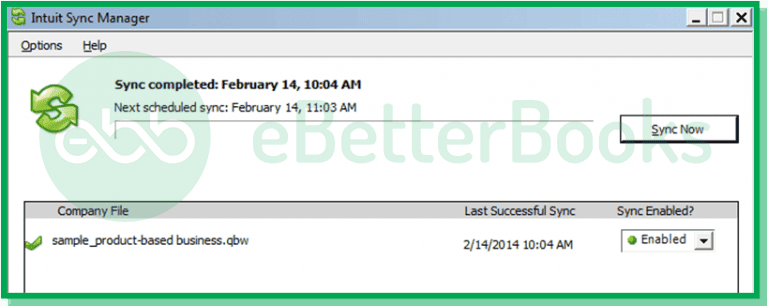
Further, we are explaining all QuickBooks sync errors along with their solutions.
Follow the detailed instructions below for effective troubleshooting steps listed for each error code:
Given below are the relevant solutions to fix the QuickBooks sync manager error.
QuickBooks Error 2014, also known as the Sync Manager error, typically occurs during data synchronization between QuickBooks Desktop and its cloud services. QuickBooks error 2014 Sync manager issue mainly occurs due to a damaged or missing program file.
When this error arises, users may experience difficulties accessing their company files and may receive messages indicating that the Sync Manager is not functioning properly.
The steps to resolve the QuickBooks Error 2014 Sync Manager are given below:
QuickBooks Sync Error 17_7300 arrises due to issues in the connection between the QuickBooks application and the Intuit Sync Manager which may be caused by outdated software or misconfigured settings. This error can disrupt data syncing which leads to potential delays in financial management tasks.
Here are the below steps to resolve it:
QuickBooks Sync Error 17_7118 typically indicates issues with data synchronization between QuickBooks and its Intuit Sync Manager. This error often arises when the QuickBooks application or the Sync Manager is outdated, or if there are connectivity problems preventing data from being written correctly.
To resolve this sync error code, go through the following steps:
QuickBooks Sync Error 5_13944 typically occurs when there are network connectivity issues during data uploads, often exacerbated by firewall or internet security settings blocking access to necessary server URLs.
Follow the below steps to fix it:
This error arises due to issues such as missing or damaged Windows components, which can hinder the synchronization process. This error may also be triggered by corrupted files within the Sync Manager folder, often located at C:\Users\username\AppData\Local\Intuit.
To resolve this follow the steps given below:
The error regarding the configuration of Intuit Sync Manager typically arises when users encounter issues with syncing data between QuickBooks and other applications. Common causes include network problems, firewall settings blocking access to Intuit servers, or outdated components within the Sync Manager itself.
Follow the steps written below to reset the QuickBooks data sync matrix:
The QuickBooks Sync Manager Error on Windows 10 occurs when there are issues with the synchronization process between QuickBooks and online services or third-party applications. This can be triggered by corrupted files, or compatibility problems following a Windows update which prevents users from accessing their QuickBooks data effectively.
You may come across this sync error code while updating Windows 10.
Here are quick steps to resolve the issue:
Conclusion
Here, we have concluded the post regarding the sync manager error in QuickBooks. Hopefully, you have found the above post fruitful while dealing with this sync problem. If you are interested to get information regarding the sync manager, feel free to talk to our experts.
In case, you are still experiencing the same issue, contact to ebetterbooks Error Support experts by dialing the phone number +1-802-778-9005.
You need to rename the original Sync Manager folder, often located in the user’s hidden AppData directory, to force QuickBooks to create a fresh, uncorrupted folder structure.
This method resolves the issue because:
SyncManager folder structure.The Sync Manager folder is typically hidden within the user’s local application data folder, which must be accessed by showing hidden files or manually navigating the path.
The typical path structure is:
C:\Users\username\AppData\Local\IntuitYou must enable hidden folders in your Windows Explorer settings to view the AppData folder. The folder you need to target and rename to SyncManager.old is usually labeled SyncManager within the Intuit directory.
You are required to manually end these processes using the Windows Task Manager because they are core QuickBooks executables that lock the company file and related folders.
Ending these processes is necessary because:
QBDBMgr.exe).Both errors are related to connectivity problems between the application and the Sync Manager, but their root causes differ slightly, leading to different solutions:
In both cases, ensuring the latest version of the Sync Manager is installed is the primary step.
Resetting the data sync matrix forces the Sync Manager to clear all previously recorded sync relationships and start the data transfer process from scratch, which is crucial when old relationships are corrupt.
The option is located within the QuickBooks application menu:
This function effectively removes the local cache of what has been synced, forcing a full, clean resync upon the next login.
Error 5_13944 is directly related to network connectivity and firewall blocks. You must configure your firewall to allow both outbound access to Intuit’s servers and inbound communication for QuickBooks processes.
You must create exceptions for:
QBW32.exe and QBDBMgr.exe.If the firewall prevents these executables from accessing necessary resources, the sync process will fail immediately.
The Intuit Sync Manager was fundamentally discontinued and replaced because its technology was older, file-based, and unable to support the real-time, bidirectional syncing required by modern cloud platforms.
The key limitations included:
Modern QuickBooks Desktop versions now use updated, API-based Intuit Cloud services that facilitate seamless, near real-time data exchange, eliminating the need for the older, error-prone Sync Manager application.


