Excerpt:
This guide helps resolve W-4 and payroll info errors in QuickBooks Desktop Pro/Premier Payroll by correcting inaccurate tax setups, filing statuses, and year-to-date figures. By updating employee records and validating payroll data, users can fix tax miscalculations, avoid compliance issues, and ensure accurate payroll reporting for W-2s and 941s—ensuring smooth, error-free payroll processing.
 Add As A Preferred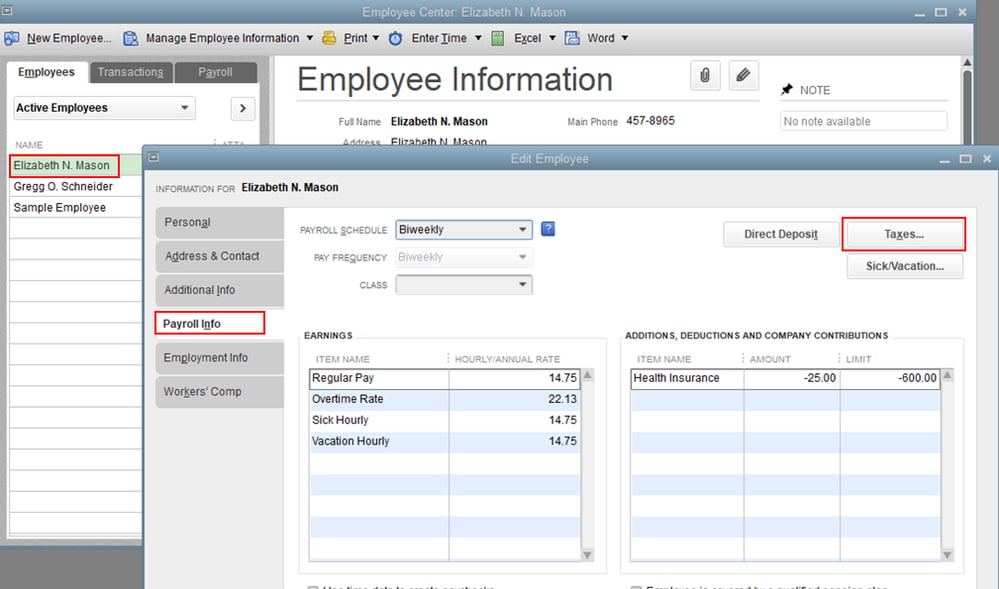
QuickBooks Desktop Pro/Premier Payroll is a payroll computation environment that stores employee withholding attributes, tax configuration variables, and wage reporting data. W-4 and payroll information errors result in incorrect filing status inputs, inaccurate dependent declarations, outdated withholding data formats, incorrect state tax assignments, and inconsistent year-to-date wage or tax records. These errors lead to inaccurate withholding calculations, inconsistent wage summaries, and incorrect outputs for W-2 and Form 941.
All the troubleshooting steps require system preparation, employee record access, withholding data verification, year-to-date data adjustment review, and payroll recalculation. The article outlines the error sources, specifies the preparatory requirements, and describes the corrective procedures in a structured format that supports the operational steps and compliance considerations in the following sections.
Before starting the troubleshooting steps, ensure system compatibility and complete all necessary preparation steps.
Meeting the following requirements keeps QuickBooks Desktop updated, maintains data integrity, and allows smooth corrections of W-4 and payroll information, enhancing audit readiness and reducing compliance risks.
W-4 and payroll configuration errors originate from incorrect employee data, outdated withholding parameters, and misaligned tax settings within QuickBooks Desktop Pro/Premier Payroll. Identifying these issues helps preserve accurate withholding calculations, consistent wage records, and reliable reporting across federal and state payroll requirements.
This section provides a structured workflow for correcting W-4 and payroll information errors in QuickBooks Desktop Pro/Premier Payroll. The steps address withholding parameters, wage and tax record accuracy, and payroll configuration settings to ensure correct calculations and compliant reporting. Fixing these errors prevents calculation errors, guarantees accurate tax reporting on W-2 and 941 forms, and maintains compliance with IRS and state requirements.
Opening the employee record allows the user to directly access and modify payroll-specific details such as tax withholding setup, YTD adjustments, and payroll items associated with that employee.
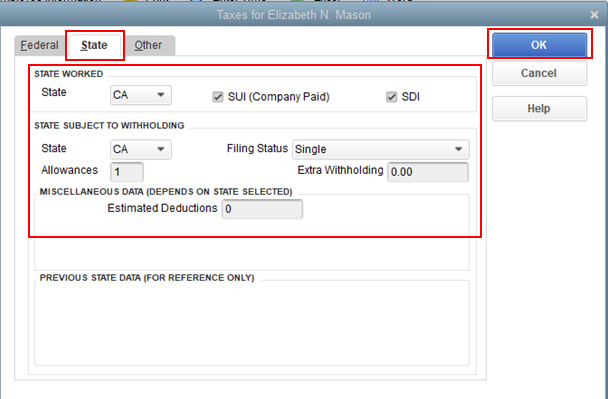
Updating W-4 data ensures that an employee’s federal and state tax withholdings match their current filing status, dependents, and any extra withholdings specified on the W-4 form.
Adjusting YTD payroll data ensures reported wages and withholdings match actual amounts paid to the employee. This is critical for accurate tax filings and payroll summaries.
| Note: Ensure adjustments align with the actual amount paid to the employee. |
Modifying payroll items ensures that prior overpayments or underpayments are corrected in the system. This maintains payroll accuracy and ensures future paychecks reflect corrected values.
Running the payroll setup again applies recent changes to tax and payroll configurations across the system. This ensures consistency in calculations and tax liabilities for future payrolls.
Running final payroll reports confirms that all corrections were successfully applied and that the system reflects accurate tax and wage data for the employee.
W-4 and payroll information errors in QuickBooks Desktop Pro/Premier Payroll require accurate withholding configuration, consistent year-to-date data, and properly aligned payroll items. Updating employee records, validating tax parameters, and recalculating payroll outputs support compliance with federal and state requirements. These procedures establish accurate wage reporting, precise withholding calculations, and correct form generation for W-2 and Form 941. Regular audits and timely updates maintain payroll accuracy and prevent potential penalties.
W-4 information errors occur when the employee record contains incorrect filing status entries, inaccurate dependent values, outdated withholding formats, or incorrect federal or state tax selections.
Open the employee record > update tax or payroll details, adjust YTD figures (if needed), and validate corrections using payroll reports.
Go to Employees > Get Payroll Updates, download the latest tax table, and install it to keep payroll calculations accurate.
Incorrect W-4 entries result in inaccurate withholding calculations, inconsistent wage summaries, and incorrect reporting outputs for forms such as W-2 and Form 941.
The Payroll Summary report, Employee Withholding Summary report, and Employee Details report provide the information required to verify wages, withholding values, and configuration accuracy.
W-4 information should be updated when an employee submits a revised W-4, experiences a change in filing status, changes dependent declarations, or requires new federal or state withholding adjustments.
Year-to-date inaccuracies create deviations in wage totals and tax liabilities, which lead to incorrect W-2 values, incorrect Form 941 entries, and inconsistencies in payroll summary reports.


