Excerpt:
If QuickBooks is not calculating taxes correctly, it may be due to outdated tax tables, incorrect payroll settings, or exceeded annual limits. This article provides targeted solutions such as updating payroll tax tables, verifying employee tax setups, and correcting paycheck calculations to resolve the issue. By following these steps, you can ensure accurate tax calculations and compliance for your payroll processing.
 Add As A Preferred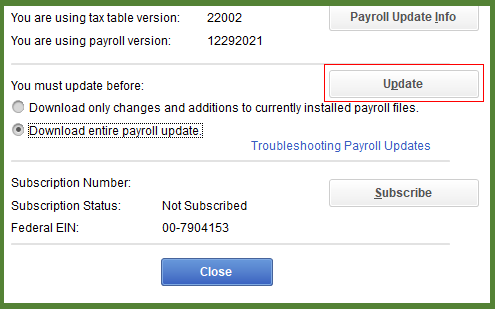

Calculating Payroll is one of the most critical functions for Quickbooks. Providing accurate tax calculations is essential for compliance and employee trust. Yet, many users encounter situations where QuickBooks does not calculate payroll taxes correctly.
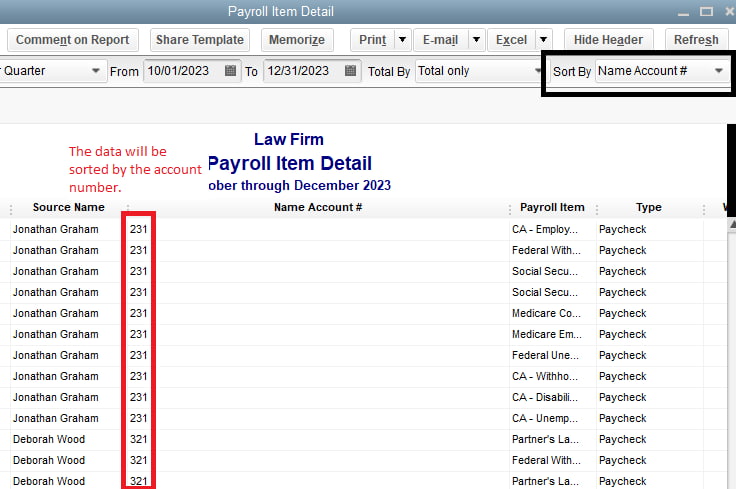
This issue can arise for several reasons from outdated tax tables and incorrect employee setup to misconfigured payroll items or state unemployment insurance (SUI) rates. It often shows up when processing paychecks, where deductions appear missing, too low, or inconsistent with expected amounts. By downloading a complete payroll summary from Quickbook can provide an overview of each and every item.
It taxes are not calculated correctly then the consequences can be as follows:
Preventing these errors matters because even small miscalculations can lead to penalties, inaccurate filings, and frustrated employees. Understanding why this happens and how to fix it ensures payroll runs smoothly and your business stays compliant.
Risk, consequences along with their preventive actions are as follows:
| Risk | Consequence | Preventive Action |
| Outdated tax tables | IRS penalties | Always update before payroll |
| Wrong employee setup | Incorrect W‑2 | Audit employee profiles quarterly |
| Incorrect SUI | State notices | Update rates annually |
| Wrong YTD | Ongoing miscalculations | Verify YTD entries during migration |
Following are the causes that generally leads to Payroll Tax errors:
QuickBooks Desktop Payroll relies on regular tax table updates. If your software or tax table is outdated, payroll won’t reflect the latest IRS or state tax rates.
Some taxes, like Social Security, stop after the annual wage limit is reached. If QuickBooks misapplies this, deductions may appear missing.
State Unemployment Insurance (SUI) rates often change yearly. If you don’t update them, payroll taxes will be wrong.
In QuickBooks Online Payroll, incorrect YTD entries can cause ongoing paycheck miscalculations.
QuickBooks payroll tax errors usually stem from outdated updates, incorrect employee setup, or misconfigured payroll items. By keeping your software updated, verifying employee and tax settings, and running regular reports, you can prevent miscalculations and ensure payroll compliance.If payroll taxes still calculate incorrectly after updates and setup verification, it’s best to contact Intuit Payroll Support or a certified QuickBooks ProAdvisor. Persistent errors can lead to compliance penalties, so professional assistance ensures accuracy and peace of mind.
QuickBooks software and the Payroll Tax Tables (PTT) are updated through two separate processes, and both are necessary to ensure the entire system functions for compliance and tax accuracy.
The Employee Withholding Report is the primary tool for auditors and bookkeepers to view and verify the tax setup for all active employees simultaneously, making it an essential diagnostic step.
The Revert paycheck feature is designed specifically to undo a calculation error within the payroll system without permanently removing the transaction record, providing an auditable trail.
A premature calculation stop is a primary indicator that the legally defined or manually set annual limit for a specific payroll item has been reached, which must be verified in the payroll item list.
An incorrect State Unemployment Insurance (SUI) rate directly impacts the employer’s tax liability and is a common cause of calculation error, requiring manual verification and correction.
To efficiently troubleshoot a payroll calculation error, follow a logical sequence that progresses from the specific employee data checks to the overall system settings.
The Employer Identification Number (EIN) is critical for tax filing and is verified and corrected within the Company Information section, not the individual employee files.


