Excerpt:
This article addresses issues with payroll reports in QuickBooks Desktop Enterprise Payroll, such as missing employee data, incorrect pay totals, and report discrepancies. It guides users through precise troubleshooting steps—like verifying employee records, updating tax tables, and recalculating payroll totals—to restore accurate reporting. Designed for users facing payroll data errors, the content focuses on ensuring compliance, avoiding financial misstatements, and maintaining payroll integrity through proactive fixes.
 Add As A Preferred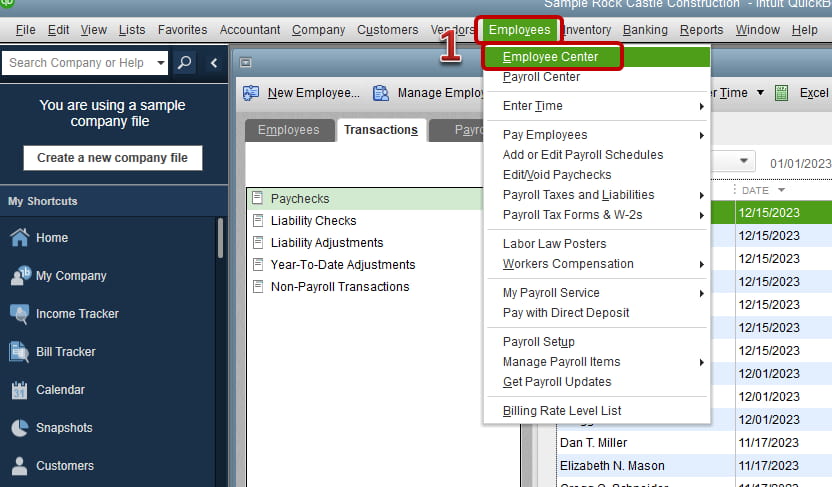
QuickBooks Desktop Enterprise Payroll (QDEP) processes payroll report attributes that determine wages, tax values, liability amounts, and accounting-mapping structures. Payroll report issues in QuickBooks Desktop Enterprise include incomplete employee attributes, incorrect payroll totals, unresponsive reporting modules, and discrepancies between payroll totals and general ledger postings.
Accurate payroll reporting in QDEP supports compliance-driven payroll operations and ensures consistent financial representation across payroll and accounting records. QDEP maintains reporting accuracy through updated software releases, current payroll tax tables, verified employee records, and consistent account-mapping structures. The article explains the definition of QuickBooks Desktop Enterprise payroll report issues, the attributes that influence these issues, the causes that generate reporting inconsistencies, and the resolution steps that restore accurate payroll reporting.
QuickBooks Desktop Enterprise Payroll generates reports through employee records, payroll item parameters, tax table data, and account-mapping structures. Report issues occur when these attributes contain incomplete values, outdated tables, or misaligned configurations. Missing employee data, incorrect calculations, unresponsive report output, and payroll-ledger mismatches represent the primary problem categories.
Before going into fixes, here are some common payroll report problems users encounter in QuickBooks Desktop Enterprise Payroll:
Reports can have missing employee details because of improper settings. This is a common problem that can lead to issues in the payroll report.
Payroll calculations can be incorrect because of tax or deduction mistakes. Make sure tax rates are correctly implemented.
Reports can be unresponsive or take longer to generate because of size issues or overstuffed data. This can be a major issue, so try to be very specific regarding data entry.
The payroll costs amount may not match with total amount in the ledger, which can create a huge discrepancy. Make sure to match the reports on a regular basis.
Calculations for tax in payroll reports can vary from anticipated amounts.
The tabular representation shows when the reports are best utilized, highlighting their purpose and benefits for payroll management:
| Report Name | Purpose | Best Used For |
|---|---|---|
| Payroll Summary | Shows wages, taxes, deductions, and net pay by employee | End-of-period payroll review |
| Payroll Detail | Breaks down transactions per paycheck | Investigating discrepancies or overpayments |
| Employee Earnings Summary | Summarizes earnings for a selected time frame | Bonus planning or wage audits |
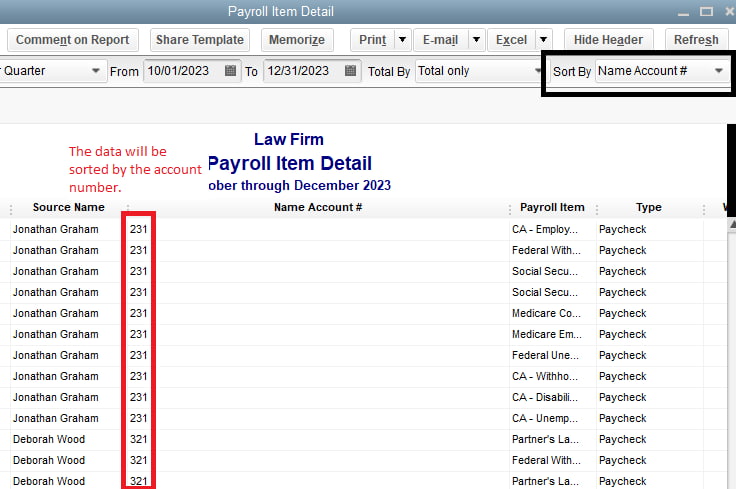
| Payroll Item Detail | Lists all uses of a specific payroll item | Verifying tax, benefit, or deduction accuracy |
| Payroll Liability Balances | Displays unpaid payroll liabilities | Ensuring tax and benefit payments are current |
QuickBooks Desktop Enterprise Payroll requires a structured update sequence before troubleshooting. Software updates establish the processing framework, payroll tax tables define withholding accuracy, backups protect data integrity, single-user mode prevents configuration conflicts, and data verification confirms structural consistency.
| Task | Why It’s Important | How to Perform It |
|---|---|---|
| Confirm that the software is updated | Prevents compatibility issues | Help > Update QuickBooks |
| Install the latest payroll tax table | Ensures tax calculations are accurate | Employees > Get Payroll Updates |
| Back up company file | Safeguard data before making changes | File > Back Up Company > Create Local Backup |
| Switch to single-user mode | Prevents conflicts during updates or rebuilds | File > Switch to Single-User Mode |
| Verify data integrity | Detects and warns of possible data issues | File > Utilities > Verify Data |
QuickBooks Desktop Enterprise Payroll corrects report issues by validating employee data, recalculating payroll totals, aligning payroll preferences, updating tax tables, reconstructing reports, and reconciling payroll accounts. These steps restore accurate payroll reporting output by correcting data inconsistencies, stabilizing payroll calculations, and aligning report values with mapped ledger accounts.
The following are steps to fix payroll report errors in QuickBooks Desktop Enterprise Payroll:
Ensure that all employee details are correctly entered in QuickBooks:
Incorrect pay totals can occur due to tax miscalculations or outdated settings:
Incorrect payroll preferences can lead to reporting errors:
Tax errors in payroll reports can be due to outdated tax tables:
If reports are unresponsive:
If payroll report totals do not match the general ledger:
Accurate payroll reporting in QuickBooks Desktop Enterprise Payroll requires consistent employee record maintenance, standardized payroll item configuration, and timely tax table updates. Account-mapping reviews ensure alignment between payroll outputs and ledger records, and structured backups protect payroll data integrity during reporting cycles.
Verify employee information, tax exemptions, and pay structures to ensure accuracy to avoid payroll calculation errors. Timely updates prevent inconsistencies in benefits and deductions.
Periodically review tax configurations and update payroll tax tables to meet federal, state, and local regulations. Errors in tax rates can result in payroll report miscalculations.
Processing payroll reports regularly helps identify discrepancies and helps financial statements capture payroll transactions with accuracy. Audits can help avoid costly errors.
Coordinate payroll data with accounts by confirming account mapping and payroll totals matching with general ledger postings to provide assurance.
Keep current on payroll-related laws, employee classifications, and tax reporting rules to stay out of trouble and maintain hassle-free payroll processing.
Safeguard payroll records by making secure backups to avert data loss or corruption, guaranteeing continuity in payroll processing.
Use filtering and preferences to customize payroll reports in QuickBooks to create informative details specific to business requirements,s to make informed decisions.
QuickBooks Desktop Enterprise Payroll maintains accurate payroll reporting through structured data validation, standardized payroll configuration, updated tax tables, and consistent ledger alignment. The troubleshooting steps restore stability in payroll calculations and remove reporting discrepancies created by incomplete employee records, outdated payroll parameters, or misaligned account mappings.
Regular updates, systematic backups, and continuous configuration reviews strengthen data integrity across reporting cycles. These processes support advanced payroll data controls and expand reconciliation workflows that reinforce long-term payroll reporting accuracy.
Use the Verify and Rebuild Data tools under the File menu to identify and fix data issues.
Go to Reports > Employees & Payroll, then select Payroll Summary or other payroll-related reports.
Open the check from the Employee Center, make the necessary edits, and save the changes or void and recreate it if needed.
Navigate to Employees > Payroll Center > Payroll Schedules, then edit or delete the schedule as needed.
Payroll reports fail to load when the company file contains excessive data volume, fragmented records, or structural inconsistencies that impair report generation.
Payroll tax calculation errors resolve when QuickBooks Desktop Enterprise Payroll uses the latest tax table data and applies correct withholding parameters within each payroll item configuration.


