Excerpt:
This article addresses payroll calculation failures in QuickBooks Desktop Enterprise caused by date or register mismatches, corrupted data, outdated tax tables, and misconfigured payroll items. It guides users through aligning pay periods, verifying bank accounts, updating software, and repairing data to ensure accurate payroll processing, tax deductions, and reporting—helping businesses avoid payroll errors, compliance issues, and payment delays efficiently.
 Add As A Preferred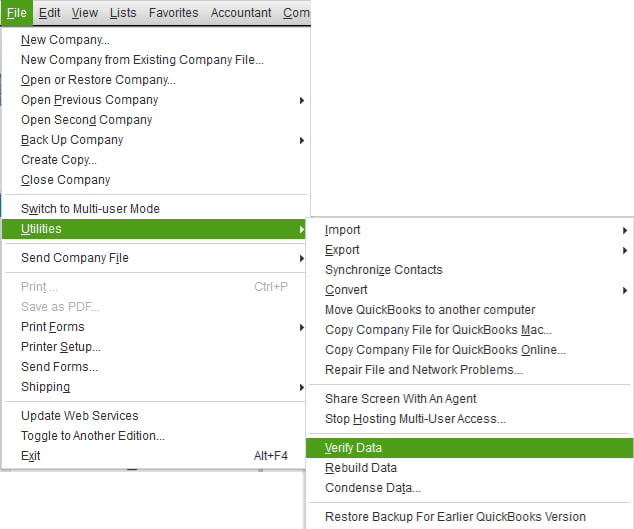
Payroll calculation failure in QuickBooks Desktop Enterprise occurs when date mismatches, register inconsistencies, outdated tax tables, incorrect payroll item setups, or damaged company files interfere with payroll accuracy. These issues directly affect wage calculations, tax deductions, liability amounts, and direct-deposit values, leading to incorrect payroll results.
Businesses often encounter these failures during pay schedule changes, edits to past paychecks, data migrations from other systems, or payroll runs performed with incorrect company file dates. Each scenario introduces gaps between pay period data, register information, and payroll configuration settings.
This article explains the key reasons behind payroll calculation failure in QuickBooks Desktop Enterprise and provides clear, step-by-step solutions to restore accurate payroll processing. It also outlines preventive measures to help businesses maintain stable payroll performance and avoid future calculation errors.
Inconsistencies between payroll dates and internal registers often fix QuickBooks payroll calculation failure due to date mismatch. When the system fails to align time-tracking data, pay periods, and account registers, it may skip employee wages, miscalculate taxes, or completely fail to process payroll.
The most common causes of payroll failures due to date or register mismatch in QuickBooks Enterprise are mentioned below:
If the pay period does not align with the actual work schedule or overlaps with a previous payroll, QuickBooks may exclude time data or double-count wages. This can lead to miscalculations or result in no payroll being generated for the affected period.
If the payroll bank account in the company file does not correspond with the account selected for payroll processing, it can lead to:
When the data file is damaged or partially corrupted, users may encounter issues such as:
Misconfigured payroll items such as Hourly Wages, Salaries, Overtime, Deductions, and Company Contributions can lead to QuickBooks excluding items from calculations.
If one or more payroll items are:
Then, these issues can cause payroll calculations to fail, resulting in:
QuickBooks uses the latest payroll tax tables to accurately calculate federal and state taxes, including Social Security and Medicare.
An outdated tax table can lead to:
These issues often arise when:
Using an outdated version of QuickBooks can result in compatibility issues between the payroll engine, register entries, and tax tables. This may lead to errors or freezing during payroll processing.
To ensure full compatibility with the latest payroll tax tables, security standards, and calculation algorithms, it’s essential to keep QuickBooks Desktop Enterprise up to date.
If your payroll subscription is expired, inactive, or temporarily suspended, QuickBooks will turn off calculation features, leading to errors even when the pay period data is correct.
Users may experience:
If payroll is set to process through an account that does not support ACH transfers, the register may reject payroll transactions, causing failures.
This issue occurs when:
If QuickBooks is unable to sync with the payroll service during a calculation, it could be due to:
The data flow may be interrupted, leading to a mismatch between local data and payroll settings.
Payroll calculation issues in QuickBooks Desktop Enterprise result from misaligned date attributes, inconsistent register attributes, inaccurate payroll item attributes, incorrect account attributes, inactive subscription attributes, and outdated system components & tax table attributes. These discrepancies change wage, tax, and liability values. This section helps to align temporal data, confirm register integrity, correct payroll item attributes, validate account configurations, update system components, and stabilize payroll output.
To ensure that the pay period aligns correctly with actual work dates or the check date, follow the below-mentioned steps:
When the bank account selected during the payroll run doesn’t match the payroll settings, then follow the below-mentioned steps to correct it:
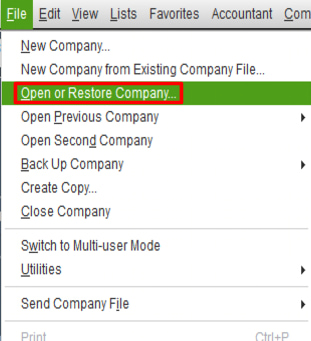
To fix corrupted company or payroll files, start by verifying the company data and follow each step carefully to ensure proper resolution:
Note: If you are using Assisted Payroll, contact QuickBooks support before proceeding with the Rebuild.
If errors persist and can’t be fixed:
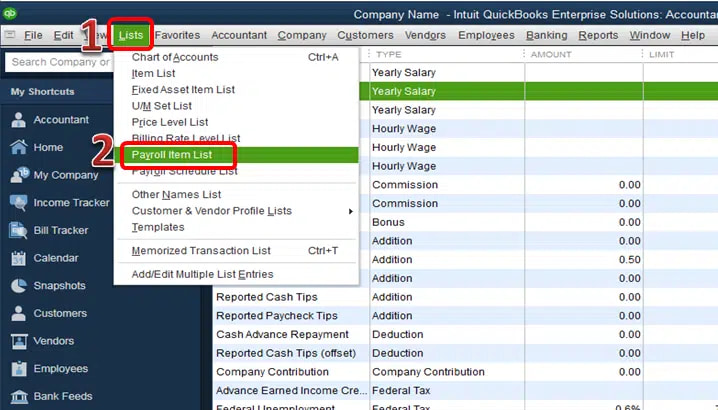
Review each payroll item carefully to ensure accurate setup and functionality. Follow the steps below to verify and correct any misconfigurations:
Failed data synchronization with the QuickBooks Payroll service can block payroll updates, tax table downloads, or direct deposit processing, follow the steps below to troubleshoot and resolve the issue.
Payroll cannot be processed from an invalid or incompatible bank account, such as a savings account. To ensure that a valid checking account is linked.
Follow the steps below to verify and update your bank account information:
An outdated QuickBooks version may not support the latest payroll features or tax calculations. Follow the steps below to check for updates and install the latest version:
If your payroll account status reflects service key issues or inactive access, you won’t be able to access essential payroll features such as direct deposit, tax calculations, or paycheck creation .
To resolve this issue, follow the steps below:
Using outdated tax tables can lead to incorrect or failed payroll calculations. Follow the steps below to update your tax tables and ensure accurate payroll processing:
To get the latest tax table:
To avoid payroll processing issues in QuickBooks Desktop Enterprise, follow these best practices consistently:
Payroll calculation errors in QuickBooks Desktop Enterprise arise from mismatched dates, outdated tax tables, corrupted files, or misconfigured payroll items. These issues may disrupt paychecks, tax filings, and direct deposits.
To fix these errors, update your software and tax tables, verify payroll setup, correct account conflicts, and restore clean backups if necessary. To prevent future errors, regularly audit payroll settings, keep your subscription active, ensure a stable internet connection, and maintain consistent timesheet practices.
Navigate to Employees > Get Payroll Updates and check whether the latest updates are installed. If the issue continues, restart QuickBooks and confirm your payroll subscription status.
Freezing issues may occur due to data corruption, outdated software, or memory problems. To resolve this, run the QuickBooks Tool Hub and select Quick Fix my Program, then restart the application.
This usually happens when time entries don’t align with the pay period, leading to excluded hours. It may also be due to misconfigured or missing tax tracking for the payroll item.
An inactive payroll subscription blocks access to updated tax tables, compliance rules, and payroll validation services. The blockage prevents accurate wage computation, tax deduction processing, and direct-deposit functionality.
Date-mismatch issues occur when paycheck dates, pay period ranges, and company file dates do not align. The mismatch alters payroll calculations, tax withholding values, and liability register values.
Register mismatch occurs when the payroll bank register, paycheck records, or liability accounts contain inconsistent attributes. The mismatch disrupts wage posting, tax allocation, and liability tracking.


