Excerpt:
If you're unable to access 1099 e-file in QuickBooks Desktop 2024 due to a failed login, it's likely because Intuit requires a separate account for online tax services. This article helps you recover or create that account and outlines how to continue filing—either electronically or manually—so you don’t miss IRS deadlines. It ensures you're never blocked from filing due to login confusion or access errors.
 Add As A Preferred
“Hi, I’m Jeena, and I’ve been using QuickBooks Desktop 2024 to manage all my business accounting—vendor payments, monthly reconciliations, and end-of-year reports. As tax season hit, I needed to access my 1099 forms to prepare for filings, but I ran into a frustrating roadblock: I can’t seem to locate or recall the login info required to access or 1099 e-file.
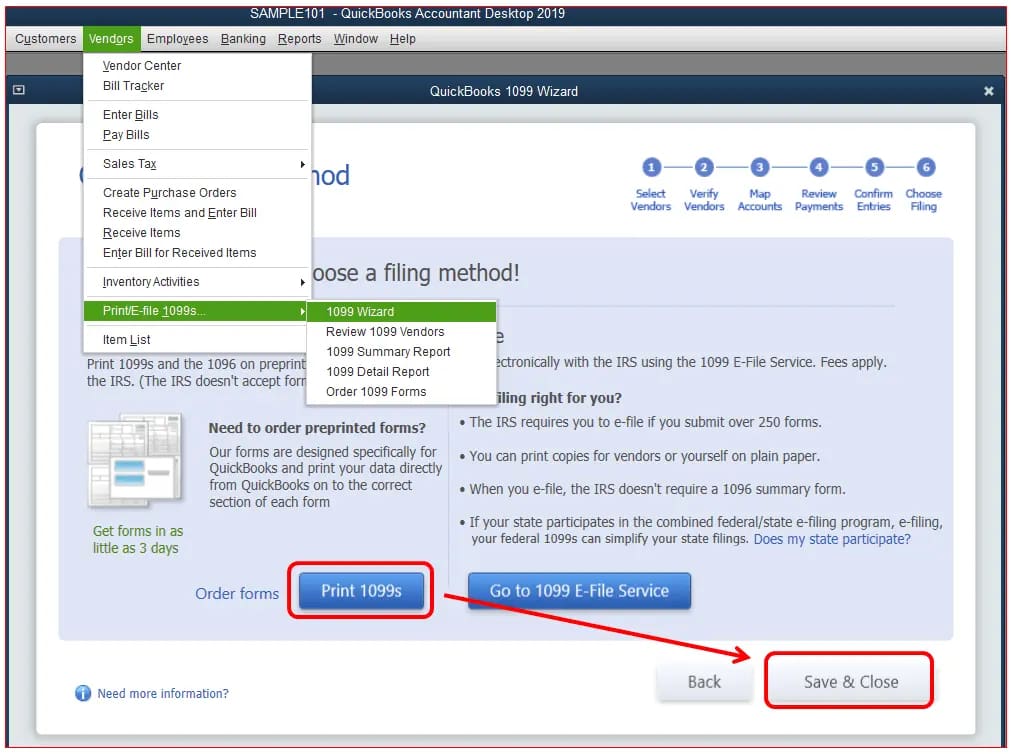
When I go to the ‘Vendors’ section and try to use the ‘Print/E-file 1099s’ option, QuickBooks prompts me to sign in—apparently for Intuit’s 1099 e-file service. The problem is, I don’t remember ever setting up a separate login for that. I’ve always used the desktop version locally and never needed an Intuit login for day-to-day use. Now I’m stuck, unsure whether I’m supposed to use my company file login, my Intuit account, or some other credentials entirely.
To make things more stressful, I need to get these forms submitted soon to stay compliant with IRS deadlines. There’s no clear guidance inside QuickBooks about how to reset or recover this login info, and I’m hesitant to start over or manually file without knowing if that could cause conflicts or duplication.
Has anyone else faced this situation while using QuickBooks Desktop 2024? What’s the exact login required to access or e-file 1099s, and how do you recover it if you’ve lost access? Is there a way to still proceed with 1099 processing without losing time or risking errors? Any insight would be appreciated.”
Hi Jeena,
You might see messages like “Sign in to E-file 1099s” or “Intuit login required” when attempting to e-file your 1099s in QuickBooks Desktop 2024 — which can feel confusing if you’ve always managed your accounting locally without needing an online login.
The prompt appears because the 1099 e-file feature is part of Intuit’s connected services, which require you to sign in using your Intuit account credentials. This is not your company file login, QuickBooks admin password, or Windows credentials, it’s a separate account used for all Intuit online services like payroll, payments, or tax filing.
While you’ve been using QuickBooks entirely offline for day-to-day operations, accessing or e-filing 1099s connects you to Intuit’s cloud-based system, which mandates authentication through their platform. If you’re unsure whether you created one—or forgot the credentials—don’t worry. Here’s how to move forward without delay.
If you don’t recall creating an Intuit account or lost the login credentials, here’s what you can do:
Tip: If you’ve ever used payroll, merchant services, or even TurboTax, you might already have an Intuit account.
If you’re sure you’ve never created one:
Make sure to use a valid business email so that you receive all filing confirmations, updates, and status alerts.
Yes, absolutely. If the e-filing process is delayed due to login issues, QuickBooks still allows you to print paper 1099s and mail them to your contractors and the IRS.
To do this:
Note: You’ll need pre-printed IRS-approved 1099 forms for mailing.
Yes. QuickBooks Desktop includes a built-in 1099 wizard that helps you generate and print 1099-NEC or 1099-MISC forms. However, to meet IRS guidelines, you’ll need pre-printed 1099 forms (such as Copy A) since QuickBooks does not print the red ink formatting required for IRS submission.
Absolutely. You can go back to Vendors > Print/E-file 1099s > 1099 Wizard, select the applicable tax year, and reprint forms as needed. If you need to file corrected versions, make sure to mark them appropriately using the IRS correction procedures.
No. Each company file in QuickBooks must print its own 1099s and 1096 form separately. You cannot combine contractor data from different businesses into a single 1096 summary—even if the same person handles accounting for both.


