Excerpt:
QuickBooks Error Code C=51 occurs when users can't find the TxList, often due to damaged company files, corrupted databases, or lost transactions. This article provides step-by-step troubleshooting solutions, such as verifying and rebuilding data, restoring deleted transactions, and checking the internet connection. It also covers methods like updating QuickBooks and using backup files to resolve the issue, helping users get back to smooth accounting operations without disruptions.
 Add As A Preferred
To fix QuickBooks Error C=51, first, close all QuickBooks processes and restart the program. If the error persists, run the Verify and Rebuild Data utility from the File menu under Utilities.
If the issue continues, use the QuickBooks File Doctor tool, check for updates, and ensure you have a stable network connection, as the error can be caused by data corruption, network problems, or a damaged or missing transaction list file. Reviewing the complete QuickBooks error codes list can also help you identify similar errors linked to data or network issues.
QuickBooks Error C=51 occurs when the software cannot locate or read the TxList, which holds transaction records essential for accounting operations. This issue often arises due to corrupted company files, interrupted data operations, or missing transactions.
The following guide explains verified diagnostic and recovery methods designed to help users restore file integrity, recover missing data, and prevent future occurrences. Each solution focuses on maintaining database consistency and ensuring uninterrupted accounting performance within QuickBooks Desktop.
QuickBooks users often experience a C=51 error when they are unable to find the List. Another instance when this error occurs is when the user tries to delete a transaction from a report. This error can also occur when you try to delete the transaction from any kind of report. When you see this type of error, it is important to shut down this application. Shut down all your windows, including QuickBooks, and then reboot it again.
When QuickBooks Error C51 occurs (typically while working with transactions inside a company file), users typically see one of these messages:
Error C=51 belongs to the same “C=” internal processing family as C343, but relates to transaction-list (TxList) integrity rather than installation components, most commonly appearing after a crash, forced shutdown, or unstable internet connection mid-download. Guidance for this family generally points to the Verify Data and Rebuild Data utilities as the first troubleshooting step.
The “can’t find txList” wording is highly consistent across many independent third-party sources; no single official Intuit KB page was located, so treat as well-corroborated but not Intuit-published.
We have listed the most effective ways to troubleshoot QuickBooks Error Code C=51. However, these methods can be time-consuming and complex. Hence, we suggest checking this quick fix to resolve the error. If these methods do not work, follow the methods to settle the issue.
Reboot QuickBooks. If the problem persists, try other methods mentioned below to fix the problem.
QuickBooks Error Code C=51 can interrupt accounting operations by preventing access to the transaction list or company file data. Before applying any solutions, it is essential to secure all related files, maintain backups, and follow the troubleshooting process systematically.
The following verified methods will help restore data integrity and ensure the stable performance of QuickBooks Desktop.
When you have collected all these files, start with the techniques to resolve the error.
This method is the primary and most reliable way to fix company file corruption or data integrity issues in QuickBooks. It scans for damaged entries and automatically repairs them to restore accurate financial data processing. Running this utility ensures that any structural data damage causing error C=51 is addressed efficiently.
Follow these steps:
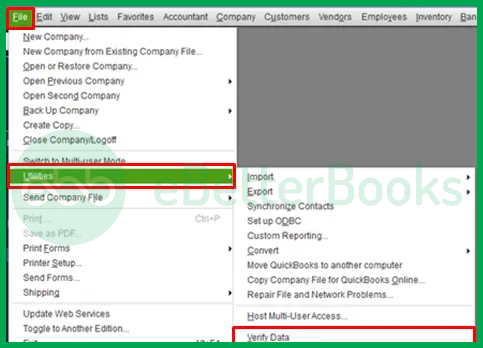
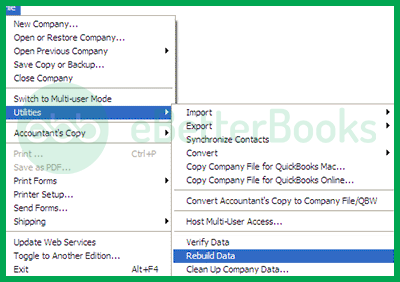
Finally, the user must run the verify data utility option again to check the damage. If it still shows QuickBooks Error Code C=51, get expert help.
This method helps recover missing or deleted financial records that may have caused the error. QuickBooks maintains a detailed log of all activity through the Audit Trail and Audit Log features, allowing users to restore lost transactions accurately. Rebuilding or recovering these transactions ensures the database remains consistent and error-free.
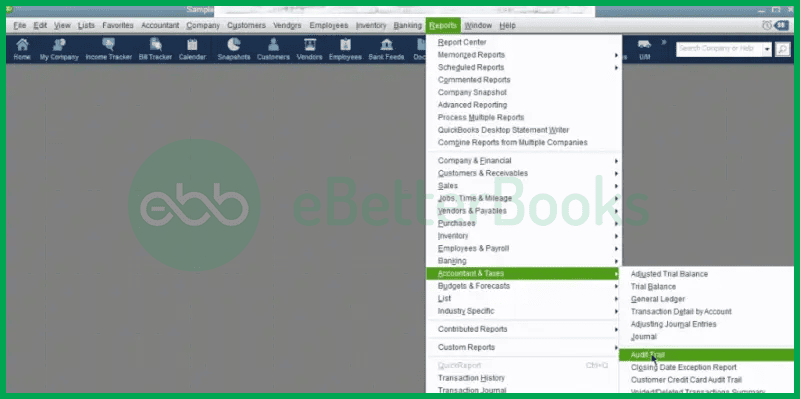
This method does not always work. When it does not work, try restoring lost transactions and data with its QBB backup file.
OR
Hopefully, it will fix the C=51 error.
A stable and secure internet connection is vital for QuickBooks to function correctly, especially during updates and data synchronization. Network interruptions or weak connectivity may lead to incomplete transactions or data corruption, triggering error C=51. Ensuring proper connectivity helps prevent recurrence of the issue.
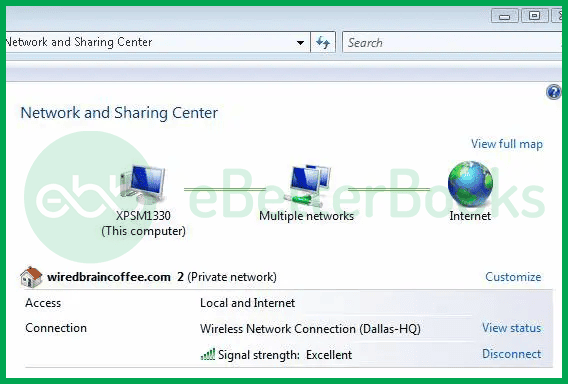
You can also try a wired connection to determine if it is the fault of the device or the internet.
Sometimes, background QuickBooks processes or conflicting applications cause software malfunctions. Ending these processes through Task Manager clears system resources and restarts QuickBooks cleanly, removing temporary glitches that can lead to error C=51.
Here is how you can do that:
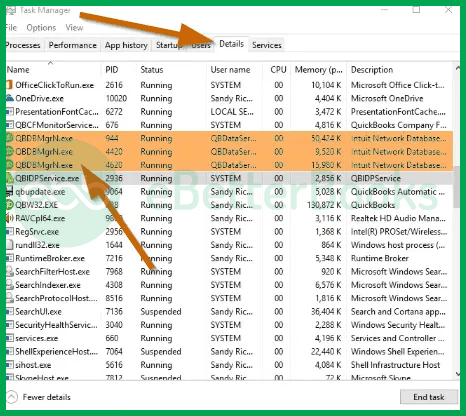
If the error reappears, try a different method to troubleshoot the error.
Using an outdated version of QuickBooks may result in compatibility problems and error codes like C=51. Updating to the latest release ensures all patches and bug fixes are applied, improving stability and performance. This method is simple yet effective for resolving persistent technical issues.
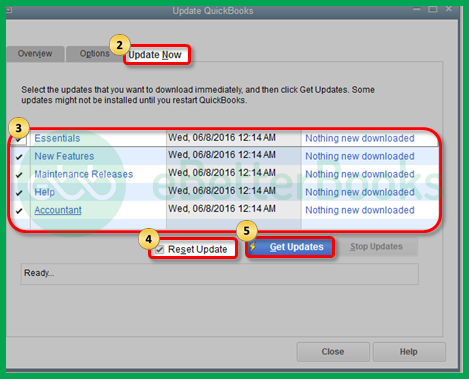
After the process is complete, close and reopen the application.
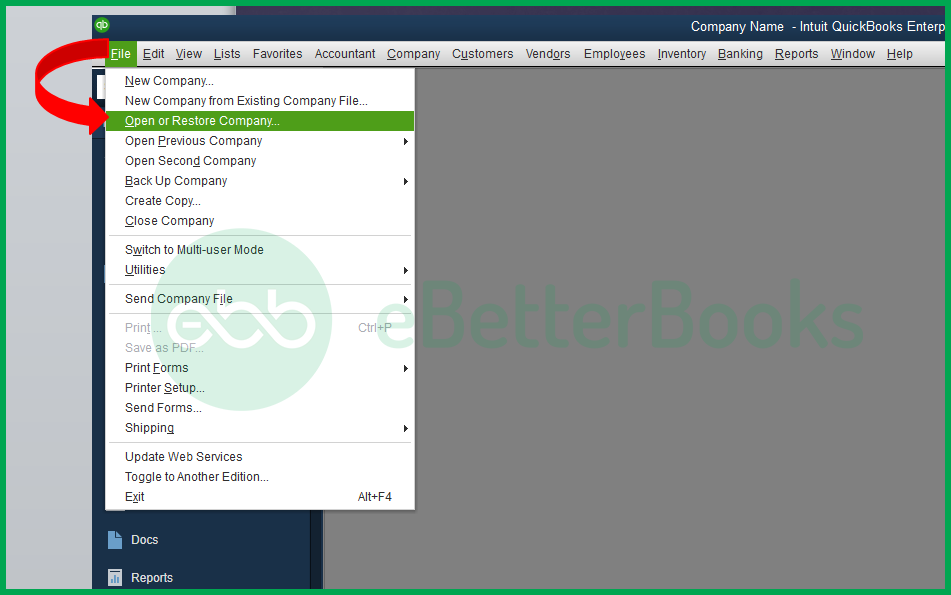
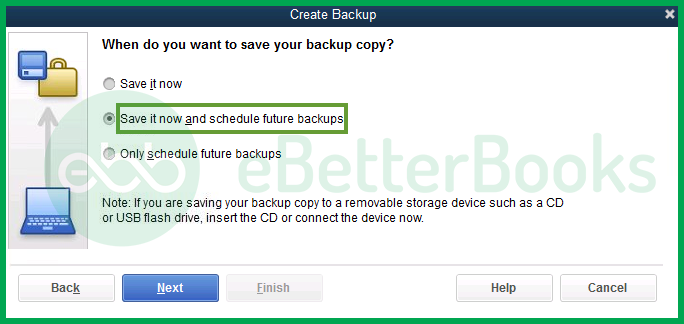
Restoring a recent backup allows users to recover a clean version of their company data, eliminating errors from corrupted files. This is one of the most reliable ways to restore lost transactions and resume accounting tasks without data loss. Always use the latest QuickBooks version to perform the restoration.
Related: QuickBooks Errors
If you are facing issues similar to Error C=51, these related errors may also impact your QuickBooks Desktop performance:
| Error | Description |
|---|---|
| QuickBooks Desktop Error C=343 | Occurs when QuickBooks fails to access necessary license or entitlement data due to missing or damaged files |
| QuickBooks Desktop Error Code 61 | Triggered by file access issues, often caused by corrupted company files or improper system configuration |
The solutions mentioned above will help you solve QuickBooks Error C=51. In case you cannot fix QuickBooks Error C=51 or are unable to understand the issue, reach out to the QuickBooks Error Support contact number +1-802-778-9005 for instant support. Our team specializes in QuickBooks support and troubleshooting, ensuring quick and reliable resolutions. We have a team of QB experts who have years of experience in fixing issues related to QuickBooks software.
The QuickBooks software cannot locate the TxList, as indicated by error number C=51. This error may be displayed when a user attempts to delete transactions from a report but is unsuccessful.
Try resolving QuickBooks problem C=51 by following these steps:
The following factors are the cause of QuickBooks error C=51:


