Excerpt:
If you're struggling with QuickBooks reporting issues like inaccurate results, poor report management, or security concerns, this guide provides practical solutions to enhance your reporting process. Regular report generation, proper data entry, report customization, and secure sharing will help you optimize QuickBooks' features. By implementing these strategies, you can streamline your reporting, improve accuracy, and make informed business decisions with confidence.
 Add As A Preferred
QuickBooks reporting problems represent structural inconsistencies that affect the accuracy, stability, and analytical reliability of financial outputs. These reporting problems occur due to inaccurate data inputs, outdated software configurations, misaligned customization parameters, and inconsistent data-entry standards. Such conditions disrupt transaction structures and create reporting inconsistencies across operational workflows.
QuickBooks reporting problems can be reduced through standardized report-generation routines that maintain uniform data architecture, multi-report processing modules that streamline recurring tasks, data-validation procedures that remove classification variance, encrypted distribution that protects sensitive outputs, and optimized memorized templates that preserve consistent analytical parameters.
This article presents these causes and resolution methods in a structured format to define a clear framework for stabilizing QuickBooks reporting performance and maintaining accurate, secure, and reliable financial outputs.
QuickBooks reporting problems reduce when routine report generation maintains consistent data structures and validated data inputs eliminate classification errors. Reporting performance improves further when multi-report workflows streamline tasks, encrypted distribution safeguards sensitive outputs, and optimized report templates preserve standardized parameters.
| Error Causes | Solutions |
| Inaccurate results and difficulty making decisions might result from infrequent report creation. | Frequently produce reports while improving and recalling them to provide accurate and timely insights. |
| The efficiency of reporting might need to improve while managing many reports. | Use QuickBooks multiple ocessing features to provide streamlined and customized report printing. |
| Time and resources can be wasted by producing irrelevant or valuable reports. | Before creating reports, carefully analyze and evaluate the data to ensure it is accurate and helpful. |
| It might not be easy to share reports safely while maintaining confidentiality. | Use QuickBooks’ encryption capability to send reports securely through email while limiting access to authorized users. |
| Ineffective remembering and optimization processes might hamper the software’s ability to generate reports. | To increase the effectiveness of the reporting provided by the program, frequently memorize and optimize reports, getting help when necessary. |
QuickBooks reporting problems occur when inaccurate data inputs affect account balances and transaction structures, creating inconsistencies across financial records. Outdated software versions reduce reporting precision, misaligned customization settings disrupt analytical accuracy, inconsistent data-entry standards generate classification conflicts, and system-level reporting limits restrict the detail required for accurate evaluation.
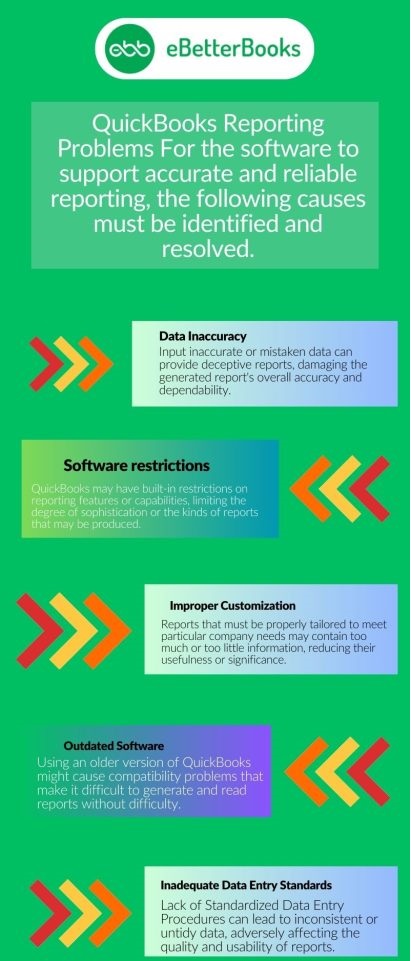
QuickBooks reporting faces challenges such as infrequent report generation, multiple-report workloads, misaligned customization, inconsistent data entry, and weak security controls. These issues reduce data accuracy, reporting consistency, and overall reliability, limiting informed decision-making.
In QuickBooks, regular report generation is essential. Decision-making may be impacted by inconsistent updates, which can skew results. An organization’s financial path may be guided by timely, reliable reports, which ensure that insights are applicable and support strategic decisions.
Operations must be managed effectively to be simplified. Productivity needs to be improved because of difficulties accessing and arranging reports. QuickBooks users require seamless categorization and retrieval tools to quickly evaluate data, enable educated decisions, and ultimately push corporate growth through informed strategies.
Poor or unnecessary reports make it difficult to make well-informed decisions. QuickBooks users could struggle to find custom reports that suit their company’s requirements perfectly. Relevant reports provide practical insights that are in line with specific objectives.
The security of reports must be guaranteed. Inadequate security measures put critical corporate data at risk of illegal access. Users of QuickBooks must set up tight security procedures, limiting access to only authorized individuals. Maintaining a report confidentially ensures organizational integrity and adherence to privacy requirements.
Using QuickBooks’ report recall feature improperly might lead to bottlenecks. Making judgments based on data as quickly as possible requires streamlining the process of gaining access to previous reports. Effective report retrieval guarantees timely insights, allowing firms to react and strategize based on previous trends and financial patterns, thus improving operational efficiency.

Resolving QuickBooks reporting problems requires standardized report-generation routines, validated data inputs, and optimized system configurations. Multi-report workflows streamline processing, encrypted distribution secures sensitive information, and memorized templates maintain consistent analytical parameters, ensuring accurate and reliable financial outputs.
You must produce many reports weekly if you intend to utilize the QuickBooks program and want to produce reliable reports. The use of this technique will ensure accurate outcomes. Additionally, the Intuit program QuickBooks offers a function that streamlines reporting when many reports are created simultaneously.
A function called Process Multiple Reports enables a user to print the reports following their needs. This function enables you to direct the printing of the reports for a particular day or time frame.
Here is how it works:
The user must take great care to confirm that the information disclosed and inputs provided are accurate before generating the reports. Checking the report’s usefulness is also necessary. Many times, reports are rejected because of their usefulness. This will help you in avoiding undesirable outcomes and undoubtedly improve the software’s effectiveness.
A professional or businessperson knows that sharing reports with others should be done securely. Due to the reports’ high level of confidentiality, this is done. A person needs authority to be permitted to access the reports. You’ll be happy to learn that QuickBooks has a function that enables you to email encrypted reports to other people.
It is required to memorize the reports in addition to producing a lot of reports. To increase the effectiveness of the software’s reporting capability, you should also optimize the reports regularly. Contact our staff at +1-802-778-9005 if you run into any issues doing that, and we’ll provide you with a fantastic, efficient answer.
QuickBooks reporting issues may arise from data damage, outdated software versions, file corruption, or incorrect system configurations. The solutions below help you verify your company data, repair file integrity, resolve technical errors, and update QuickBooks Desktop, ensuring accurate, consistent, and error-free reporting.
Note: Contact the QuickBooks Support Team before you rebuild your data in case you use Assisted Payroll.
Note: Avoid replacing your existing company file and re-entering the info into your company file after the backup was created.
The scan can take up to 10–15 minutes depending on your file size. The scan may say it was unsuccessful even if it fixes your issue. When the scan finishes, open QuickBooks, and your company file.
Maintaining consistent routines, ensuring accurate data inputs, customizing reports to business needs, and regularly reviewing results enable organizations to turn raw data into actionable insights. These best practices strengthen decision-making, boost operational efficiency, maintain compliance, and foster sustainable business growth.
QuickBooks reporting problems arise from data inaccuracies, outdated configurations, misaligned customization, and inconsistent data-entry practices, all of which reduce the reliability and analytical value of financial outputs. Addressing these issues through standardized report-generation routines, multi-report workflows, data validation, encrypted distribution, and optimized memorized templates restores reporting accuracy and operational stability.
Precise procedures, regular monitoring, and secure practices ensure that financial reports remain consistent, actionable, and reliable, allowing organizations to make informed decisions and sustain long-term operational efficiency.
Feel free to get in touch with us at +1-802-778-9005, or email us at: support@ebetterbooks.com if you’re facing any kind of issues with your software and need professional assistance, regarding accounting, bookkeeping & accounting software-related issues.
In QuickBooks, summary and detail reports are the two basic types of reports. In summary reports, you may get summary data on clients, sales, spending, and more. The detailed reports, however, provide comprehensive study data.
Here are the 4 types of common financial reports in QuickBooks Online:
QuickBooks reporting refers to the process of generating structured financial reports from company data within the QuickBooks software. These reports compile transactions, account balances, and other financial information to provide accurate, actionable insights for decision-making and operational analysis.
Implement stringent security measures, allowing only authorized users to access reports in QuickBooks to protect their security and confidentiality. Additionally, QuickBooks can securely transmit encrypted reports, protecting important company information from illegal access and upholding privacy standards, ensuring organizational integrity.
Incorrect totals often result from inaccurate data entry, uncleared transactions, or mismatched accounts. Regularly reconciling accounts and verifying entries can correct totals.
QuickBooks allows users to filter, sort, and display specific data fields in reports. Use the Customize Report option to select columns, set date ranges, and apply filters to generate reports tailored to your business requirements.


