Excerpt:
Recording personal money in QuickBooks ensures accurate financial tracking by properly categorizing owner contributions and investments. By setting up equity accounts and recording transactions like deposits or checks, businesses can maintain clear financial records and ensure tax compliance. This process helps streamline financial operations, maintain transparency, and improve financial reporting for both owners and their businesses.
 Add As A Preferred
Properly recording personal money invested into a business is essential for maintaining accurate financial statements and ensuring tax compliance within QuickBooks. This process requires business owners to correctly differentiate the transaction as either an Owner’s Contribution (Equity), which increases ownership stake and is not repaid, or an Owner’s Loan (Liability), which is a debt the business must repay.
The guide details the necessary steps for creating and utilizing specialized equity accounts in both QuickBooks Desktop and QuickBooks Online. Crucially, the content extends to advanced financial management, covering the precise method for recording non-cash asset contributions at their Fair Market Value using a journal entry, addressing the specific tracking needs for multiple owners in a partnership structure, and outlining the significant risk of tax penalties if owner contributions are mistakenly classified as taxable sales income. Following these authoritative bookkeeping practices is paramount for audit readiness and clear financial analysis.
Highlights (Key Facts & Solutions)
Personal money refers to the funds that business owners put into their company’s finances. It is one way to add additional capital to the business.
There are two ways to put personal money into the business:
To record personal money put into a business in QuickBooks Desktop, create an equity account in the Chart of Accounts, enter the owner’s contribution, and save the transaction.
Steps to Record Owner Contributions in QuickBooks Desktop:
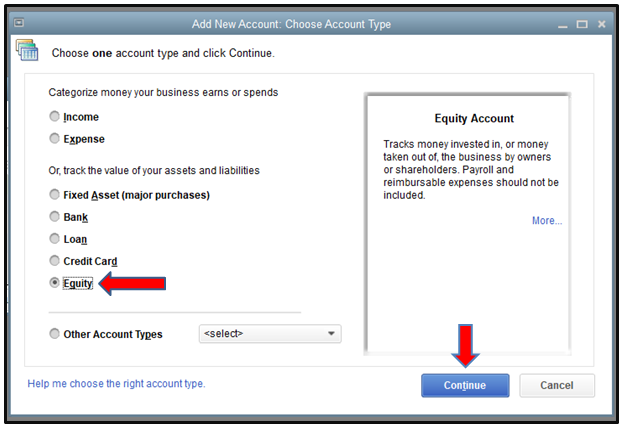
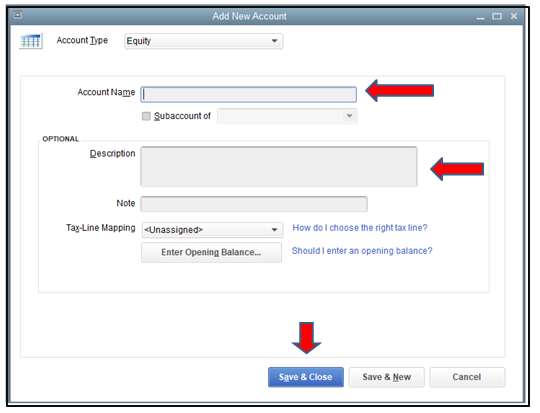
Create a new bank account in QuickBooks Desktop, go to the Chart of Accounts under Accounting, click “New,” and select Equity as the account type.
How to record the owner’s contribution, enter the transaction in QuickBooks Desktop by selecting Owner’s Equity, inputting the contribution name and amount, then save and close the transaction.
Record personal money in QuickBooks Online, set up an equity account under Chart of Accounts. Record the investment via a bank deposit, then pay from the investment using Check or Expense options.
Steps to Record Owner Investment in QuickBooks Online:
How to set up an equity account in QuickBooks Online, go to the Chart of Accounts under Settings, select Equity from the Account Type, choose Owner’s or Partner’s Equity from the Detail Type, and save.
Record an investment, go to + New and select Bank Deposit. Choose the bank account, enter the date, investor details, equity account, payment method, and amount, then save the transaction.
How to pay from an investment, create a Check for actual payments, entering check details and categories. For card payments, record as an Expense, include vendor, payment method, and details, then save.
Make a payment with a check in QuickBooks, click + New, select Check, specify the payee, enter the check number, allocate amounts to equity and expense accounts, then save and close.
Following the step-by-step information below:
Step 1: Find the person or business
Step 2: Enter the check details
Step 3: Save the transaction
To record a payment with a debit or credit card, click + New, select Expense, enter vendor details, payment method, amount, and tax. Add a description and save the transaction. Record the repayment as an expense in your QuickBooks Online account.
Following the step-by-step information below:
Step 1: Navigate to Expense
Step 2: Enter the transaction details
Step 3: Save the transaction
While recording personal funds in QuickBooks may seem simple, real-world situations often involve more complex decisions. Whether it’s choosing between equity and loan treatment, managing multiple owners, or avoiding tax pitfalls—understanding these advanced scenarios is critical. This section breaks down 5 important sub-topics that help business owners make smarter entries, avoid errors, and keep their books clean, compliant, and audit-ready.
In QuickBooks, Owner’s Equity records the money or assets the owner contributes to the business, while Owner’s Draw tracks the money taken out for personal use. Use Owner’s Equity when you add funds (cash, property, or equipment) to the business. Use Owner’s Draw when you withdraw cash, pay personal bills, or transfer profits. These two entries impact financial reports differently: equity increases business value, draw reduces it. Keeping both accounts separate helps maintain clean records, ensures accurate tax reporting, and supports clear cash flow tracking. QuickBooks requires you to choose the correct type during each transaction to avoid errors.
Record personal funds as a loan in QuickBooks if you plan to repay yourself with interest, track liability, and show it as a debt on the balance sheet. Use equity if the money is invested without expecting repayment, affects ownership value, and supports long-term growth. Loans require a payment schedule, impact liabilities, and need formal documentation. Equity boosts net worth, simplifies reporting, and avoids repayment obligations. Decide based on intent: repayment = loan; ownership stake = equity. Proper categorization prevents audit issues, supports clean financials, and helps align your books with legal and tax requirements.
To track multiple owners’ contributions, create individual equity accounts for each owner, label them clearly, and assign each deposit to the correct account. This method separates ownership stakes, supports accurate reporting, and helps during profit distribution. In QuickBooks, use the Chart of Accounts to create accounts like “Owner A Equity” and “Owner B Equity.” Record each contribution through Bank Deposit or Journal Entry, linking the correct owner’s account. This keeps ownership transparent, simplifies end-of-year tax filing, and ensures legal clarity during audits or exit planning. Always reconcile entries to avoid discrepancies in capital balances.
Recording personal investments correctly in QuickBooks impacts tax liability, audit accuracy, and financial transparency. Owner contributions marked as equity are not taxable income but increase your capital account. Misclassifying them as revenue may inflate profits, trigger higher tax, and cause compliance issues. If treated as a loan, the business may deduct interest paid, but it must follow loan documentation and payment rules. Accurate classification avoids IRS scrutiny, simplifies Schedule C or K-1 reporting, and ensures year-end statements reflect real owner activity. Always consult a tax advisor when recording large transactions to align with federal and state laws.
Many users make critical mistakes like using income accounts, mixing personal and business funds, or skipping documentation. Never record owner contributions as sales income—this inflates revenue, increases tax, and misleads reports. Avoid combining personal expenses in business accounts; it breaks audit trails, damages credibility, and complicates tax filing. Failing to categorize deposits properly (loan vs. equity) leads to balance sheet errors, ownership disputes, and reporting issues. Always attach notes, use correct equity or liability accounts, and reconcile regularly. These practices protect financial accuracy, maintain compliance, and improve business decision-making.
Recording personal funds in QuickBooks goes beyond just entries—it requires strategy, clarity, and smart financial handling. This section covers 5 practical topics that support the main process, such as reimbursements, capital tracking, and reporting. These insights help you stay audit-ready, legally compliant, and financially accurate. Whether you’re managing multiple owners, separating finances, or choosing between journal entries and deposits, these supplementary practices tighten your books and improve financial control.
To reimburse personal expenses, record them as a business expense, not personal spending. Use the Expense or Journal Entry feature in QuickBooks, select the correct vendor, and assign the proper business category. Link the payment to the owner’s equity or loan account to track repayment accurately. Always attach receipts to support the transaction, ensure tax deductibility, and maintain clear audit trails. Avoid paying back directly without recording—this causes balance sheet mismatches, missing expenses, and incorrect profit figures. Timely reimbursement improves transparency, supports tax claims, and keeps owner finances organized.
Capital accounts track each owner’s investment, withdrawals, and share of profits. In QuickBooks, sole proprietors usually use a single Owner’s Equity account, while partnerships need separate capital accounts for each partner. These accounts reflect ownership changes, help with profit distribution, and support accurate tax reporting. Set them up under the Equity category in the Chart of Accounts, and name them clearly—like “Partner A Capital.” Avoid mixing capital with draws or expenses. Well-maintained capital accounts ensure clean books, simplify year-end adjustments, and provide transparency during audits or ownership changes.
To review owner contributions, use custom reports in QuickBooks that filter transactions by equity accounts, date range, and source. Start with the General Ledger or Transaction Detail by Account report, customize it to show only owner-related entries, and group by account for clarity. You can export reports to Excel for deeper analysis, partner reviews, or tax filing. Accurate reports help track how much each owner has invested, validate financial records, and support fair profit distribution. Always verify entries with attached notes or receipts for full transparency and error-free accounting.
Always maintain separate bank accounts, credit cards, and expense records for your business to avoid confusion, ensure compliance, and simplify bookkeeping. In QuickBooks, never record personal expenses in business categories—it skews financial reports, increases tax risk, and complicates audits. Use owner’s draw or reimbursement entries when crossing funds is unavoidable. Reconcile accounts monthly, label transactions clearly, and avoid paying personal bills from business accounts. Separation builds credibility with lenders, supports cleaner tax returns, and protects you in case of legal or IRS scrutiny.
Use Bank Deposits when you’re physically depositing cash or checks into a business account—this links directly to your bank feed, tracks payment method, and simplifies reconciliation. Use Journal Entries when adjusting balances, recording non-cash contributions, or entering prior-period investments—this gives you more control over accounts, dates, and narratives. Bank Deposits are quick, beginner-friendly, and visible in the register. Journal Entries are precise, useful for accountants, and better for equity-to-loan adjustments. Always choose the method based on transaction type, documentation available, and reporting needs. Incorrect usage can lead to double entries, missing funds, or tax issues.
Categorizing personal and business funds is important for accurate financial reporting. Updating the information in your accounting software, QuickBooks helps you in generating accurate reports and update your capital accounts, equity and other related ledgers.
The core difference is the expectation of repayment and the resulting classification on the Balance Sheet.
A key distinction based on entity type: For a sole proprietorship or partnership, most cash put in or taken out flows through Equity accounts (Contributions and Withdrawals). For a corporation, funds paid to the shareholder are almost always recorded as a Liability (Shareholder Loan) until converted to equity.
Non-cash asset contributions must be recorded at their Fair Market Value (FMV) on the date of the transfer, not the original purchase price. This transaction is typically recorded using a Journal Entry in QuickBooks.
The Journal Entry structure is as follows:
This process ensures the asset’s value is properly recognized on the business’s books and increases the owner’s capital. Supporting documentation (like an appraisal or market data) for the FMV should be kept on file.
Mistakenly classifying an owner’s contribution as sales or service income artificially inflates the business’s gross revenue, leading to several adverse tax and reporting consequences.
Key risks include:
In QuickBooks, multi-owner entities must create separate, detailed Equity accounts for each owner to accurately track their specific ownership stake, required for tax reporting documents like the K-1.
The Chart of Accounts should be structured to include:
This structure allows for a clear, auditable balance of each owner’s net investment.
While the Bank Deposit function is quick and user-friendly for a simple cash deposit (especially with connected bank feeds), a Journal Entry (JE) is often preferred by accounting professionals for:
For a simple cash investment, categorizing the bank feed transaction directly to Owner’s Equity is the simplest and most common method in QuickBooks Online.
Reimbursing a personal payment for a business cost must be recorded as a legitimate Business Expense because the original transaction provided a tax-deductible benefit to the company (e.g., utilities, supplies).
The most accurate report for determining the total net investment (capital contributed minus capital withdrawn) is the Balance Sheet Report.
Steps to Review Net Investment:
For a more granular view of only the activity (contributions and draws), run the General Ledger Report filtered specifically for the Owner’s Equity or Capital accounts.